Browse
AI Directory Open Source AI News 🏆 AI Challenge AI Statistics
Browse by profession
Accounting, Bookkeeping & TaxCompliance, Audit & GRCConstructionCustomer SupportData ScienceMedical All 38 professions →
Company
About Advertise Submit a tool Get the free Marketing AI guide
Overview How It Works Before & After Try It Reviews Screenshots Integrations Why This Tool FAQ Pricing Top 10 Get Alerts News

LetsEnhance.io

Rescue low-res campaign images. AI-upscale, sharpen, and enhance photos for professional-quality marketing assets, from web to print.

Turn blurry product shots, user-generated content, and AI art into crisp, high-resolution visuals in seconds.

DifferentiatorProduces natural-looking results without 'AI plastic' artifacts.
ProofUpscales images up to 16x and 512 megapixels.
Try LetsEnhance.io
Free Plan Pro from$9/mo
Free plan verified · free AI tools for Marketers
9 Zekai
High-res assets, instantly.
AI for Marketing & Content Creation
Ease of Use
9.2
Accuracy
9.0
Value
8.3
Time Saving
9.5
Image UpscalingBatch ProcessingAI Art EnhancerBackground RemovalPhoto Restoration
🏷 Is this your tool? Claim this listing →

Zekai Verdict

What is it?
LetsEnhance.io is an AI image enhancement tool that allows marketing and content teams to automatically improve image quality.
Best for
Marketing teams needing to quickly upscale and enhance low-resolution images for multi-channel campaigns, from web to…
Not ideal for
Credit system has different rollover rules for personal vs. business plans.
Price
Free plan · paid from $9/mo
Zekai Score
9/10
Hand-scored by Zekai

Top AI for Marketing & Content Creation picks

See all 110 AI tools for Marketers →
⚡ Quick answer

For Marketing & Content Creation professionals, LetsEnhance.io is a top choice for AI image enhancement. It excels at upscaling low-resolution assets into print-ready visuals, sharpening blurry photos, and batch-processing images for consistency across campaigns. Its ability to turn user-generated content or poor stock photos into professional-quality assets makes it invaluable.

CategoryAI Image Enhancement
Best ForUpscaling low-res images for professional marketing and print use.
Price From$9/mo
FreeYes, 10 free credits
DifferentiatorProduces natural-looking results without 'AI plastic' artifacts.
ProofUpscales images up to 16x and 512 megapixels.
Rating9.0/10
📖 About LetsEnhance.io
How It Works

Your workflow, automated

1
Upload Your Image
Drag and drop or select a JPG, PNG, or WebP file from your device.
2
Select Enhancement
Choose your goal: upscale for size, enhance for quality, or use modes like 'Prime' for general improvement or 'Old Photo' for restoration.
3
Download & Use
Download the high-resolution, watermark-free (on paid plans) image for your marketing campaign.
Ready to automate your workflow with LetsEnhance.io?
Try LetsEnhance.io →
Real Impact

Before & After

❌ Before

Working with low-res, blurry, or poorly lit images from clients or stock sites.

Unusable asset inventory
✅ After

Delivering crisp, professional, high-resolution visuals for any campaign, web or print.

Print-ready campaign assets
Prompt Templates

Try it with these prompts

Copy any prompt and paste it directly into the tool.

Enhance product photos for e-commerce

Improve the quality, resolution, and consistency of product photos for my e-commerce catalog. I need to automate this process to ensure all visuals are sharp, well-lit, and high-resolution without re-shooting. Aim for pr…

Upscale AI art for print

Increase the resolution of AI-generated art from platforms like Midjourney or Stable Diffusion up to 4K or 8K. I need to remove artifacts and smooth out blurry areas to make the art suitable for printing as posters or on…

Restore old photos with AI

Repair damage, reduce noise, and sharpen details in old scanned photos. Correct soft focus, compression damage, and poor lighting to bring lost details back. I need a single tool that can handle multiple restoration need…

AI Prompts

Prompts for Marketers

Prompt 01 Generate an SEO Content Brief with Surfer SEO
1. **Enter Keyword:** Input your primary target keyword (e.g., "ai in advertising"). 2. **Create Content Editor:** Surfer analyzes the top SERPs. 3. **Review Outline:** Examine the recommended headings, questions, and terms. 4. **Custom…
Prompt 02 Prompt Example: Creating a Content Brief
Act as a senior content strategist. Create a comprehensive content brief for a 1,500-word blog post targeting the primary keyword "best project management software for small business". The target audience is non-technical small business ow…
Prompt 03 Prompt for an SEO Content Brief
Act as a Senior Content Strategist. I am writing a blog post targeting the primary keyword "[[primary keyword]]". My target audience is [[describe audience]]. The top 3 ranking competitors are [[URL 1]], [[URL 2]], and [[URL 3]]. Create a c…
See all 12 AI prompts for Marketers →
Social Proof

Trusted by professionals

Ease of Use
9.2
Accuracy
9.0
Value
8.3
Time Saving
9.5

"This is a lifesaver. I constantly get low-quality images for social posts, and LetsEnhance turns them into something I'm proud to publish. The upscaling is magic."

Mark T., Social Media Manager · June 2026

"Batch processing our product photos has saved us countless hours. We can now get consistent, high-res images for our entire catalog without expensive reshoots."

Jenna P., E-commerce Specialist · May 2026

"The quality is great for photos, but the credit system is a bit clunky. I wish there was an unlimited plan instead of having to track credits and rollovers."

David R., Graphic Designer · June 2026

"I use this to upscale my AI-generated art for printing. It cleans up artifacts and gives me the resolution I need for posters and merch. Absolutely essential."

Aisha K., Content Creator · April 2026
Proof of Use

Inside LetsEnhance.io

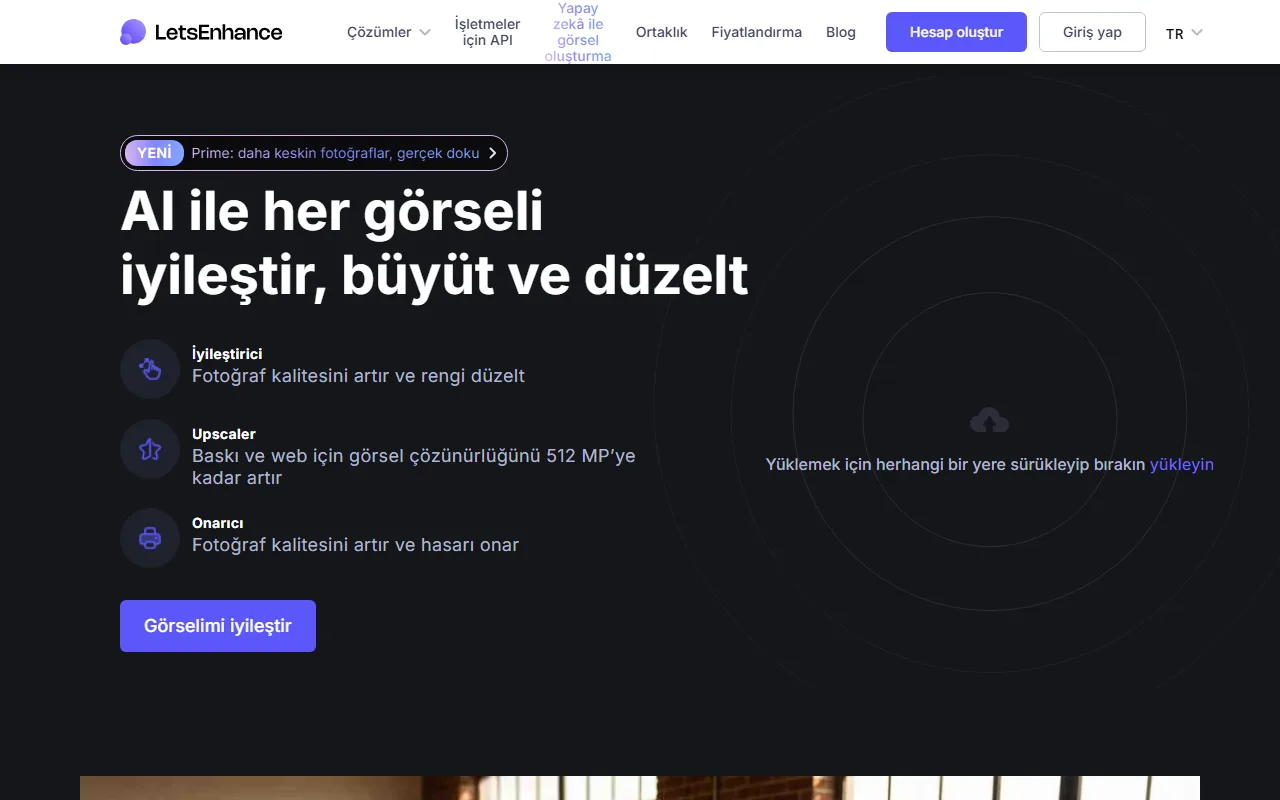
LetsEnhance.io screenshot — interface view 1

Captured by Zekai from the live LetsEnhance.io interface during review.

Connects With

Works with your existing stack

API for Business Claid.ai
Setup complexity: Beginner-friendly
LetsEnhance.io is an AI image enhancement tool that allows marketing and content teams to automatically improve image quality. It can upscale resolution for print, sharpen blurry photos, correct color and lighting, and remove backgrounds, ensuring all visual assets are professional and on-brand.
Comparison

How it compares

LetsEnhance.io vs. Canva's AI Image Tools: Choose LetsEnhance.io when your primary goal is maximum image quality, resolution, and artifact removal, especially for print. Its specialized algorithms are fine-tuned for natural-looking upscaling and sharpening, making it superior for photographers and print designers. Opt for Canva's built-in AI tools when your task is part of a larger design workflow (e.g., creating social media posts) and convenience within a single platform outweighs the need for the absolute highest-fidelity image restoration. LetsEnhance is a specialist tool for quality; Canva is a generalist platform for speed.

You need advanced, layer-based photo editing capabilities (e.g., Photoshop).
You require a fully integrated design suite with team collaboration features (e.g., Canva).
Your primary need is vector image editing, not raster image enhancement.
The decision

Is it worth it?

Return on investment
By using the $24/mo Pro plan to salvage just a few unusable images per month, you can avoid hours of manual editing or the cost of a reshoot, saving hundreds of dollars in labor and asset acquisition.
Built for
Marketing managers, social media managers, content creators, e-commerce managers, and print designers who need to improve the quality of visual assets.
Effort to adopt
Beginner-friendly
Compliance
Compliance posture not publicly documented — verify with vendor.
Who It's For

Why Marketing & Content Creation choose this tool

🎯
Built for
Marketing teams needing to quickly upscale and enhance low-resolution images for multi-channel campaigns, from web to large-format print.
In-Depth Overview
For marketing and content professionals, visual quality is non-negotiable. LetsEnhance.io directly addresses the common problem of receiving or having low-resolution images that are unusable for campaigns. Instead of rejecting assets or attempting time-consuming manual fixes, you can use its AI to instantly elevate them. The platform's 'Prime' enhancement model is designed to produce natural-looking results, avoiding the 'plastic skin' or over-processed look common in other tools. This is critical for maintaining brand authenticity. The proof is in its power. The ability to upscale images up to 16x and 512 megapixels means a small web graphic can be repurposed for a large-format print banner. For e-commerce managers, the feature to batch process up to 20 images at once standardizes product catalogs efficiently. It also serves the growing need to refine AI-generated art from platforms like Midjourney or DALL-E, cleaning up artifacts and scaling them for commercial use. It transforms visual liabilities into high-value assets.

Key Use Cases

🛒
Standardize and elevate product photography
E-commerce Manager
A supplier sends low-quality product images. Use LetsEnhance.io to batch upscale, sharpen, and remove backgrounds to create a consistent, high-resolution product catalog without a reshoot.
Uniformly crisp visuals
✓ Pros
Produces natural, professional-looking enhancements without 'plastic' AI artifacts.
Excellent for preparing low-res images for high-DPI printing.
Free plan with 10 credits allows for thorough testing.
Unused credits roll over on personal plans, adding flexibility.
Simple drag-and-drop interface with clear enhancement modes.
· Cons
Credit system has different rollover rules for personal vs. business plans.
Watermark is applied on the free plan until you upgrade.
Processing can be slow for very large images or complex enhancements.
No dedicated mobile application; browser-based only.
⚡ Editorial Verdict

LetsEnhance.io is a powerful and accessible tool for rescuing and repurposing images that would otherwise be unusable. Its ability to upscale for print and batch-process makes it a major time-saver for content teams. The credit-based system, while flexible, can become costly for high-volume users who may need to carefully manage their monthly usage.

Questions & Answers

Frequently asked questions

Is LetsEnhance.io available in my country?

+
Yes, LetsEnhance.io is a web-based tool accessible globally with an internet connection.

Can I use LetsEnhance.io on my company's computers in Europe, and is it GDPR compliant?

+
Yes, you can use it on any computer with a web browser. The company has a public privacy policy, but for specific GDPR compliance details for business use, you should verify with their support team.

What happens to my unused credits?

+
On personal plans, unused credits roll over to the next month, up to a maximum of 6 times your monthly plan amount. Unused credits do not roll over on business plans.

How do I remove the watermark?

+
Images processed with a paid plan or pay-as-you-go bundle are watermark-free. After upgrading, you can re-download images processed on the free plan to get them without the watermark.

What image formats are supported?

+
The tool supports JPG, PNG, and WebP formats for upload.

What are the image size limits?

+
Input images can be up to 64 megapixels or 50MB. Output resolution limits depend on your plan, ranging up to 512 megapixels.

Last reviewed:

Plans & Pricing

Start today

Prices and features are updated regularly but can change at any time — always confirm on the official website. Some links on this page are affiliate links.

See all 110 AI tools for Marketers →
Free guide

Take it with you

  • **Upscale Social Media Assets:** Turn low-res user-generated content into crisp, on-brand posts.
  • **Prepare for Print:** Hit 300 DPI on any image for flawless posters, brochures, and merch.
  • **Refine AI-Generated Art:** Remove artifacts and increase resolution from Midjourney or DALL-E outputs.
  • **Restore Old Campaign Photos:** Revive grainy or faded images from past marketing efforts for 'throwback' content.
  • **Standardize E-commerce Shots:** Batch-process product photos for a uniform, high-quality online store.
+3 more steps inside the guide
Send me the full guide

Get LetsEnhance.io deal alerts

Be the first to know when LetsEnhance.io drops a new discount, adds features, or changes pricing.

Exclusive LetsEnhance.io discount codes
New feature announcements
Best alternative picks when pricing changes
Zero spam — unsubscribe anytime
🎉
You're subscribed!
We'll notify you when LetsEnhance.io has a new deal.
AI Directory

About LetsEnhance.io

Full Description

LetsEnhance.io is an AI image enhancement tool that allows marketing and content teams to automatically improve image quality. It can upscale resolution for print, sharpen blurry photos, correct color and lighting, and remove backgrounds, ensuring all visual assets are professional and on-brand.

Editorial Verdict

LetsEnhance.io is a powerful and accessible tool for rescuing and repurposing images that would otherwise be unusable. Its ability to upscale for print and batch-process makes it a major time-saver for content teams. The credit-based system, while flexible, can become costly for high-volume users who may need to carefully manage their monthly usage.

Last reviewed:
Disclaimer
Zekai is an independent AI tools directory. We are not affiliated with, endorsed by, or officially connected to LetsEnhance.io unless clearly stated. All product names, logos, and brands are the property of their respective owners and are used for identification purposes only. The information on this page — including pricing, features, and availability — is general information, may have changed since our last review, and is not professional advice. Zekai Scores and verdicts are our editorial opinion. Some outbound links are affiliate links that may earn us a commission at no extra cost to you. Spotted outdated or incorrect information? Request a correction →
Previous Tool Lately.ai Next Tool Machined.ai
All AI Tools A–Z →
Visit website ↗
LetsEnhance.io9.0Try LetsEnhance.io ↗Next tool →
Today's top 3 AI for Marketing & Content Creation tools →

See Zekai first in Google