You came from an AI answer. These are today's Topaz Video AI alternative prices and free limits. See the table →Get price alerts
AI tools, scored for your job
Get paid to train AI
Updated 13 Nov 2026 · prices read on vendor pages

11 best Topaz Video AI alternatives in 2027

Mehmet ElmicenniReviewed by Mehmet Elmicenni, founder of Zekai•Prices checked •How we check

The short answer

The best Topaz Video AI alternatives in 2027 are HitPaw Video Enhancer (VikPea) (best overall, $124.99/yr), TensorPix (best free plan) and QualityScaler (best open source, MIT). Topaz Video AI itself starts at $299/yr. Zekai checked these prices on vendor pages on 13 Nov 2026; 8 more are compared below, including 3 with a free plan and 2 open source.

11alternatives compared
5with a free plan
3open source
$5.5/mo billed yearlycheapest paid · TensorPix
$299/yrTopaz Video AI starts at
01 · Zekai Price Ledger

Which Topaz Video AI alternatives are worth it in 2027?

The strongest Topaz Video AI alternatives in 2027 are HitPaw VikPea, UniFab, VideoProc Converter AI, AVCLabs and Aiarty on the paid side, TensorPix for a free browser tier, and Video2X, QualityScaler and REAL Video Enhancer as open-source options. Topaz Video costs $299 a year, so lifetime licences from $89.95 undercut it.

ToolTypeStarting priceFree plan limitBest forCost for your teamChecked
Topaz Video AIThe tool you are replacing
You are here
$299/yrTopaz Video Personal: $299/yr billed annually (about $24.92/mo; Black Friday first-year promo $254 is not the price), $39/mo billed monthly on a 12-month commitment, or $59/mo month-to-month. Video Pro $699/yr. Topaz Studio (all apps) $499/yr regular
No free plan Local AI video upscaling for editors — 13 Nov 2026 Pricing ↗
HitPaw Video Enhancer (VikPea) Zekai score 6.0Best overall
Free plan + paid
$124.99/yrVikPea list prices: $53.99 monthly, $124.99/yr, $437.99 perpetual (page currently shows promo prices $43.19 / $99.99 / $350.39, not the price)
Free licence previews only; exporting needs a paid plan or credits Editors wanting 8K upscale with perpetual option — 13 Nov 2026 Pricing ↗
UniFab logo
UniFab Zekai score 5.5Cheapest paid
Free
$129.99 one-timeVideo Upscaler AI lifetime licence, local processing (page shows $84.99 promo). FabCloud version $129.99 list, $103.99 promo. FabCloud credits from $16.67 for 600 credits
30-day free trial, full access, no watermark Lifetime-licence 4K to 16K upscaling $0 13 Nov 2026 Pricing ↗
TensorPix logo
TensorPix Zekai score 8.4Best free plan
Free plan + paid
$5.5/mo billed yearlyStandard, billed annually, 10 credits a month with rollover; extra credits $1.3 each. Monthly-billing price not readable on the page. Premium $12.42/mo yearly, Elite $30.25/mo yearly
Free forever: weekly login credits, 720p input, 1 GB storage, files deleted after 30 days Browser video enhancing on a free tier — 13 Nov 2026 Pricing ↗
VideoProc Converter AI logo
VideoProc Converter AI Zekai score 7.6
Free
$89.95 one-timeConverter AI lifetime licence, list $89.95 (store currently shows $54.95 promo), Windows and Mac, lifetime free upgrades
Free trial download; trial limits not stated on store page Upscaler plus converter in one licence $0 13 Nov 2026 Pricing ↗
$39.95/moVideo Enhancer AI desktop, $39.95 per month (no yearly price shown on page). Video Enhancer Cloud $9.95/mo. Video + Photo Enhancer bundle $49.95/mo
No free plan Upscaling with object removal and colour fixes — 13 Nov 2026 Pricing ↗
Aiarty Video Enhancer logo
Aiarty Video Enhancer Zekai score 7.8
$99/yrStandard 1-year licence, 1 PC, list $99 (promo $79). Lifetime licence on 3 PCs, list $235 (promo $149)
No free plan Local upscaling with lifetime licence — 13 Nov 2026 Pricing ↗
DaVinci Resolve Studio Zekai score 9.2
Free
$236 one-timeStudio, one-time purchase; page shows a SAVE 20% sale at $236. Free version available without Studio-only features
Free version edits up to 60 fps; Super Scale is Studio-only Editing suite with built-in Super Scale $0 13 Nov 2026 Pricing ↗
Pixop logo
Pixop Zekai score 8.0
Not checkedPixop Prime (licensed pipeline) and Pixop FILE (managed SaaS); no public prices, contact sales
No free plan Broadcast-scale managed video enhancement — 13 Nov 2026
QualityScaler logo
QualityScaler Zekai score 7.8Best open source
Open source
Free (self-hosted)
No limit, self-hosted (MIT) Free offline Windows video upscaling $0 14 Nov 2026 Code ↗
Video2X logo
Video2X Zekai score 6.9
Open source
Free (self-hosted)
No limit, self-hosted (AGPL-3.0) Scriptable open-source video upscaling $0 14 Nov 2026 Code ↗
REAL Video Enhancer logo
REAL Video Enhancer Zekai score 7.5
Open source
Free (self-hosted)
No limit, self-hosted (AGPL-3.0) Open-source upscale and interpolation GUI $0 14 Nov 2026 Code ↗

Every price was read on the vendor's own pricing page on the date shown. The Cost Finder assumes one entry plan per person, so it multiplies by your team size; yearly prices are shown per month, and team or business plans can cost more per seat. "Not checked" means we could not confirm a public price.

Price alert

Know first when Topaz Video AI or an alternative changes price

One email when a price or free plan on this page changes, plus The AI Briefing. Unsubscribe any time.

Alternatives Spotlight

Your tool here

One labelled card beside this table, outside the ranking.

Advertise here
For vendors

Is one of these tools yours?

Claim your listing to correct prices and free-plan limits.

Claim your tool
02 · Free plan

Is there a free version of Topaz Video AI?

Topaz Video AI has no free plan. Topaz's trial has no time limit, but exports carry a watermark and cloud rendering is unavailable during the trial. Paid Personal plans include 25 monthly video cloud credits and unlimited local rendering. For genuinely free upscaling, use TensorPix's free tier or an open-source tool such as QualityScaler.

Source: Topaz Video AI pricing page, read 13 Nov 2026.

FreeNone

No free plan on the pricing page

Paid from$299/yr

Topaz Video Personal: $299/yr billed annually (about $24.92/mo; Black Friday first-year promo $254 is not the price), $39/mo billed monthly on a 12-month commitment, or $59/mo month-to-month. Video Pro $699/yr. Topaz Studio (all apps) $499/yr regular

03 · Free alternatives

What are the best free Topaz Video AI alternatives?

The best free Topaz Video AI alternatives are TensorPix, which gives a free-forever plan with weekly login credits and 720p input, UniFab's 30-day trial with full access and no watermark, and open-source QualityScaler for Windows. Topaz itself has no free plan; its trial exports carry a watermark and exclude cloud rendering.

HitPaw Video Enhancer (VikPea)

Best overallFree plan + paid
Free licence previews only; exporting needs a paid plan or credits
Paid from $124.99/yr
UniFab logo

UniFab

Cheapest paidFree
30-day free trial, full access, no watermark
TensorPix logo

TensorPix

Best free planFree plan + paid
Free forever: weekly login credits, 720p input, 1 GB storage, files deleted after 30 days
Paid from $5.5/mo billed yearly
VideoProc Converter AI logo

VideoProc Converter AI

Free
Free trial download; trial limits not stated on store page

DaVinci Resolve Studio

Free
Free version edits up to 60 fps; Super Scale is Studio-only
04 · Open source

What are the best open-source Topaz Video AI alternatives?

The best open-source Topaz Video AI alternatives are Video2X (AGPL-3.0, Qt6 GUI plus command line, RIFE interpolation), QualityScaler (MIT, Windows, offline photo and video upscaling) and REAL Video Enhancer (AGPL-3.0, upscaling and interpolation GUI). All run on your own GPU, with no per-minute credits or subscription.

QualityScaler logo

QualityScaler

MIT★ 3.2k GitHub stars · Aug 2026
To self-host: Windows desktop app that upscales photos and video offline; the repo recommends a DirectX 12 capable GPU, with NVIDIA, AMD and Intel GPUs detected automatically.
Last release 26 Aug 2026
Video2X logo

Video2X

AGPL-3.0★ 22.7k GitHub stars · Mar 2026
To self-host: Desktop app and command-line tool; Linux builds ship as AppImage and release notes list RIFE interpolation models v4.25 and v4.26; a Vulkan-capable GPU is expected.
Last release 24 Jan 2025
REAL Video Enhancer logo

REAL Video Enhancer

AGPL-3.0★ 2.4k GitHub stars · Nov 2026
To self-host: Linux, Windows and macOS builds; the Flatpak backend install needs about 16 GB RAM per release notes, and macOS support is described as very limited.
Last release 2 Jan 2026
05 · Side by side

How does Topaz Video AI compare with each alternative?

Topaz Video is a Mac and Windows enhancement app with unlimited local rendering, $299 a year for Personal. HitPaw and AVCLabs charge monthly or yearly, UniFab, VideoProc and Aiarty sell lifetime licences, TensorPix runs in a browser on credits, and DaVinci Resolve Studio adds Super Scale inside a full editor for $236.

01

Topaz Video AI vs HitPaw Video Enhancer (VikPea)

Best overallFree plan + paid$124.99/yr · checked 13 Nov 20266.0
The differenceVikPea upscales to 8K with 10+ models, adds Seedance 2.5, Kling and VEO 3 video generation, and sells a $437.99 perpetual licence; Topaz Video is subscription-only.
Switch to HitPaw Video Enhancer (VikPea) ifyou want a one-off perpetual licence plus colourisation and generative models, and accept credit-based exports.
Stay with Topaz Video AI ifyour pipeline relies on Topaz plugins inside After Effects or DaVinci Resolve and unlimited local rendering of Starlight models.
Pros
  • Extremely simple one-click operation requires no technical skill.
  • Multiple specialized AI models for different enhancement needs.
Cons
  • High-resolution rendering is very CPU and GPU intensive.
  • Can produce unnatural 'plastic' looking results on heavily compressed source files.

Pros and cons from the Zekai review of HitPaw Video Enhancer (VikPea) · Verdict: Automated Footage Rescue

02
UniFab logo

Topaz Video AI vs UniFab

Cheapest paidFree$129.99 one-time · checked 13 Nov 20265.5
The differenceUniFab upscales to 4K, 8K and 16K with four models (Equinox, Kairo, Vellum, Titanus) on a lifetime licence, plus a FabCloud version for PCs without an RTX GPU.
Switch to UniFab ifyou would rather pay once for a lifetime licence and need anime or movie-specific upscaling models up to 16K.
Stay with Topaz Video AI ifyou want a mainstream editor plugin workflow and Mac-first support with yearly model updates from a single vendor.
Pros
  • All-in-one 26-tool suite replaces multiple single-purpose apps
  • Supports extreme high-resolution upscaling up to 16K
Cons
  • High-end features require powerful hardware (e.g., Nvidia RTX 30 series GPU)
  • Pricing starts at $16.67 on the website

Pros and cons from the Zekai review of UniFab · Verdict: Post-Production Power Suite

03
TensorPix logo

Topaz Video AI vs TensorPix

Best free planFree plan + paid$5.5/mo billed yearly · checked 13 Nov 20268.4
The differenceTensorPix runs in the browser on cloud credits, accepts inputs up to 720p on the free plan and 4K on paid, and offers API access from Premium; Topaz renders locally without credits.
Switch to TensorPix ifyou enhance a few short clips a month, have no GPU, and want to start free in a browser.
Stay with Topaz Video AI ifyou process long footage or batches where unlimited local rendering beats paying per credit.
Pros
  • Cloud-based processing avoids need for expensive local hardware
  • Processes multiple videos simultaneously, saving significant time
Cons
  • Final quality is highly dependent on the source video's condition
  • Processing large 4K files can still take considerable time

Pros and cons from the Zekai review of TensorPix · Verdict: Cloud Video Restoration

04
VideoProc Converter AI logo

Topaz Video AI vs VideoProc Converter AI

Free$89.95 one-time · checked 13 Nov 20267.6
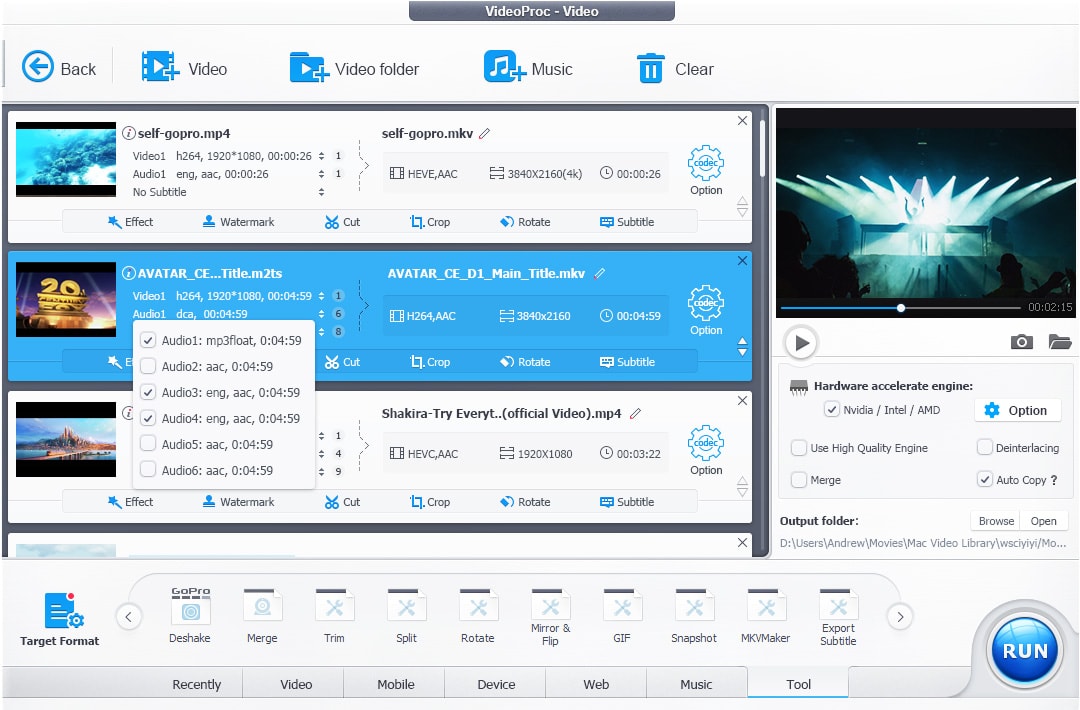
The differenceVideoProc bundles Super Resolution, frame interpolation and stabilisation with a converter, compressor, downloader and screen recorder under one lifetime licence; Topaz Video only enhances.
Switch to VideoProc Converter AI ifyou also convert, compress and record video and want one lifetime licence instead of a yearly enhancement subscription.
Stay with Topaz Video AI ifyou need Topaz's Starlight and Precision models or its After Effects and DaVinci Resolve plugins for finished-quality restorations.
Pros
  • Full GPU acceleration delivers exceptional processing and conversion speeds.
  • Strong suite of AI tools for video/image enhancement and restoration.
Cons
  • Not a full non-linear editor (NLE); editing capabilities are basic.
  • The UI combines many tools, which can feel less focused than specialized single-purpose apps.

Pros and cons from the Zekai review of VideoProc Converter AI · Verdict: High-Speed Video Processor

05
AVCLabs Video Enhancer AI logo

Topaz Video AI vs AVCLabs Video Enhancer AI

$39.95/mo · checked 13 Nov 20266.6
The differenceAVCLabs combines upscaling with object removal and colour enhancement and sells a separate $9.95-a-month cloud edition; Topaz Video cloud rendering draws on monthly credits.
Switch to AVCLabs Video Enhancer AI ifyou need a month-to-month licence that adds object removal and colour enhancement, with an optional low-cost cloud edition.
Stay with Topaz Video AI ifyou want a flat $299 yearly licence rather than $39.95 every month, and Topaz's plugin integrations.
Pros
  • Fully automates tedious restoration tasks like de-noising and upscaling.
  • Upscales video up to 8K, salvaging low-resolution source files.
Cons
  • Processing can be slow and requires a powerful GPU for optimal speed.
  • As a desktop application, it lacks cloud-based collaboration features.

Pros and cons from the Zekai review of AVCLabs Video Enhancer AI · Verdict: Automated footage restoration.

06
Aiarty Video Enhancer logo

Topaz Video AI vs Aiarty Video Enhancer

$99/yr · checked 13 Nov 20267.8
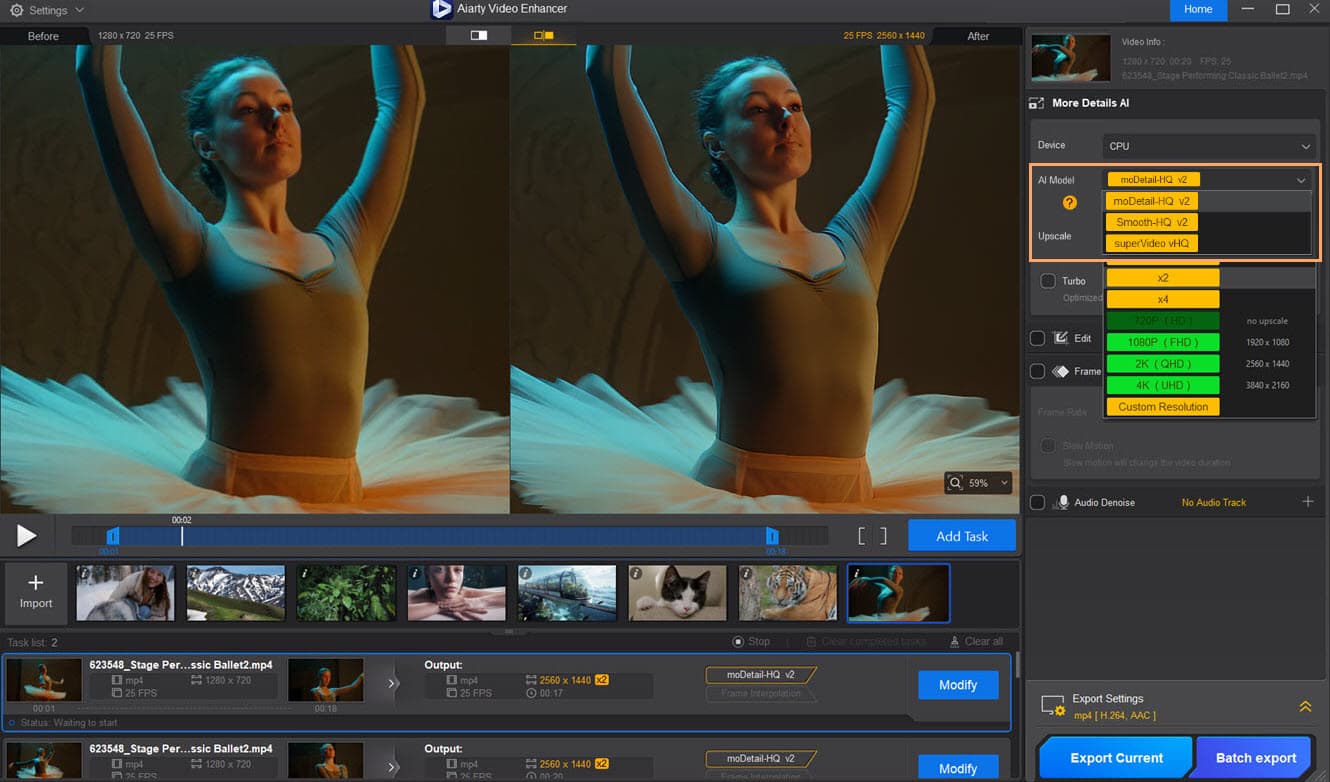
The differenceAiarty raises video to 4K and up to 120 fps, adds HDR edits, and sells a lifetime licence with free updates on 3 PCs; Topaz stopped selling perpetual licences in September 2025.
Switch to Aiarty Video Enhancer ifyou want a lifetime licence covering three PCs with local, private processing and frame-rate boosting to 120 fps.
Stay with Topaz Video AI ifyou want Topaz's larger model library and plugin support in After Effects and DaVinci Resolve.
Pros
  • Runs locally, so footage is not uploaded
  • 30-day money-back guarantee
Cons
  • Standard License is billed yearly ($99 list) and updates last one year
  • Speed and quality depend on your GPU

Pros and cons from the Zekai review of Aiarty Video Enhancer · Verdict: Local 4K upscaler

07

Topaz Video AI vs DaVinci Resolve Studio

Free$236 one-time · checked 13 Nov 20269.2
The differenceResolve Studio includes Super Scale upscaling to 4K and 8K from HD inside a full editor, colour and audio suite for one payment; Topaz Video is an enhancement app that plugs into editors.
Switch to DaVinci Resolve Studio ifyou already cut and grade in Resolve and only need occasional HD-to-4K upscaling without another subscription.
Stay with Topaz Video AI ifyou need dedicated denoise, deinterlace, stabilisation and slow-motion models on archival or heavily degraded footage.
Pros
  • Cross-platform support for Mac, Windows, and Linux
Cons
  • Steep learning curve, especially for Fusion and Fairlight pages
  • Requires a powerful computer for smooth 4K/8K workflows

Pros and cons from the Zekai review of DaVinci Resolve Studio · Verdict: Post-Production Powerhouse

08
Pixop logo

Topaz Video AI vs Pixop

Not checked8.0
The differencePixop FILE is a managed SaaS with a REST API and Pixop Prime is a licensed pipeline with about 600 ms real-time latency, aimed at broadcasters; Topaz is a single-user desktop app.
Switch to Pixop ifyou run a broadcast or archive library and need API-driven or real-time enhancement under a negotiated contract.
Stay with Topaz Video AI ifyou are an individual or small studio buying a self-serve licence with a published price.
Pros
  • Integrates directly into existing broadcast chains pre-encoding.
  • Consolidates multiple processing stages into one ML layer.
Cons
  • No public pricing; requires direct sales contact and a demo.
  • Primarily designed for large broadcasters, not individual editors or small studios.

Pros and cons from the Zekai review of Pixop · Verdict: Broadcast-Grade Video Enhancement

09
QualityScaler logo

Topaz Video AI vs QualityScaler

Best open sourceOpen sourceFree (self-hosted)7.8
The differenceQualityScaler is a Windows-only MIT-licensed app that upscales video and photos offline and auto-selects NVENC, AMF or QSV encoding; Topaz Video also runs on Mac.
Switch to QualityScaler ifyou are on Windows, want a free MIT-licensed tool, and can accept fewer models and no editor plugins.
Stay with Topaz Video AI ifyou use a Mac or need Topaz's Starlight models, frame interpolation and plugin support.
10
Video2X logo

Topaz Video AI vs Video2X

Open sourceFree (self-hosted)6.9
The differenceVideo2X version 6.4.0 offers a Qt6 GUI with task queue plus command-line batch processing, and bundles RIFE frame-interpolation models; it is AGPL-3.0 where Topaz is closed source.
Switch to Video2X ifyou want scriptable batch upscaling you can inspect and modify under AGPL-3.0, with no licence fee.
Stay with Topaz Video AI ifyou want a polished model set with denoise, stabilisation and a support team behind it.
11
REAL Video Enhancer logo

Topaz Video AI vs REAL Video Enhancer

Open sourceFree (self-hosted)7.5
The differenceREAL Video Enhancer is an AGPL-3.0 desktop GUI for upscaling and frame interpolation with Flatpak packaging on Linux, and its macOS build is labelled very limited support.
Switch to REAL Video Enhancer ifyou run Linux, prefer a free open-source GUI for upscaling and interpolation, and can troubleshoot GPU backends yourself.
Stay with Topaz Video AI ifyou need dependable Mac support and vendor-backed models for client work.
06 · What changed

Why do people leave Topaz Video AI?

  • Topaz CEO announced Topaz Studio on 17 September 2025 and stated that perpetual licences would no longer be available for its products, moving new buyers to subscriptions. (source)

  • Topaz's pricing page says Personal licences cover personal use and commercial use for organisations under $1M annual revenue; larger organisations need Topaz Video Pro at $699 a year. (source)

  • Topaz Video Personal includes 25 monthly video cloud credits, while Topaz Studio includes 300 and Studio Pro 600, so heavy cloud users are steered to the higher plans. (source)

08 · FAQ

Questions people ask about Topaz Video AI alternatives

What is the best alternative to Topaz Video AI in 2027?

HitPaw Video Enhancer (VikPea) is the best overall Topaz Video AI alternative on this page ($124.99/yr). For no cost, TensorPix has a free plan (Free forever: weekly login credits, 720p input, 1 GB storage, files deleted after 30 days). To self-host, QualityScaler is open source (MIT).

Is there a free version of Topaz Video AI?

No. Topaz Video AI has no free plan; paid plans start at $299/yr, checked on 13 Nov 2026.

Is there a 100% free alternative to Topaz Video AI?

Yes. QualityScaler, Video2X, REAL Video Enhancer are open source and free to self-host. HitPaw Video Enhancer (VikPea), UniFab, TensorPix, VideoProc Converter AI, DaVinci Resolve Studio have a free plan with limits, shown in the table.

What is cheaper than Topaz Video AI?

UniFab starts at $129.99 one-time, against $299/yr for Topaz Video AI, as listed on each vendor's pricing page on 13 Nov 2026.

How much do Topaz Video AI alternatives cost for a team of 5?

If each of 5 people buys the entry paid plan, at the prices Zekai checked on 13 Nov 2026, the monthly cost is TensorPix $27.50/mo, Aiarty Video Enhancer $41.25/mo, HitPaw Video Enhancer (VikPea) $52.10/mo, against Topaz Video AI $124.60/mo for Topaz Video AI. Team and business plans can cost more per seat. The Zekai Cost Finder on this page recalculates for any team size.

Which is better, HitPaw Video Enhancer (VikPea) or Topaz Video AI?

VikPea upscales to 8K with 10+ models, adds Seedance 2.5, Kling and VEO 3 video generation, and sells a $437.99 perpetual licence; Topaz Video is subscription-only. Choose HitPaw Video Enhancer (VikPea) if you want a one-off perpetual licence plus colourisation and generative models, and accept credit-based exports. Stay with Topaz Video AI if your pipeline relies on Topaz plugins inside After Effects or DaVinci Resolve and unlimited local rendering of Starlight models.

Why are people leaving Topaz Video AI?

The documented reasons are: Topaz CEO announced Topaz Studio on 17 September 2025 and stated that perpetual licences would no longer be available for its products, moving new buyers to subscriptions (17 Sep 2025); Topaz's pricing page says Personal licences cover personal use and commercial use for organisations under $1M annual revenue; larger organisations need Topaz Video Pro at $699 a year (13 Nov 2026). Each is sourced in the section above.

09 · Method

How did Zekai check this page?

Zekai independently reviews AI tools. For this page we read each vendor's own pricing and product pages and recorded the starting price, the free-plan limit and the date of the check. Only tools that do the same job as Topaz Video AI are listed, and sponsors never change the order or the scores.

1 · Same job onlyEvery alternative does the same task as Topaz Video AI; tools for other jobs are left out.
2 · Vendor pages onlyPrices and free limits come from each vendor's own pricing page, never from blogs.
Zekai score0–10, from four published weights: ease 25%, output quality 30%, value 20%, time saved 25%. How we score
3 · Re-checkedA price older than 35 days is re-read or the page falls back to an older version.
Change log
  • Page rebuilt on v6; all prices re-read on vendor pages.

Get paid to train AI →

See Zekai first in Google