AI tools, scored for your job
Get paid to train AI
Overview How It Works Before & After Reviews Why This Tool FAQ Top 10 Get Alerts News

Aiarty Video Enhancer — AI for Video Editing & Production

Desktop AI video upscaler for Windows and Mac: denoise, deblur, 4K upscale, slow motion and audio cleanup, offline.

What is Aiarty Video Enhancer?

Aiarty Video Enhancer: Desktop AI video upscaler for Windows and Mac: denoise, deblur, 4K upscale, slow motion and audio cleanup, offline. No free plan. Zekai's independent review scores it 7.8 out of 10. Best for local video restoration and 4K upscaling.

Facts checked 12 Nov 2026.

DifferentiatorLocal offline processing with a one-time lifetime license
ProofTraining set of 2.38 million images and 120 hours of HD/4K video (vendor figure)
Explore Aiarty Video Enhancer
7.8 Zekai
Local 4K upscaler
AI for Video Editing & Production
Ease of Use
8.0
Accuracy
8.0
Value
8.0
Time Saving
7.0
4K UpscaleOfflineSlow MotionAudio DenoiseLifetime License
🏷 Is this your tool? Claim this listing →

Zekai Verdict

What is it?
Aiarty Video Enhancer is a desktop program that upscales and restores video to up to 4K using Diffusion and GAN-based models, processed locally on your computer.
Best for
Editors and creators who upscale and restore footage locally on a Windows or Mac GPU
Not ideal for
Standard License is billed yearly ($99 list) and updates last one year
Price
Pricing on request
Zekai Score
7.8/10
Hand-scored by Zekai

Top AI for Video Editing & Production picks

See all 128 AI tools for Video Editors →
⚡ Quick answer

Aiarty Video Enhancer is a desktop AI video upscaler for Windows and Mac. It denoises, deblurs and upscales video up to 4K, adds slow motion and audio cleanup, and processes locally. Licenses are per year or lifetime.

CategoryAI video upscaler (desktop)
Best forLocal video restoration and 4K upscaling
Free planno
DifferentiatorLocal offline processing with a one-time lifetime license
ProofTraining set of 2.38 million images and 120 hours of HD/4K video (vendor figure)
Rating4
📖 About Aiarty Video Enhancer
How It Works

Your workflow, automated

1
Import clips
Add one or many videos to the batch.
2
Choose a model
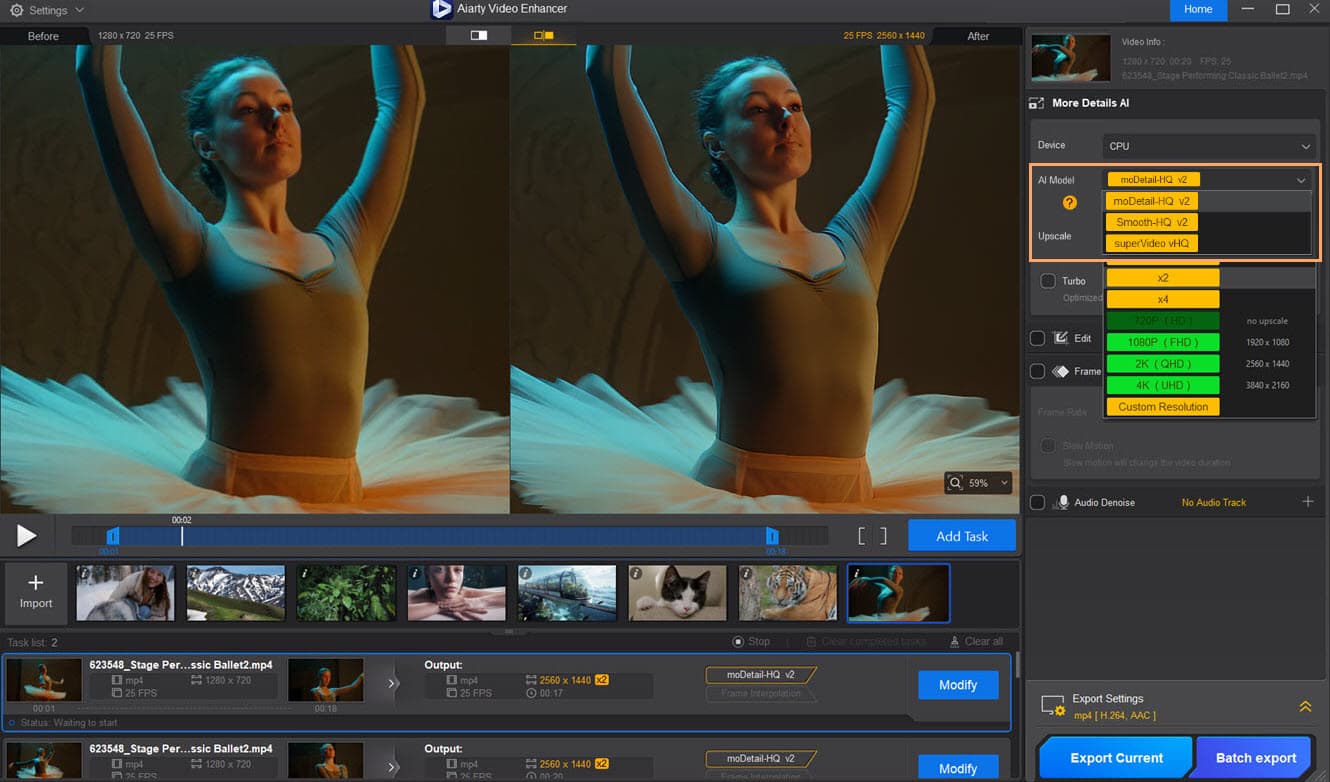
Pick a model, upscale factor and strength; add denoise or interpolation.
3
Export
Process locally on your GPU and export without watermarks on a paid license.
Ready to automate your workflow with Aiarty Video Enhancer?
Explore Aiarty Video Enhancer →
Real Impact

Before & After

❌ Before

Old or noisy footage looks soft and grainy at today's resolutions.

Low-res footage
✅ After

Local AI models denoise, deblur and upscale it to up to 4K.

Up to 4K
AI Prompts

Prompts for Video Editors

Prompt 01 Universal Dialogue Cleanup
Isolate all human speech from the background. Remove wind noise, microphone hum, and room echo. Normalize all speakers to a target loudness of -14 LUFS and a true peak of -1.5 dB.
Prompt 02 Filler Word and Silence Removal
Transcribe the audio track. Identify and create an edit list of all instances of the words 'um,' 'uh,' 'like,' 'you know,' and 'so.' Also identify all silent segments longer than 0.7 seconds. Do not delete them; present the list for review.
Prompt 03 De-Mix Production Audio
Separate the source audio into three distinct stems: one for dialogue, one for background music, and one for ambient sound effects. Export each as a 24-bit WAV file.
See all 36 AI prompts for Video Editors →
Social Proof

Trusted by professionals

Ease of Use
8.0
Accuracy
8.0
Value
8.0
Time Saving
7.0
The decision

Is Aiarty Video Enhancer worth it?

Built for
Video editors, YouTubers, photographers offering video, and anyone restoring old or low-quality footage.
Effort to adopt
Easy
Who It's For

Why Video Editing & Production choose this tool

🎯
Built for
Editors and creators who upscale and restore footage locally on a Windows or Mac GPU
In-Depth Overview
Aiarty Video Enhancer is for footage you already have: old family video, grainy low-light clips, or AI-generated video that needs sharpening. It runs on your own machine, so files stay local and the product page highlights offline processing. Three models cover different jobs: moDetail-HQ v3 for hair, skin and texture, Smooth-HQ v3 for faithful restoration, and superVideo vHQ for noisy or dark clips. Upscaling goes to 1K, 2K or 4K, and the frame interpolation module can raise stuttering video to 90 or 120 fps and make 8X or 16X slow motion. An audio denoise module removes background noise and a color panel handles white balance, exposure, contrast, saturation and HDR. Batch processing is supported and the page lists GPU optimization for NVIDIA, AMD, Intel and Apple Silicon. Pricing is a license, not a subscription: the Standard License is $99 per year for 1 PC with a year of updates, and the Lifetime License is $235 for 3 PCs; the buy page showed Black Friday discounts on both. Speed depends on your GPU, and the speed comparisons on the page are the vendor's own.

Key Use Cases

🎞️
Restore old home video
Family archivist
Denoise, deblur and upscale old footage to a sharper size.
Up to 4K
🎬
Smooth stuttering clips
Video editor
Use frame interpolation to turn choppy footage into slow motion.
8X/16X slow motion
🤖
Sharpen AI-generated clips
AI video creator
Upscale generated video before delivery.
Batch export
✓ Pros
Runs locally, so footage is not uploaded
30-day money-back guarantee
Optimized for NVIDIA, Intel and AMD GPUs, and CoreML on Mac
· Cons
Standard License is billed yearly ($99 list) and updates last one year
Speed and quality depend on your GPU
Speed and quality comparisons on the page are the vendor's own
Free trial limits are not stated on the pages read
⚡ Editorial Verdict

A practical local upscaler with a one-time Lifetime option and no cloud upload. Limitation: results and speed depend on your GPU, the speed and quality comparisons on the site are the vendor's own, and the trial limits are not stated.

Questions & Answers

Frequently asked questions

How much does Aiarty Video Enhancer cost?

+
The Standard License lists per year for 1 PC and the Lifetime License for 3 PCs; the page showed discounted prices during a sale.

Does it work offline?

+
Yes, the page says processing is offline and private.

Can I use it commercially?

+
Both licenses list unlimited personal and commercial use.

Is it the same as Aiarty Image Enhancer?

+
No, it is a separate video product; the image tool is a different Aiarty program.

Last reviewed:

See all 128 AI tools for Video Editors →

Get Aiarty Video Enhancer deal alerts

Be the first to know when Aiarty Video Enhancer drops a new discount, adds features, or changes pricing.

Exclusive Aiarty Video Enhancer discount codes
New feature announcements
Best alternative picks when pricing changes
Zero spam — unsubscribe anytime
🎉
You're subscribed!
We'll notify you when Aiarty Video Enhancer has a new deal.
AI Directory

About Aiarty Video Enhancer

Full Description

Aiarty Video Enhancer is a desktop program that upscales and restores video to up to 4K using Diffusion and GAN-based models, processed locally on your computer. It also does frame interpolation for slow motion, audio denoise and basic color correction. It is a separate product from Aiarty Image Enhancer.

Editorial Verdict

A practical local upscaler with a one-time Lifetime option and no cloud upload. Limitation: results and speed depend on your GPU, the speed and quality comparisons on the site are the vendor's own, and the trial limits are not stated.

Last reviewed:
Disclaimer
Zekai is an independent AI tools directory. We are not affiliated with, endorsed by, or officially connected to Aiarty Video Enhancer unless clearly stated. All product names, logos, and brands are the property of their respective owners and are used for identification purposes only. The information on this page — including pricing, features, and availability — is general information, may have changed since our last review, and is not professional advice. Zekai Scores and verdicts are our editorial opinion. Some outbound links are affiliate links that may earn us a commission at no extra cost to you. Spotted outdated or incorrect information? Request a correction →
Get paid to train AI →
‹ Previous Tool H3 Max Studio › Next Tool Fliki ‹ ›
All AI Tools A–Z →
Visit website ↗
Aiarty Video Enhancer7.8Try Aiarty Video Enhancer ↗Next tool →
● 1,528 paid AI jobs open now →

See Zekai first in Google