Browse
AI Directory Open Source AI News AI Statistics
Browse by profession
Accounting, Bookkeeping & TaxCompliance, Audit & GRCConstructionCustomer SupportData ScienceMedical All 38 professions →
Company
About Advertise Submit a tool Get the free Video AI guide
Overview How It Works Before & After Try It Reviews Screenshots Integrations Why This Tool FAQ Pricing Top 10 Get Alerts News

Automatically edit multi-camera video podcasts and shows directly inside Adobe Premiere Pro and DaVinci Resolve.

Save hours on tedious tasks like multi-cam switching, social clip creation, and jump cuts with this suite of AI plugins.

Best forAutomating multi-camera podcast and interview edits.
DifferentiatorFully automated multi-cam editing and social clip creation inside Premiere Pro/DaVinci Resolve.
ProofSaves hours per project; trained on thousands of hours of podcast footage for human-like cuts.
Explore AutoPod
Pro from$29/mo
9.1 Zekai
Podcast Editing Automation
AI for Video Editing & Production
Ease of Use
9.0
Accuracy
9.2
Value
8.7
Time Saving
9.5
Multi-Cam EditingSocial ClipsJump CutsPremiere Pro PluginDaVinci Resolve Plugin
🏷 Is this your tool? Claim this listing →
Hand-scored by Zekai

Top AI for Video Editing & Production picks

See all 99 AI for Video Editing & Production tools →
⚡ Quick answer

For video editors working on multi-camera podcasts, AutoPod is the best AI tool for automating the editing process. It integrates directly into Adobe Premiere Pro and DaVinci Resolve, using AI to create human-like multi-camera edits from separate audio tracks. This saves editors hours of manual cutting per episode.

CategoryVideo Editing Plugin
Best ForAutomating multi-camera podcast and interview edits.
Price From$29/mo
Free30-day trial
DifferentiatorFully automated multi-cam editing and social clip creation inside Premiere Pro/DaVinci Resolve.
ProofSaves hours per project; trained on thousands of hours of podcast footage for human-like cuts.
Rating4.6/5
📖 About AutoPod
Watch

See AutoPod in action

How It Works

Your workflow, automated

1
Install & Sync
Install the plugin in Adobe Premiere Pro or DaVinci Resolve. Sync your multi-camera footage with your separate audio tracks in a sequence.
2
Run AutoPod
Open the AutoPod extension, select your desired editor (e.g., Multi-Camera), configure settings like wide-shot frequency, and click run.
3
Refine & Export
Review the automatically generated edit, make any creative tweaks, and use the Social Clip Creator to batch export content for social media.
Ready to automate your workflow with AutoPod?
Explore AutoPod →
Real Impact

Before & After

❌ Before

Manually switching between camera angles for hours on every podcast episode.

6-8 hours per episode
✅ After

Generating a complete multi-camera edit automatically in minutes.

<1 hour per episode
Prompt Templates

Try it with these prompts

Copy any prompt and paste it directly into the tool.

Automate Multi-Camera Edits

Input your multi-camera footage and audio. AutoPod will automatically edit sequences for up to 10 cameras and microphones, handling various shot types and editing methods. Save your custom presets for consistent results.

Create Social Media Clips Automatically

Provide your main video and desired aspect ratios (1920x1080, 1080x1350, 1080x1920). AutoPod will generate social clips, resize footage, and add auto-reframes, watermarks, or end pages as needed. Batch export all clips a…

Generate Jump Cuts from Silence

Upload your footage and specify a decibel cutoff for your microphone. AutoPod will automatically create engaging jump cuts by identifying and removing silences, ideal for social media content.

Social Proof

Trusted by professionals

Ease of Use
9.0
Accuracy
9.2
Value
8.7
Time Saving
9.5

"This plugin paid for itself on the first project. What used to take me a full day now takes less than an hour of review. Absolutely essential for my business."

Frank P., Podcast Editor · June 2026

"The social clip creator is a hidden gem. Setting up an in/out point and getting three different aspect ratios with watermarks is a massive workflow boost."

Maria L., Content Creator · May 2026

"It's a lifesaver, but you have to be meticulous with your audio setup. If there's any bleed between mics, it can get confused on the cuts. Still worth it, but be warned."

Sam T., Video Producer · June 2026

"I was skeptical, but the AI editing logic is surprisingly human-like. It understands pacing and conversation flow better than I expected. Huge time saver."

Chloe B., Freelance Editor · April 2026
Proof of Use

Inside AutoPod

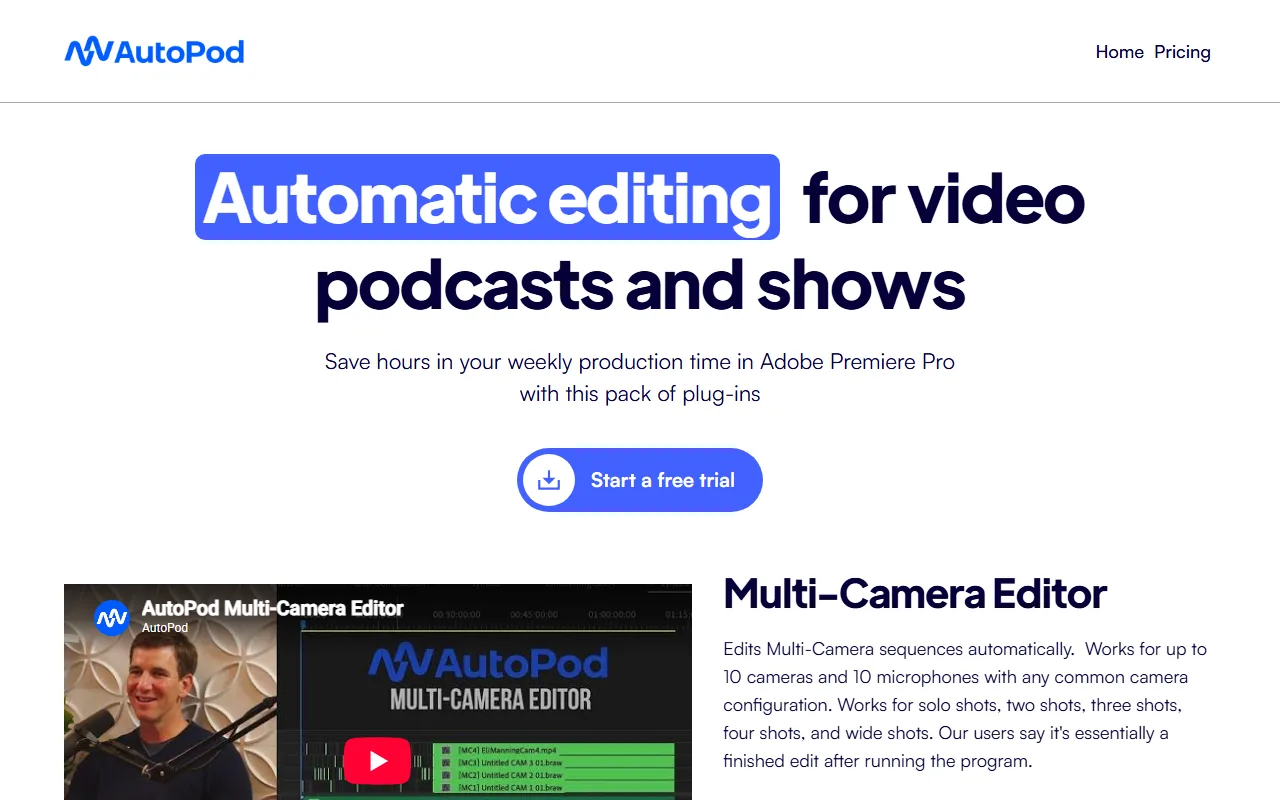
AutoPod screenshot — interface view 1

Captured by Zekai from the live AutoPod interface during review.

Connects With

Works with your existing stack

Adobe Premiere Pro DaVinci Resolve
Setup complexity: Easy
AutoPod is a suite of plugins for Adobe Premiere Pro and DaVinci Resolve designed to automate the most repetitive parts of video podcast editing. It automatically handles multi-camera editing, creates social media clips in various aspect ratios, and generates jump cuts based on silence.
Comparison

How it compares

AutoPod's primary competitor in the AI editing space is Descript. Choose AutoPod when your workflow is centered inside a traditional NLE like Premiere Pro or DaVinci Resolve and your main goal is automating the video switching aspect of a multi-camera shoot. Its strength is its deep integration and focus on visual editing. Choose Descript if your workflow is transcript-based and you primarily need to edit content by editing text. Descript is better for single-camera content or when the text edit is the primary driver of the video cut.

You need to edit on Final Cut Pro, Avid, or another unsupported NLE.
Your projects are single-speaker or use a single mixed audio source.
You require a completely free tool and are willing to perform manual edits.
The decision

Is it worth it?

Return on investment
At $29/month, saving just one hour of billable editing time makes AutoPod profitable for most professional video editors.
Built for
Video editors, podcast producers, and production agencies who produce multi-camera shows and want to drastically reduce their post-production time.
Effort to adopt
Easy
Compliance
Compliance posture not publicly documented — verify with vendor.
Who It's For

Why Video Editing & Production choose this tool

🎯
Built for
Automating the multi-camera switching and social clip creation process for video podcasts, interviews, and panel discussions.
In-Depth Overview
For video editors, AutoPod eliminates the most time-consuming part of producing multi-camera shows: the manual switching between speakers. The platform operates as a set of plugins directly within your existing NLE (Premiere Pro or DaVinci Resolve), preserving your professional workflow. Its core Multi-Camera Editor analyzes up to 10 separate audio tracks to make human-like editing decisions, generating what many users call a "finished edit" in minutes, not hours. Beyond the main cut, the Social Clip Creator automates another tedious task. It takes a selection from your timeline and batch creates clips in 16:9, 4:5, and 9:16 aspect ratios, automatically reframing the shot and adding watermarks or endpages. The Jump Cut Editor further refines content for social platforms by removing silence. Built by editors for editors, AutoPod targets specific, high-effort tasks and automates them effectively, freeing you to focus on creative storytelling and client revisions.

Key Use Cases

🎙️
Automate an entire multi-camera podcast edit in minutes
Podcast Video Editor
An editor receives a 2-hour, 4-camera podcast recording. Instead of manually cutting between speakers for 6-8 hours, they run AutoPod's Multi-Camera Editor, generating a solid first-pass edit in under 30 minutes.
From 8 hours to <1 hour per episode
✓ Pros
Drastically reduces manual editing time for multi-camera podcasts.
Automates the creation of social media clips in multiple formats.
Highly customizable settings for camera switching and shot selection.
Simple installation and integration within Premiere Pro & DaVinci Resolve.
Includes a 30-day free trial to test full functionality.
· Cons
Requires separate, clean audio tracks for each speaker to function correctly.
Not suitable for single-speaker videos or single-source audio recordings.
No support for Final Cut Pro, Avid, or other NLEs.
Each license is tied to a single machine.
⚡ Editorial Verdict

AutoPod is an indispensable time-saver for any editor working on multi-camera podcasts. Its ability to generate a near-finished multi-cam edit and a full suite of social clips automatically is a game-changer for production workflows. The primary limitation is its specificity; it requires separate audio tracks per speaker and is only available for Premiere Pro and DaVinci Resolve.

Questions & Answers

Frequently asked questions

What are the system requirements for AutoPod?

+
You need a computer that can run Adobe Premiere Pro 2023 or newer. The DaVinci Resolve version is also available.

Does each AutoPod license only work on one computer?

+
Yes, each license is for a single computer. The key is activated on the first machine it is used on, though you can request to switch machines via their website.

Can I use the Multi-Camera Editor with a single audio source?

+
No, AutoPod's multi-camera editing requires multiple unique audio tracks, one for each speaker, to make its editing decisions.

Is AutoPod available for DaVinci Resolve?

+
Yes, a version of AutoPod for DaVinci Resolve is available for purchase through the same portal as the Premiere Pro version.

Is AutoPod available for Final Cut Pro or Avid?

+
No, the company states there are no current plans to add support for Final Cut Pro, Avid, or other NLEs.

How does AutoPod's Multi-Camera Editor decide which camera to use?

+
The editor is based on analysis of thousands of hours of podcast footage. It makes decisions based on who is speaking, your specified camera layout, and conventional human editing patterns.

Last reviewed:

Plans & Pricing

Start today

Prices and features are updated regularly but can change at any time — always confirm on the official website. Some links on this page are affiliate links.

See all 99 AI for Video Editing & Production tools →
Free guide

Take it with you

  • Cut your podcast editing time by up to 90%.
  • Master the three core AutoPod plugins.
  • Learn the optimal project setup for perfect AI edits.
  • Automate social media clip creation in 3 aspect ratios.
  • Troubleshoot common issues like audio bleed.
+3 more steps inside the guide
Send me the full guide

Get AutoPod deal alerts

Be the first to know when AutoPod drops a new discount, adds features, or changes pricing.

Exclusive AutoPod discount codes
New feature announcements
Best alternative picks when pricing changes
Zero spam — unsubscribe anytime
🎉
You're subscribed!
We'll notify you when AutoPod has a new deal.
AI Directory

About AutoPod

Full Description

AutoPod is a suite of plugins for Adobe Premiere Pro and DaVinci Resolve designed to automate the most repetitive parts of video podcast editing. It automatically handles multi-camera editing, creates social media clips in various aspect ratios, and generates jump cuts based on silence.

Editorial Verdict

AutoPod is an indispensable time-saver for any editor working on multi-camera podcasts. Its ability to generate a near-finished multi-cam edit and a full suite of social clips automatically is a game-changer for production workflows. The primary limitation is its specificity; it requires separate audio tracks per speaker and is only available for Premiere Pro and DaVinci Resolve.

Last reviewed:
Disclaimer
Zekai is an independent AI tools directory. We are not affiliated with, endorsed by, or officially connected to AutoPod unless clearly stated. All product names, logos, and brands are the property of their respective owners and are used for identification purposes only. The information on this page — including pricing, features, and availability — is general information, may have changed since our last review, and is not professional advice. Zekai Scores and verdicts are our editorial opinion. Some outbound links are affiliate links that may earn us a commission at no extra cost to you. Spotted outdated or incorrect information? Request a correction →
Previous Tool AutoCut Next Tool TimeBolt
All AI Tools A–Z →
AutoPod9.1Try AutoPod ↗Next tool →
Today's top 3 AI for Video Editing & Production tools →