84 Verified AI Tools
Best AI Tools for Photographers
AI tools that cull thousands of RAW files, edit in your personal style, retouch portraits, and rescue technically flawed shots - so photographers shoot more and sit at the desk less.
Faster
culling and selection
Less
repetitive retouching
Better
batch consistency
More time
behind the camera
✓
Verified tools only✓
Real user ratings✓
Updated monthly✓
Free tools highlightedStay Updated
Get AI tool updates
for Photographers
New tools, price drops, exclusive deals. Free forever.
✓
New tools added weekly↓
Price drop alerts★
Exclusive deals for subscribersWhy AI Matters
Problems AI is solving
for Photographers
Endless Culling
Selecting from thousands of frames takes hours.
✓ AI ranks for sharpness, eyes and duplicates
Repetitive Editing
Applying a consistent look across a shoot is slow.
✓ AI learns your style and edits whole galleries
Manual Retouching
Skin and portrait retouching is tedious frame by frame.
✓ AI retouches portraits in a single pass
Technically Flawed Shots
Noise, motion blur and low resolution ruin keepers.
✓ AI rescue tools sharpen, denoise and upscale
Browse by Use Case
What do you need AI for?
Culling
Style Editing
Retouching
Restoration
Upscaling
Delivery
Tools
84 verified AI tools for Photographers
NEW
ProntoPic
Photographers
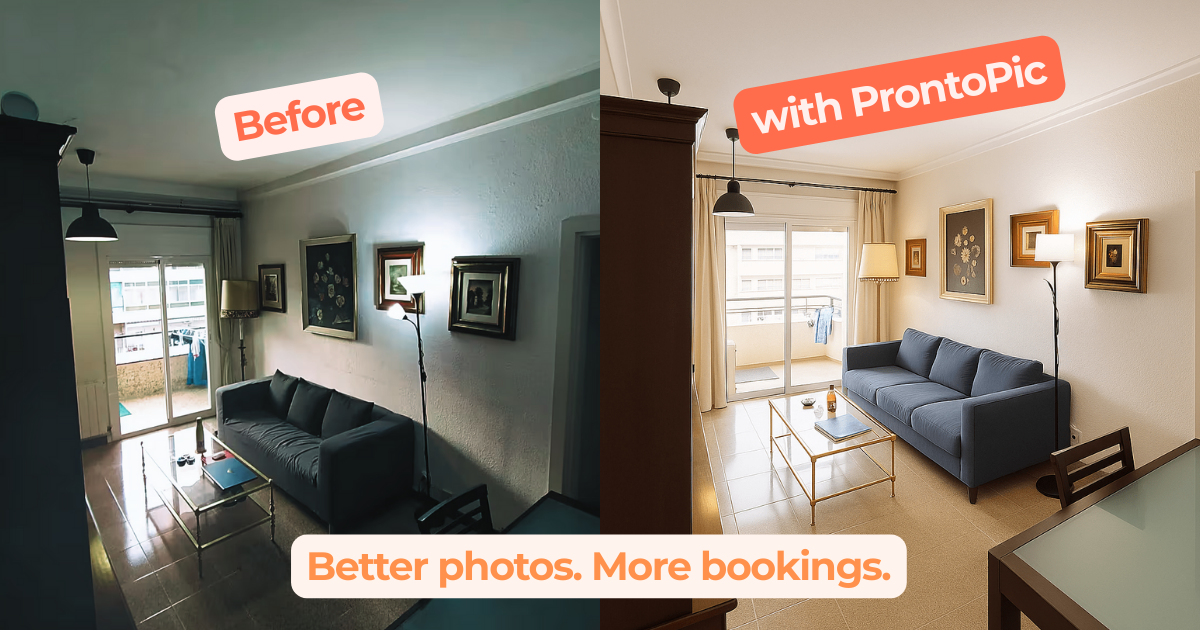
ProntoPic is an AI photo enhancement tool for photographers specializing in real estate and short-term rentals. It automatically improves listing photos by fixing lighting, color, and clutter, and can virtually stage empty rooms. This allows photographers to deliver listing-ready images in minutes, eliminating the need for expensive reshoots or time-consuming manual edits.
★★★★★ 4.8
View Tool →NEW

Sozee AI
Photographers
Sozee AI is a content generation platform for photographers and creators to produce hyper-realistic images and videos from just three source photos. It eliminates physical photoshoots, allowing for instant creation of content in any style, location, or outfit, directly from text prompts.
★★★★★ 4.7
View Tool →NEW

ProShoot
Photographers
ProShoot is an AI headshot generator that creates professional, true-to-likeness portraits from a few everyday photos. For photographers, this offers a way to supplement traditional shoots or provide a fast, affordable alternative for clients needing quick updates for LinkedIn, resumes, or corporate profiles. The platform focuses on realistic results, avoiding the 'plastic skin' look common in other AI tools.
★★★★★ 4.7
View Tool →NEW
Skylum Aperty
Photographers
Skylum Aperty is an AI-powered portrait editor for professional photographers. It runs locally on your Mac or Windows machine to batch-retouch thousands of portraits, ensuring consistency without per-image credits. It integrates directly into Lightroom and Photoshop workflows.
★★★★★ 4.7
View Tool →NEW
Optyx
Photographers
Optyx is an AI-powered culling software designed for photographers to drastically speed up their post-production workflow. It analyzes entire shoots for sharpness, facial expressions, and blinks, automatically grouping similar images and selecting the best takes. This allows photographers to move from culling to editing in minutes, not hours.
★★★★★ 4.7
View Tool →NEW
AI Keywording
Photographers
AI Keywording automates metadata creation for photographers. Upload images to generate relevant keywords, titles, and detailed descriptions instantly, streamlining your submission process for stock photo websites and Adobe Bridge.
★★★★★ 4.6
View Tool →NEW

SellShots
Photographers
SellShots is an AI product photography tool for e-commerce sellers. Upload a single product image to generate an entire suite of studio, lifestyle, and AI model shots, all in 4K resolution and ready for marketplaces like Amazon, Etsy, and Shopify.
★★★★★ 4.6
View Tool →NEW

Decor8 AI
Photographers
Decor8 AI is a virtual staging platform that allows real estate photographers to add a new, high-margin service. Upload photos of empty rooms to add realistic furniture, enhance listing photos for professional quality, and even convert daytime shots to twilight images.
★★★★★ 4.6
View Tool →NEW

TrackAction AI
Photographers
TrackAction AI is a specialized tool for motorsport photographers that automates the tedious process of keywording. It uses a desktop app to analyze photos, identify race car numbers via cloud AI, and write the data directly into XMP metadata files, integrating with Lightroom, Capture One, and other professional software.
★★★★★ 4.6
View Tool →NEW

RaceTagger
Photographers
RaceTagger is a desktop app for professional motorsport, cycling, and running photographers. It uses AI to automatically read race numbers on each photo, match them to a driver/competitor list, and write the data to EXIF metadata. This pre-sorts your entire event's photos into organized folders before you import them into your editing software.
★★★★★ 4.6
View Tool →NEW

Snap2Pass
Photographers
For professional photographers, Snap2Pass is an AI-powered utility that instantly transforms client headshots into government-compliant document photos. It automates background replacement, biometric validation, and cropping for passports, visas, and IDs worldwide, eliminating manual editing and rejection risks.
★★★★★ 4.6
View Tool →NEW

Batch.ai
Photographers
Batch.ai is an AI-powered plugin for Adobe Lightroom Classic designed for professional photographers. It learns from your edits on a few 'anchor' images to apply your unique style across an entire gallery, processing thousands of photos in minutes.
★★★★★ 4.6
View Tool →All AI tools for Photographers (84)
Every tool in this category, independently tested and scored by Zekai. How we score →
🔥
Active Deals
Exclusive discounts for Photographers AI tools — updated weekly
Deals
Save on the best
AI tools for Photographers
20% off all packages
Aragon AI
Expires Jan 1, 1970
Aragon AI is an AI-powered platform that transforms basic selfies into a wide array of professional headshots. For photographers, it offers a rapid method to generate updated profile pictures for their own marketing materials or to explore the capabilities and limitations of AI in commercial portraiture.
Save 67%
Magic Studio
Magic Studio is a suite of AI-powered editing tools designed for photographers needing fast, effective image manipulation. It simplifies tasks like removing unwanted objects, replacing backgrounds, and generating images from text prompts, accessible via web and mobile apps without requiring deep design skills.
Want deal alerts for new Photographers AI tools?
🔔 Get Photographers Deal AlertsCompare
Compare Top Tools
Key features side by side to help you choose.
| Tool | Integrations | Free Plan | Mobile | Rating | Pricing |
|---|---|---|---|---|---|
| ProntoPic | Airbnb, Vrbo | — | — | 4.8 ★ | Paid |
| ProShoot | — | — | — | 4.7 ★ | Paid (from $35 one-time) |
| Skylum Aperty | Adobe Photoshop, Adobe Lightroom | — | — | 4.7 ★ | Paid (from $174/year) |
| Sozee AI | OnlyFans, Fansly | — | — | 4.7 ★ | Paid |
| Optyx | Adobe Lightroom, Capture One | ✓ | — | 4.7 ★ | Free |

FAQ
Questions about AI tools
for Photographers
What are the best AI tools for photographers?
Photographers commonly use Adobe Lightroom for AI denoise, subject masking and generative remove, Photoshop for generative fill, Topaz Photo AI for sharpening and upscaling, and culling assistants such as Aftershoot or Narrative Select. Wedding and event shooters gain most from automated culling and batch editing.
Can AI replace a photographer?
No, not for real events or real people. AI cannot attend a wedding, direct a nervous subject, or document something that actually happened. Stock and simple product imagery are genuinely threatened by generated images, but commissioned photography still depends on presence, timing and trust that no model provides.
Can photographers sell AI-edited images?
Photographers keep copyright in the original photograph, and ordinary AI edits such as denoise, masking or retouching do not change that. Heavily generated content is murkier, because purely machine-made elements may not be protected. Stock agencies and news outlets often restrict or ban generative fill, so check submission rules.
How much do AI photography tools cost?
Adobe's photography plan is a modest monthly subscription covering Lightroom and Photoshop, which is where most photographers meet AI features. Standalone tools such as Topaz sell perpetual licences, while culling and batch editing services usually charge per image or per month, so high-volume event work costs proportionally more.
Are there free AI photo editing tools?
Yes. Darktable and GIMP offer free editing with some AI-assisted plugins, phone camera apps include free enhancement and background removal, and several web tools remove backgrounds or upscale images at no cost. Free tools rarely handle large raw files well and often limit output resolution or commercial use.
Does AI actually reduce a photographer's editing time?
Yes, particularly for high-volume work. Automatic culling, AI masking of skies and subjects, batch profiles learned from past edits, and denoise on high-sensitivity files remove hours from event and portrait workflows. Fine-art and commercial retouching benefit less, because those images need individual attention regardless.
Do AI edits make photographs look unnatural?
They can. Over-applied AI sharpening, skin smoothing and upscaling produce plastic textures and invented detail that was never in the frame. Denoise is generally safe at sensible strengths. Photographers should compare against the original at full magnification, because generated detail looks convincing on screen and wrong in print.
Which AI tool should a photographer start with?
Start with Lightroom denoise and AI masking, because they fit the existing raw workflow and improve almost every shoot immediately. Photographers handling large volumes should add culling software next. Generative fill is worth learning last, since it carries the most licensing and authenticity complications for client delivery.
Related Professions
AI tools for other professions
Affiliate Disclosure: Some links are affiliate links. Sponsored placements are labeled. Rankings are editorially independent.


