
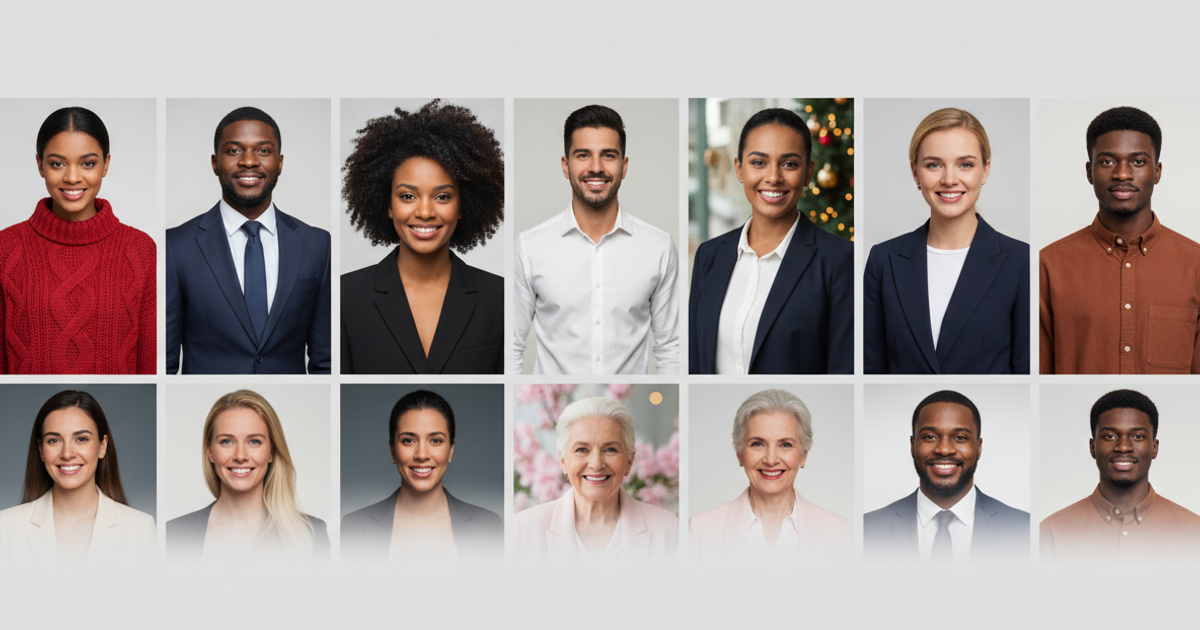
Generate hundreds of studio-quality headshot concepts from a single client photo in minutes.
Use AI to quickly create style guides, mood boards, and pre-visualizations for upcoming portrait sessions.
What is Try It On AI?
Try It On AI: Generate hundreds of studio-quality headshot concepts from a single client photo in minutes. No free plan. Zekai scores it 5.4 out of 10 after independent testing. Best for rapidly generating headshot concepts for client pre-visualization.
Zekai Verdict
- What is it?
- Try It On AI is an AI headshot generator that creates hundreds of professional-looking portraits from a single uploaded selfie.
- Best for
- It's best for photographers who need to quickly generate a wide range of stylistic concepts to present to clients…
- Not ideal for
- No granular control over lighting, posing, or expression.
- Price
- Pricing on request
- Zekai Score
- 5.4/10
 DxO PureRAW
 Upscayl
 Capture One Pro
 Pixellu SmartAlbums
 Topaz Photo AI
For photographers, the best AI headshot tool for pre-production is Try It On AI. It allows you to upload a single client photo and generate hundreds of studio-quality concepts in minutes. This makes it exceptionally efficient for creating lookbooks and aligning on style with clients before a real photoshoot, saving hours of manual mood-boarding.
Your workflow, automated
Before & After
Manually creating extensive mood boards for each client is time-consuming.
Hours per clientGenerate over 100 visual concepts in minutes to accelerate client alignment.
Minutes per clientTry it with these prompts
Copy any prompt and paste it directly into the tool.
Generate professional headshots for my LinkedIn profile. I will upload 10 casual selfies taken from my phone. I want to select a business casual style.
Create consistent, on-brand team portraits for our company website. We will provide selfies for each team member and specify a custom portrait style. Ensure the final images are suitable for a global team.
Design hyper-personalized AI portraits for marketing and content creation. I will upload my selfies and choose a creative style. The goal is to have unique visuals that stand out for personal branding.
Prompts for Photographers
Paid remote AI jobs for people who use tools like Try It On AI
AI companies pay experts by the hour to test and improve AI. Remote and flexible. These roles are open now.
12 open roles · updated today
Get new roles like these by email
One short email each morning with new roles open in your country. Free. Unsubscribe any time.
Trusted by professionals
Best Try It On AI alternatives
Try It On AI vs. Midjourney: Choose Try It On AI for speed and simplicity when you need headshot concepts, fast. Its single-photo upload and automated 'studio quality' output is perfect for quick client presentations with zero learning curve. Pick a tool like Midjourney when you need creative control. Midjourney's text-based prompting allows photographers to precisely define lighting, camera angles, art style, and composition, making it a more powerful tool for unique artistic expression, but with a much steeper learning curve and longer iteration time.
Is Try It On AI worth it?
Why Photographers choose this tool
Key Use Cases
Try It On AI is an incredibly fast tool for generating headshot ideas, making it a useful asset for client pre-visualization. A photographer can use it to create a style menu for a client in minutes. The primary trade-off is the complete lack of granular creative control, making it a tool for ideation rather than final production.
Frequently asked questions
How can photographers use Try It On AI without it replacing their job?
How many photos do I need to upload?
How long does it take to get the AI headshots?
Can I specify the style of headshot?
Is Try It On AI a good tool for generating client mood boards?
Can I use AI to get headshot ideas for a client photoshoot?
Last reviewed:
Top 10 AI tools in this category


Take it with you
- Why AI for Pre-visualization?
- Overcoming creative blocks
- Accelerating client communication
- Setting clear expectations for the shoot
- Choosing the Right Input Photo
Get Try It On AI deal alerts
Be the first to know when Try It On AI drops a new discount, adds features, or changes pricing.
More on AI for Photographers

About Try It On AI
Full Description
Try It On AI is an AI headshot generator that creates hundreds of professional-looking portraits from a single uploaded selfie. For photographers, it serves as a rapid pre-visualization tool to explore styles and concepts with clients before a shoot, or to generate diverse lookbooks in minutes.
Editorial Verdict
Try It On AI is an incredibly fast tool for generating headshot ideas, making it a useful asset for client pre-visualization. A photographer can use it to create a style menu for a client in minutes. The primary trade-off is the complete lack of granular creative control, making it a tool for ideation rather than final production.


