AI tools, scored for your job
Learn AI in 30 days
Overview How It Works Before & After Try It Reviews Integrations Why This Tool FAQ Pricing Top 10 Get Alerts News

PhotoMentor — AI for Photographers

Get an AI photo editor's instant, honest critique on any photo to see what works, what doesn't, and how to improve.

Analyze composition, lighting, and technique to turn good shots into great ones.

DifferentiatorCritiques and culls based on creative intent, not just technical flaws.
Proof6,000+ photos analyzed; Chrome Extension and Telegram Bot available.
Try PhotoMentor
Free Plan
Free plan verified · free AI tools for Photographers
5.7 Zekai
Your AI Photo Editor
AI for Photographers
Ease of Use
7.0
Accuracy
5.6
Value
5.6
Time Saving
4.6
AI Photo CritiqueBulk CullingComposition AnalysisProgress TrackingGoogle Photos Extension
🏷 Is this your tool? Claim this listing →

Zekai Verdict

What is it?
PhotoMentor provides photographers with instant AI-powered critiques, analyzing images for composition, lighting, and technical quality.
Best for
This tool is best for photographers who want instant, objective feedback to accelerate their learning curve and improve…
Not ideal for
Lacks deep integration with local software like Lightroom/Capture One.
Price
Free plan
Zekai Score
5.7/10
Hand-scored by Zekai

Top AI for Photographers picks

See all 86 AI tools for Photographers →
⚡ Quick answer

For photographers seeking to improve their craft, PhotoMentor is the best AI tool for instant, objective critique. It analyzes photos against professional standards of composition, lighting, and technique, providing a score and actionable feedback. Unlike generic AIs, it's built by photographers for photographers, and its bulk culling feature helps you find the strongest images in a large shoot, making it an invaluable AI coach.

CategoryAI Photo Critique & Culling
Best ForPhotographers wanting to improve their craft with instant feedback.
Price From$0
FreeFree tier available (2 welcome analyses, then 1/mo)
DifferentiatorCritiques and culls based on creative intent, not just technical flaws.
Proof6,000+ photos analyzed; Chrome Extension and Telegram Bot available.
Rating5.7/10
📖 About PhotoMentor

PhotoMentor provides photographers with instant AI-powered critiques, analyzing images for composition, lighting, and technical quality. It delivers a score, highlights distractions, and offers actionable advice to help improve your craft.

How It Works

Your workflow, automated

1
Upload Your Photo
Drag and drop any image or use the Chrome Extension to select a photo from Google Photos.
2
Get Instant Analysis
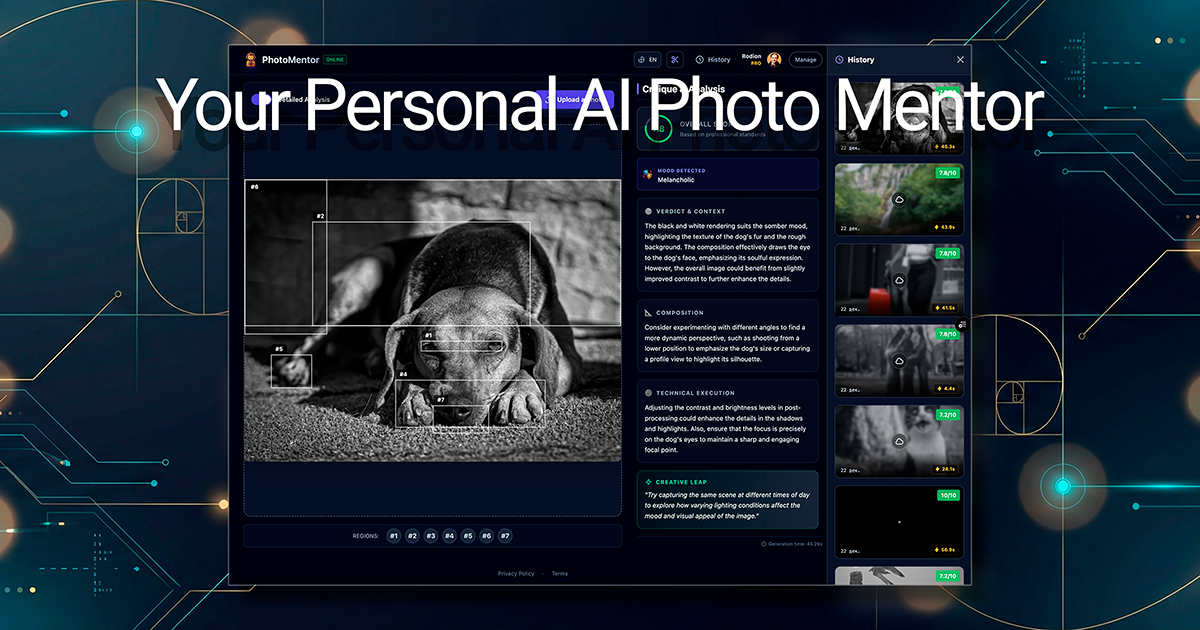
Receive a score out of 10, a written critique, and visual highlights of strengths and weaknesses.
3
Improve Your Shot
Use the specific, actionable recommendations to refine your shot in-camera or guide your editing process.
Ready to automate your workflow with PhotoMentor?
Try PhotoMentor →
Real Impact

Before & After

❌ Before

Unsure why a photo isn't working

Subjective feedback
✅ After

Clear, actionable critique on every shot

Data-driven improvement
Prompt Templates

Try it with these prompts

Copy any prompt and paste it directly into the tool.

Critique my street photo composition

Analyze this street photograph for composition, lighting, and timing. Provide a score out of 10 and identify key insights about where the eye should land. Suggest specific crops or adjustments to improve focus on the mai…

Get feedback on my portrait lighting

Critique the lighting and mood of this portrait. Does it align with a whimsical or nostalgic feel? Offer recommendations on how to enhance the subject's presence and the overall aesthetic.

Evaluate my landscape photo's balance

Assess the balance and framing of this landscape image. Identify any elements that make the frame feel bottom-heavy or distracted. Provide actionable advice on how to correct these issues for a stronger visual impact.

AI Prompts

Prompts for Photographers

Prompt 01 AI Prompt for a Client Email
Draft a polite but firm follow-up email to a client whose payment for their wedding photography package is 15 days overdue. Reference invoice number [[Invoice Number]] for the amount of [[Amount]]. Maintain a professional and friendly tone,…
Prompt 02 Pro Tip: The 'Good Photo' Checklist
Before you upload, ensure your input photos meet these criteria: - **Just You:** No other people, pets, or distracting objects. - **Face is Visible:** No sunglasses, hats, or hands covering your face. - **Variety of Expressions:** Include s…
Prompt 03 Prompt for Generative Fill
Extend the background, matching the vintage paper texture and slight yellowing of the old photograph.
See all 28 AI prompts for Photographers →
Social Proof

Trusted by professionals

Ease of Use
7.0
Accuracy
5.6
Value
5.6
Time Saving
4.6

"This is incredible for culling. It doesn't just find the sharp faces, it finds the *strongest* images. Saved me hours on the last wedding."

David C., Wedding Photographer · June 2026

"I'm finally understanding *why* some of my photos work and others don't. The composition debugger is like having a teacher on call."

Maria S., Hobbyist Photographer · May 2026

"The feedback on composition is solid and surprisingly nuanced. It's great for technical checks, but for conceptual work, you still need a human peer group."

Ken L., Street Photographer · June 2026

"I ran my portfolio through it and the feedback was spot on. It's a cheap and fast way to get a second opinion before a client presentation."

Sarah J., Portrait Photographer · April 2026
Connects With

PhotoMentor integrations

Google Photos (via Chrome Extension) Telegram Bot API available for developers
Setup complexity: Easy
PhotoMentor provides photographers with instant AI-powered critiques, analyzing images for composition, lighting, and technical quality. It delivers a score, highlights distractions, and offers actionable advice to help improve your craft.
Comparison

Best PhotoMentor alternatives

PhotoMentor's main alternative for culling is AfterShoot. Choose AfterShoot if your priority is pure speed and a tight, local-first integration with Lightroom for rejecting technical misses (blurry, closed eyes). Choose PhotoMentor when your goal is to understand *which* of your technically good photos are the *strongest* creative images. PhotoMentor's culling is about curation and learning, ranking your best shots based on your creative brief and providing a full critique on why they made the cut, making it a better tool for portfolio development and skill improvement.

You need fast, local culling integrated directly with Lightroom.
You want a community-based critique platform, not an AI.
You primarily need an AI photo enhancer, not a critique tool.
The decision

Is PhotoMentor worth it?

Return on investment
At just $5/month, saving a single hour of manual culling or gaining one insight that improves a portfolio piece makes PhotoMentor immediately profitable.
Built for
Professional and advanced amateur photographers seeking to refine their technical skills and develop a stronger editorial eye.
Effort to adopt
Easy
Compliance
Compliance posture not publicly documented — verify with vendor.
Who It's For

Why Photographers choose this tool

🎯
Built for
This tool is best for photographers who want instant, objective feedback to accelerate their learning curve and improve their shot selection.
In-Depth Overview
Stop guessing why a shot doesn't work. For photographers who want to improve, PhotoMentor offers an objective, trained eye on demand. It moves beyond generic 'likes' from social media or vague feedback from friends by providing specific, actionable critiques grounded in professional photography principles. The AI analyzes composition against the Rule of Thirds and leading lines, evaluates lighting and color, and identifies visual 'dead zones' that weaken your frame—all highlighted with bounding boxes directly on your image. It understands context, differentiating between intentional stylistic choices like grain and technical errors like camera shake. The Bulk Culling feature extends this analysis to entire shoots, ranking your strongest frames not just on technical merit, but on how well they match your creative intent. It's like having a senior photo editor's perspective available 24/7, helping you build your visual taste and consistently produce stronger work.

Key Use Cases

📸
Select the best headshot from a series
Portrait Photographer
Use Bulk Culling to quickly identify the technically sharpest and most compelling expressions from a client session.
Shortlist in minutes
🏞️
Refine your compositions in the field
Landscape Photographer
Upload a test shot to get immediate feedback on framing and lighting, helping you adjust your next shot for maximum impact.
Stronger compositions
🧑‍🎓
Accelerate your learning with daily feedback
Photography Student
Analyze your daily practice shots to understand composition rules and get specific advice, turning theory into practice.
Faster skill development
✓ Pros
Provides instant, objective feedback available 24/7.
Affordable pricing with a functional free tier.
Teaches core principles of composition and lighting.
Bulk culling ranks photos based on creative intent, not just technical flaws.
Identifies specific distractions and weaknesses in a frame.
· Cons
Lacks deep integration with local software like Lightroom/Capture One.
AI critique is technical and may not capture all artistic nuance.
Web-based culling may be slower for large batches than local software.
Free tier is limited to one analysis per month after the initial two.
⚡ Editorial Verdict

PhotoMentor is a powerful and affordable AI coach for photographers. Its ability to provide instant, structured feedback on composition and technique is a game-changer for learning. The main trade-off is its focus on single-image analysis; while it offers bulk culling, it lacks deep workflow integrations with tools like Lightroom that competitors focus on.

Questions & Answers

Frequently asked questions

What is the best AI to critique my photos?

+
PhotoMentor is a leading tool for AI photo critique. Unlike general chatbots, it's purpose-built for photographers, providing a structured score, visual highlights on your image, and actionable feedback based on professional principles of composition, lighting, and technique.

How can AI help me become a better photographer?

+
AI tools like PhotoMentor act as an objective, 24/7 mentor. They provide instant feedback on technical aspects like composition and lighting, helping you spot weaknesses and understand photographic rules, which accelerates the learning process far more than just taking pictures.

Is there an AI that can help me cull my photos?

+
Yes, PhotoMentor's AI Bulk Culling feature is designed to sort through large photo sessions. It ranks your photos not just by technical quality but also by theme and creative intent, handing you a ranked shortlist of the strongest frames and explaining why they were chosen.

Can an AI analyze photo composition?

+
Absolutely. PhotoMentor's AI is trained to analyze composition elements like the Rule of Thirds, leading lines, visual balance, and framing. It provides a specific verdict on whether your composition works and where it could be improved.

What's a good alternative to AfterShoot for culling?

+
PhotoMentor is an excellent alternative if your goal is to find the *strongest* images, not just the technically acceptable ones. While AfterShoot excels at rejecting blurry or out-of-focus shots, PhotoMentor ranks your keepers based on your creative brief and provides a critique for each finalist.

Where can I get my photos rated online for free?

+
PhotoMentor offers a free plan that allows you to analyze a limited number of photos each month. You get an instant, objective score out of 10 and a full critique, making it one of the fastest ways to get a professional rating online for free.

Last reviewed:

Plans & Pricing

PhotoMentor pricing and plans

Prices and features are updated regularly but can change at any time — always confirm on the official website. Some links on this page are affiliate links.

See all 86 AI tools for Photographers →
Free guide

Take it with you

Get Your First AI Photo Critique in 60 Seconds
  • **Understand Your Photos:** Move beyond 'likes' to get objective, actionable feedback.
  • **Learn Composition:** See rules like the Rule of Thirds applied directly to your images.
  • **Spot Distractions:** Discover what weakens your frame and how to fix it.
  • **Cull Smarter:** Learn to use AI to find the best shots in a large session.
  • **Track Your Growth:** Use your personal dashboard to see your skills improve over time.
+3 more steps inside the guide
Send me the full guide

Get PhotoMentor deal alerts

Be the first to know when PhotoMentor drops a new discount, adds features, or changes pricing.

Exclusive PhotoMentor discount codes
New feature announcements
Best alternative picks when pricing changes
Zero spam — unsubscribe anytime
🎉
You're subscribed!
We'll notify you when PhotoMentor has a new deal.
AI Directory

About PhotoMentor

Full Description

PhotoMentor provides photographers with instant AI-powered critiques, analyzing images for composition, lighting, and technical quality. It delivers a score, highlights distractions, and offers actionable advice to help improve your craft.

Editorial Verdict

PhotoMentor is a powerful and affordable AI coach for photographers. Its ability to provide instant, structured feedback on composition and technique is a game-changer for learning. The main trade-off is its focus on single-image analysis; while it offers bulk culling, it lacks deep workflow integrations with tools like Lightroom that competitors focus on.

Last reviewed:
Disclaimer
Zekai is an independent AI tools directory. We are not affiliated with, endorsed by, or officially connected to PhotoMentor unless clearly stated. All product names, logos, and brands are the property of their respective owners and are used for identification purposes only. The information on this page — including pricing, features, and availability — is general information, may have changed since our last review, and is not professional advice. Zekai Scores and verdicts are our editorial opinion. Some outbound links are affiliate links that may earn us a commission at no extra cost to you. Spotted outdated or incorrect information? Request a correction →
Previous Tool Narrative Select Next Tool Optyx
All AI Tools A–Z →
Visit website ↗
PhotoMentor5.7Try PhotoMentor ↗Next tool →
Today's top 3 AI for Photographers tools →

See Zekai first in Google