Browse
AI Directory Open Source AI News AI Statistics
Browse by profession
Accounting, Bookkeeping & TaxCompliance, Audit & GRCConstructionCustomer SupportData ScienceMedical All 38 professions →
Company
About Advertise Submit a tool Get the free Video AI guide
Overview How It Works Before & After Try It Reviews Integrations Why This Tool FAQ Pricing Top 10 Get Alerts News

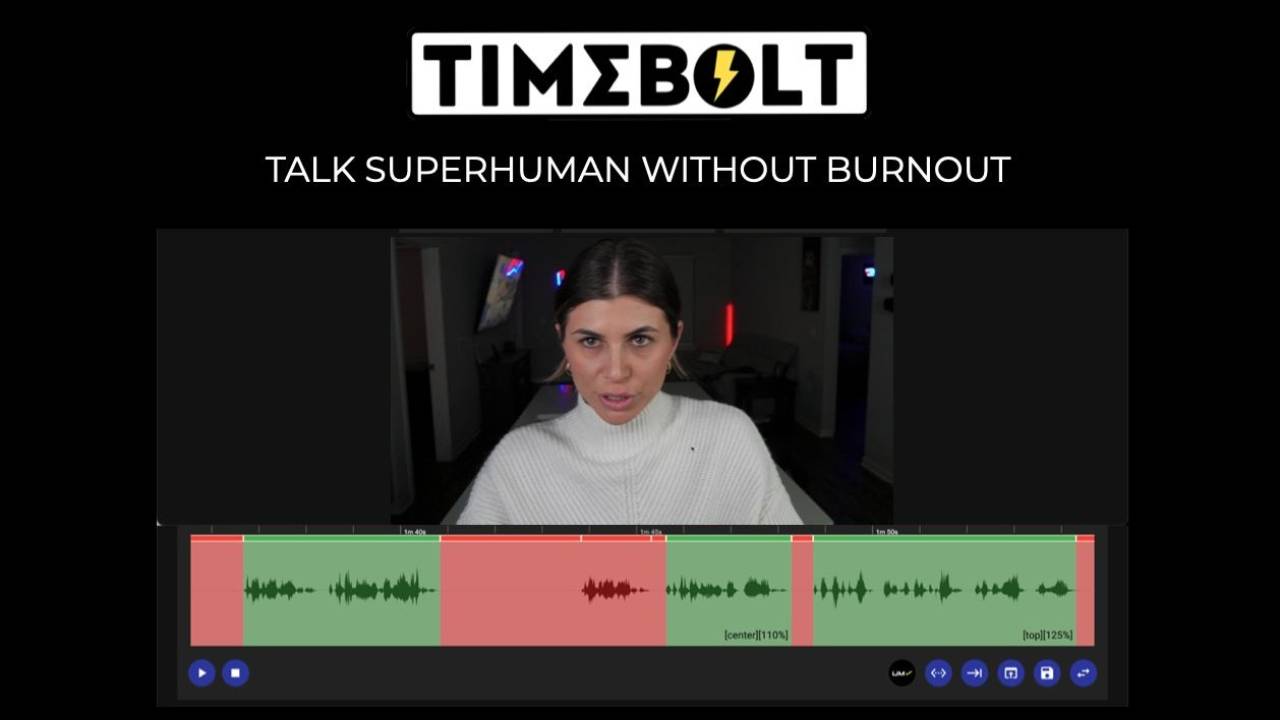
Automatically remove silence, filler words, and bad takes from video with waveform precision, cutting your rough cut time by up to 5.5x.

Export a clean, edited timeline directly to Premiere Pro, Final Cut Pro, and DaVinci Resolve.

Best forAutomating precise rough cuts for NLE workflows
DifferentiatorWaveform-based cutting for 0.01s precision, not transcript guesswork.
ProofTrusted by 11,700+ paid users. Benchmark shows 0 mistakes per hour vs. 500+ for competitors.
Try TimeBolt
Free Plan
9.1 Zekai
Precision Rough Cut Automation
AI for Video Editing & Production
Ease of Use
8.5
Accuracy
9.5
Value
8.8
Time Saving
9.6
11,700+Users
9.1/10Zekai Score
Multi-Cam SyncNLE ExportLocal ProcessingFiller Word Removal4K Screen Recorder
🏷 Is this your tool? Claim this listing →
Hand-scored by Zekai

Top AI for Video Editing & Production picks

See all 99 AI for Video Editing & Production tools →
⚡ Quick answer

For video editors prioritizing precision and speed, TimeBolt is a leading AI tool for automating rough cuts. It uses a local, waveform-based engine to remove silence with 0.01s accuracy, far exceeding transcript-based editors. This prevents clipped words and ensures a clean XML export to professional NLEs like Premiere Pro and Final Cut Pro.

CategoryAI Video Editing
Best ForAutomating precise rough cuts for NLE workflows
Price From$17/mo
FreeFree plan available (watermarked)
DifferentiatorWaveform-based cutting for 0.01s precision, not transcript guesswork.
ProofTrusted by 11,700+ paid users. Benchmark shows 0 mistakes per hour vs. 500+ for competitors.
Rating4.6/5
📖 About TimeBolt
Watch

See TimeBolt in action

How It Works

Your workflow, automated

1
Import & Detect
Drop your video, audio, or multi-cam files into TimeBolt. It instantly analyzes the audio waveform to detect all silent moments.
2
Review & Refine
Review the automatically marked cuts on the timeline. Optionally, run UMCHECK™ to find and remove filler words and bad takes.
3
Export to NLE
Export the timeline as an XML file and open it in Premiere Pro, Final Cut, or Resolve to continue with your creative edit.
Ready to automate your workflow with TimeBolt?
Try TimeBolt →
Real Impact

Before & After

❌ Before

Manually finding and cutting every pause, 'um,' and 'uh' in a long video.

5 hours of manual editing
✅ After

A clean, tightly-edited rough cut generated automatically in minutes.

1 hour of review & export
Prompt Templates

Try it with these prompts

Copy any prompt and paste it directly into the tool.

Remove Silence and Filler Words

Use TimeBolt to automatically remove silence and filler words from my video recordings. I want to ensure all cuts are precise and aligned with the waveform, preventing any words from being cut off. Please process the vid…

Generate Captions Automatically

Leverage TimeBolt's UMCHECK AI to automatically generate captions for my video content. The tool should identify and remove filler words and bad takes, then create accurate captions faster than the original recording tim…

Multi-Cam Sync and Switch

Upload all speaker recordings to TimeBolt for automatic waveform syncing and speaker detection. The tool should then switch cameras based on who is talking, providing a rough cut ready for export to my NLE.

Social Proof

Trusted by 11,700+

11,700+ professionals using this tool
Ease of Use
8.5
Accuracy
9.5
Value
8.8
Time Saving
9.6

"This little bit of code has changed my YouTube life! No longer am I dependent on the video editor to jump cut and take hours for producing content."

Educator · June 2026

"Not only is it fast, but the app is so versatile AND the founders are great with support. Huge time saver. Essential in my toolkit."

Podcaster · May 2026

"Saved my back from having to sit for hours to jump cut. The only downside is that the UMCHECK for filler words is an extra cost per minute, which can add up on long streams."

Gaming Creator · April 2026

"The multi-cam sync is a game-changer for podcast edits. It lines up ISO tracks perfectly and the XML export to Resolve saves me hours on every project."

Chris P., Freelance Editor · June 2026
11,700+ professionals are already using this tool.
Start Free Today →
Connects With

Works with your existing stack

Premiere Pro Final Cut Pro DaVinci Resolve Camtasia
Setup complexity: Easy to learn
TimeBolt is a desktop application that automates the tedious process of cutting dead air, filler words, and retakes from video and audio files. It uses waveform analysis for frame-accurate cuts, avoiding the errors common with transcript-based editors. Editors can then export a clean timeline XML to their preferred NLE for final polishing.
Comparison

How it compares

TimeBolt vs. Descript: Choose TimeBolt for surgical precision and an NLE-centric workflow. Its waveform-based cutting is superior for clean jump cuts without clipped words, and it exports a timeline directly to Premiere or Final Cut. It's a specialized tool for accelerating the rough cut. Choose Descript for an all-in-one, text-based editing experience. If you want to edit video like a document, collaborate with a team in the cloud, and need integrated podcasting and transcription features in one platform, Descript is the more comprehensive, albeit less precise, choice for silence removal.

You need a full-featured, all-in-one video editor with collaborative cloud features (use Descript).
Your primary need is text-based editing and you prefer a browser-based tool (use Gling).
You only need basic silence removal and prefer to use your NLE's native tools (use DaVinci Resolve's 'Detect Silence').
The decision

Is it worth it?

Return on investment
By automating silence removal on a 1-hour recording, a user on the $97/year plan can save up to 4 hours of manual editing time per project.
Built for
Video editors, content creators, podcasters, and production teams looking to accelerate their rough cut and assembly edit process.
Effort to adopt
Easy to learn
Compliance
The on-premise 'Vault' edition is designed for regulated industries and offers a pathway for HIPAA, FINRA, and FedRAMP compliance by ensuring no data leaves the user's network.
Who It's For

Why Video Editing & Production choose this tool

🎯
Built for
This tool is best for rapidly creating clean rough cuts from long-form content like interviews, tutorials, and podcasts by automatically removing dead air.
In-Depth Overview
For video professionals, speed without sacrificing precision is paramount. TimeBolt delivers this by rejecting the guesswork of transcript-based editing. Its core engine analyzes the audio waveform, allowing it to detect and cut silence with 0.01-second precision—20x more accurate than tools like Descript. A benchmark study showed competitors left hundreds of mistakes per hour, while TimeBolt left zero. This precision means no more clipped words or awkward cuts in your initial assembly. The workflow is built for professionals: edit locally on your machine for speed and privacy, then hand off a clean XML file directly to Premiere Pro, Final Cut Pro, or DaVinci Resolve. For multi-camera productions like podcasts or interviews, TimeBolt automatically syncs separate video/audio tracks by their waveform—no clap or timecode needed—and can even create an auto-switched cut that follows the active speaker. It’s a specialized tool designed to perfect the first, most time-consuming step of your edit.

Key Use Cases

🎬
Cut a 1-hour vlog edit down to minutes
Content Creator
Use TimeBolt to automatically remove all pauses and 'ums' from a long recording, then export the clean timeline directly to Final Cut Pro for final polishing.
Up to 5.5x faster rough cuts
🎙️
Sync and cut multi-speaker interviews instantly
Podcast Producer
Drop in separate ISO audio/video tracks for each speaker. TimeBolt syncs them, cuts dead air, and auto-switches to the active speaker, delivering a ready-to-edit multi-cam sequence.
Syncs without timecode or clap
🏢
Process sensitive internal training videos securely
Corporate Video Editor
Edit internal communications and training footage entirely on your local machine. No files are ever uploaded, helping maintain compliance and data security.
100% on-premise editing
✓ Pros
Extremely precise cuts based on audio waveform, not transcription.
Processes all files locally on your machine, ensuring speed and data privacy.
Directly exports edited timelines to major NLEs, streamlining workflows.
Automatically syncs and cuts multi-camera footage without timecode.
Offers a one-time lifetime payment option, avoiding subscriptions.
· Cons
Filler word removal (UMCHECK™) is a pay-per-minute add-on, not included in the base price.
The user interface is functional but less modern than some cloud-based competitors.
The free version is heavily limited, with watermarked exports and no NLE integration.
The Lifetime plan has a reduced usage limit for the 'Banger' video sharing feature.
⚡ Editorial Verdict

TimeBolt excels at its core function: creating surgically precise jump cuts based on audio waveforms, making it significantly faster and more reliable than transcript-based editors for initial cleanup. The main trade-off is that its AI filler word removal (UMCHECK™) is a pay-per-use add-on, which can increase costs for dialogue-heavy projects.

Questions & Answers

Frequently asked questions

Does TimeBolt upload my video files to the cloud?

+
No, TimeBolt processes everything locally on your machine. Your video files never leave your device, ensuring privacy and eliminating upload/download wait times.

What is UMCHECK™ for filler word removal?

+
UMCHECK™ is an AI feature that uses transcription to find filler words like "um" and "uh". It then uses TimeBolt's precise waveform engine to make the cuts. It's a pay-per-use feature available on all paid plans at $0.03 per minute of video.

Can I use TimeBolt on more than one computer?

+
Yes, a single TimeBolt license can be installed and used on up to two machines with simultaneous logins.

How does TimeBolt help create a rough cut for Premiere Pro or Final Cut?

+
After removing silence and filler words, TimeBolt can export an XML or FCPXML file. You can import this file directly into Premiere Pro, Final Cut Pro, or DaVinci Resolve, and it will recreate the edited timeline with all the cuts, ready for further editing.

Is TimeBolt the best AI tool for automating jump cuts in video editing?

+
For editors who prioritize precision and a local-first workflow, TimeBolt is a top contender. Its core strength is its waveform-based cutting engine, which is more accurate than transcript-only editors for removing silence, resulting in cleaner jump cuts with no clipped words.

What's the fastest way to edit a multi-camera podcast with TimeBolt?

+
Drop all speaker ISO recordings into TimeBolt. It will automatically sync the tracks by their audio waveform, cut dead air across all tracks simultaneously, and even create an auto-switched program cut that follows the conversation. You can then export this multi-cam sequence to your NLE.

Last reviewed:

Plans & Pricing

Start today

Enterprise
Pricing on request
Tailored for teams and large organisations.
Contact Sales

Prices and features are updated regularly but can change at any time — always confirm on the official website. Some links on this page are affiliate links.

See all 99 AI for Video Editing & Production tools →
Free guide

Take it with you

Getting Started with TimeBolt for Faster Rough Cuts
  • **Benefit 1: Waveform Precision:** Avoids the awkward, clipped words common in transcript-based editors.
  • **Benefit 2: NLE Workflow:** Exports a clean XML timeline directly to Premiere, Final Cut, and Resolve.
  • **Benefit 3: Local & Secure:** Your footage never leaves your computer, ensuring privacy and speed.
  • **Benefit 4: Multi-Cam Magic:** Automatically syncs and cuts multiple camera angles without timecode.
  • **Benefit 5: One-Time Purchase:** Offers a lifetime deal to avoid recurring subscriptions.
+3 more steps inside the guide
Send me the full guide

Get TimeBolt deal alerts

Be the first to know when TimeBolt drops a new discount, adds features, or changes pricing.

Exclusive TimeBolt discount codes
New feature announcements
Best alternative picks when pricing changes
Zero spam — unsubscribe anytime
🎉
You're subscribed!
We'll notify you when TimeBolt has a new deal.
AI Directory

About TimeBolt

Full Description

TimeBolt is a desktop application that automates the tedious process of cutting dead air, filler words, and retakes from video and audio files. It uses waveform analysis for frame-accurate cuts, avoiding the errors common with transcript-based editors. Editors can then export a clean timeline XML to their preferred NLE for final polishing.

Editorial Verdict

TimeBolt excels at its core function: creating surgically precise jump cuts based on audio waveforms, making it significantly faster and more reliable than transcript-based editors for initial cleanup. The main trade-off is that its AI filler word removal (UMCHECK™) is a pay-per-use add-on, which can increase costs for dialogue-heavy projects.

Last reviewed:
Disclaimer
Zekai is an independent AI tools directory. We are not affiliated with, endorsed by, or officially connected to TimeBolt unless clearly stated. All product names, logos, and brands are the property of their respective owners and are used for identification purposes only. The information on this page — including pricing, features, and availability — is general information, may have changed since our last review, and is not professional advice. Zekai Scores and verdicts are our editorial opinion. Some outbound links are affiliate links that may earn us a commission at no extra cost to you. Spotted outdated or incorrect information? Request a correction →
Previous Tool AutoPod Next Tool Reap
All AI Tools A–Z →
TimeBolt9.1Try TimeBolt ↗Next tool →
Today's top 3 AI for Video Editing & Production tools →