Browse
AI Directory Open Source AI News AI Statistics
Browse by profession
Accounting, Bookkeeping & TaxCompliance, Audit & GRCConstructionCustomer SupportData ScienceMedical All 30 professions →
Company
About Advertise Submit a tool Get the free Writing AI guide
Overview How It Works Before & After Reviews Integrations Why This Tool FAQ Pricing Top 10 Get Alerts News
MacGPT

MacGPT integrates ChatGPT directly into your macOS workflow, allowing writers and translators to access AI assistance instantly from the menubar or within...

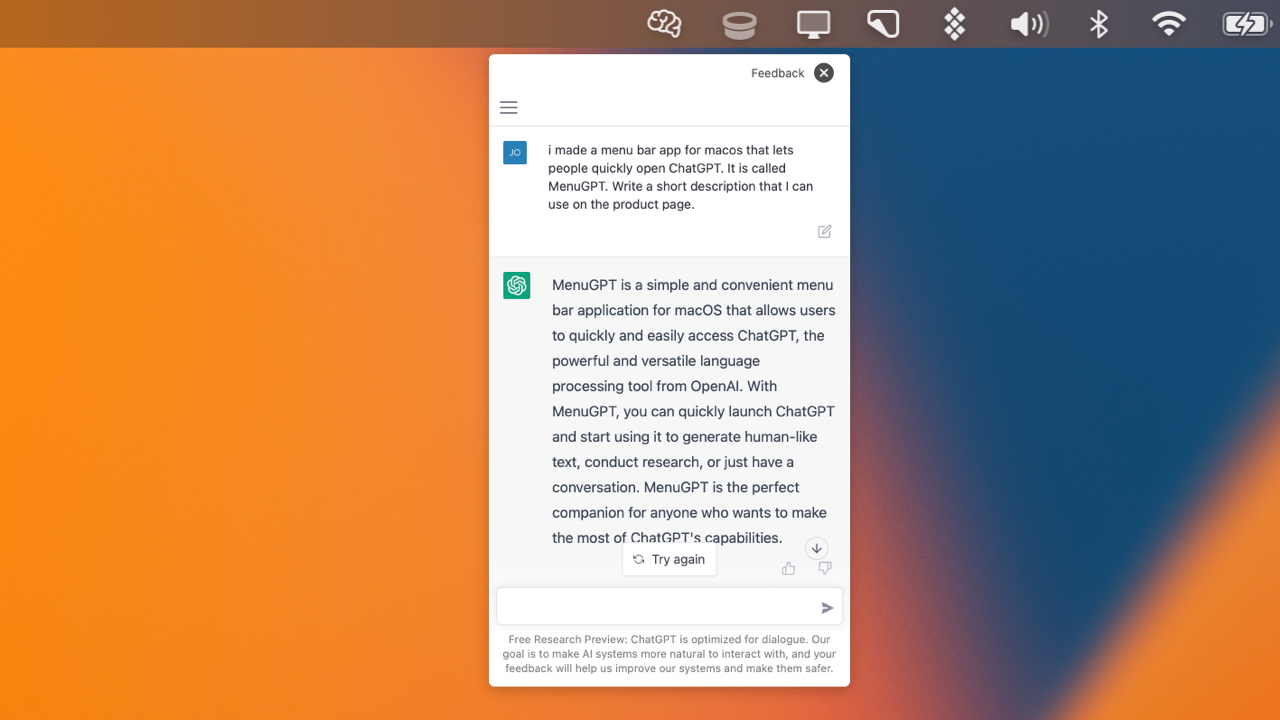
Access ChatGPT's full power from anywhere on your Mac—menubar, global hotkey, or directly inside any text field.

Streamline your writing and translation workflow by bringing AI assistance directly into your native macOS environment.

Try MacGPT Free
Free Plan
Global HotkeyInline Text GenerationMenubar AccessVoice ControlNative API Mode
9.2 Zekai
Seamless Mac AI Integration
AI for Writing, Translation & Localization
Ease of Use
9.2
Accuracy
8.5
Value
9.6
Time Saving
9.4
🏷 Is this your tool? Claim this listing →
⚡ Quick answer

For writers and translators using macOS, MacGPT is an excellent choice for integrating AI into your workflow. It provides system-wide access to ChatGPT via a menubar icon, a global hotkey, and a unique 'Inline' feature that writes directly into your applications. This tight integration significantly reduces context switching, saving time and maintaining focus.

CategoryAI Writing Assistant
Best ForIntegrating ChatGPT seamlessly into the macOS workflow for writers.
Price FromFree
FreeYes, a full version is available for free.
DifferentiatorInline feature allows ChatGPT to type directly into any app's text field.
ProofThe tool offers global hotkey, menubar, and inline access to ChatGPT on macOS.
Rating4.6/5
📖 About MacGPT

MacGPT integrates ChatGPT directly into your macOS workflow, allowing writers and translators to access AI assistance instantly from the menubar or within any application. Use it to draft, edit, or translate text without switching contexts.

How It Works

Your workflow, automated

1
Install and Configure
Download MacGPT from the official website and move it to your Applications folder. Choose between web view or add your OpenAI API key for native mode.
2
Use Global or Menubar Access
Press your global hotkey to bring up the ChatGPT window anywhere, or click the icon in your menubar for quick queries and brainstorming.
3
Write with Inline AI
In any text field (e.g., email, document), type your trigger phrase followed by a prompt (e.g., 'gpt: rewrite this sentence to be more formal') and let MacGPT type the response for you.
Ready to automate your workflow with MacGPT?
Try MacGPT Free →
Real Impact

Before & After

❌ Before

Constantly switching between writing apps and a ChatGPT browser tab.

Dozens of context switches per hour
✅ After

AI assistance is available instantly within any application.

Zero context switching
Social Proof

Trusted by professionals

Ease of Use
9.2
Accuracy
8.5
Value
9.6
Time Saving
9.4

"This has completely changed my workflow. The inline feature alone saves me at least an hour a day. Being able to rephrase a sentence without leaving my editor is a game-changer."

Chris T., Technical Writer · June 2026

"I use the global hotkey constantly to check idioms and cultural nuances. It's so much faster than keeping a browser tab open. The voice mode is also surprisingly useful for hands-free brainstorming."

Isabelle M., Translator · May 2026

"A fantastic utility and a must-have for any Mac user who relies on ChatGPT. My only frustration is that the inline feature doesn't work in Notion, which is where I do most of my planning."

David L., Content Strategist · June 2026

"I can't believe this is free. I use it to draft and polish email copy directly in my marketing platform. It's seamless, fast, and makes my writing so much better."

Samantha P., Email Marketer · April 2026
MacGPT+ professionals are already using this tool.
Start Free Today →
Connects With

Works with your existing stack

macOS OpenAI API
Setup complexity: Simple Utility
MacGPT integrates ChatGPT directly into your macOS workflow, allowing writers and translators to access AI assistance instantly from the menubar or within any application. Use it to draft, edit, or translate text without switching contexts.
Who It's For

Why Writing, Translation & Localization choose this tool

🎯
Built for
It's best for macOS-based writers and translators who want to embed AI assistance directly into their native applications to speed up drafting and editing.
In-Depth Overview
For writers and translators, context switching is a major productivity killer. MacGPT eliminates this by embedding ChatGPT directly into your macOS environment. Instead of toggling between your document and a browser tab, you can summon AI assistance with a global hotkey or work 'inline' to have ChatGPT type directly into your editor, translation software, or email client. This tight integration saves countless clicks and keeps you focused on the task at hand. The 'Conversation Mode' allows you to dictate prompts and receive spoken replies, perfect for brainstorming or hands-free work. You can use either the standard ChatGPT web interface or connect your own OpenAI API key for a faster, more native experience. This flexibility lets you leverage your existing ChatGPT Plus or API subscription for more powerful models like GPT-4, turning your Mac into a seamless AI-powered writing station.

Key Use Cases

✍️
Draft ad copy variations instantly
Copywriter
While in a Google Doc, use the Inline feature to generate five different headlines for a new campaign without ever leaving the document.
Reduces draft time by 50%
🌐
Get quick translations for tricky phrases
Translator
Highlight a difficult idiom in your CAT tool, use the Global hotkey to ask ChatGPT for cultural equivalents, and paste the best option back in.
Improves translation accuracy
📝
Rephrase and proofread paragraphs on the fly
Content Editor
Select a clunky paragraph in an email or report, and use the Inline feature to ask ChatGPT to 'make this more concise and professional'.
Cuts editing time per document
✓ Pros
Deeply integrates with macOS for minimal context switching.
Inline feature allows AI to write directly in any app's text field.
Voice-based 'Conversation Mode' for hands-free prompting.
Free to download and use.
Supports both the standard web interface and faster API access.
· Cons
Inline feature is not compatible with all applications (e.g., Notion, Sublime Text).
Requires a modern macOS version (Monterey or newer).
Using the faster native/API mode requires your own OpenAI API key and billing setup.
⚡ Editorial Verdict

MacGPT is a powerful utility for any writer or translator on a Mac, brilliantly solving the problem of context switching. Its 'Inline' feature is a genuine time-saver, but its main trade-off is reliability, as it doesn't work in all applications like Notion or Sublime Text.

Questions & Answers

Frequently asked questions

Does MacGPT work with a ChatGPT Plus account? +
Yes, you can log in with your OpenAI credentials to access your Plus account features through the web view.
Can I use GPT-4 with MacGPT? +
Yes, but it requires using the native mode with your own OpenAI API key. You must also have been granted GPT-4 API access by OpenAI, which may require joining a waitlist.
Why doesn't the Inline feature work in my app? +
The developer is aware that the Inline feature is not compatible with certain applications like Notion, Sublime Text, and WhatsApp. They are currently investigating solutions for this known issue.
What are the system requirements for MacGPT? +
MacGPT requires a modern version of macOS, specifically Monterey or Ventura, as it relies on the latest system APIs.
Is MacGPT available outside of the US? +
Yes, MacGPT can be downloaded and used globally. However, its functionality depends on your ability to access OpenAI's services, which may have their own regional restrictions.
Is MacGPT safe for confidential documents? +
MacGPT acts as a client for OpenAI's services. When using the API, your data is subject to OpenAI's data usage policies. For highly sensitive information, review OpenAI's terms and consider their business offerings.

Last reviewed: Reviewed June 2026 — Assessed native macOS integration and inline text features for writing workflows.

Plans & Pricing

Start today

Writing, Translation & Localization

Top 10 AI tools in this category

Get MacGPT deal alerts

Be the first to know when MacGPT drops a new discount, adds features, or changes pricing.

Exclusive MacGPT discount codes
New feature announcements
Best alternative picks when pricing changes
Zero spam — unsubscribe anytime
🎉
You're subscribed!
We'll notify you when MacGPT has a new deal.
Zekai Blog

Latest AI news

AI Directory

About MacGPT

Full Description

MacGPT integrates ChatGPT directly into your macOS workflow, allowing writers and translators to access AI assistance instantly from the menubar or within any application. Use it to draft, edit, or translate text without switching contexts.

Editorial Verdict

MacGPT is a powerful utility for any writer or translator on a Mac, brilliantly solving the problem of context switching. Its 'Inline' feature is a genuine time-saver, but its main trade-off is reliability, as it doesn't work in all applications like Notion or Sublime Text.

Last reviewed: Reviewed June 2026 — Assessed native macOS integration and inline text features for writing workflows.
Previous Tool Limitless AI Next Tool MacGPT
All AI Tools A–Z →
This site is registered on wpml.org as a development site. Switch to a production site key to remove this banner.