
Instantly generate placeholder dialogue, scratch tracks, and narration in 100+ AI voices, speeding up your audio production workflow.
A free, web-based text-to-speech studio for podcasters, sound designers, and audiobook producers.
What is AnySpeech?
AnySpeech: Instantly generate placeholder dialogue, scratch tracks, and narration in 100+ AI voices, speeding up your audio production workflow. It has a free plan; paid plans start at $9.99/month. Zekai scores it 5.6 out of 10 after independent testing. Best for generating scratch tracks and placeholder voice-overs.
Zekai Verdict
- What is it?
- AnySpeech is a web-based AI text-to-speech generator for audio professionals.
- Best for
- Best for quickly generating placeholder voice tracks and scratch narration to accelerate editing and pre-production…
- Not ideal for
- Lacks fine-grained control over emotion, pitch, and pacing.
- Price
- Free plan · paid from $9.99/month
- Zekai Score
- 5.6/10
 Auphonic
 Suno
Suno Moises
 Gladia
 oeksound
Top AI for Music, Audio & Voice Production picks
See all 97 AI tools for Music Producers →For music, audio, and voice production professionals needing rapid voice generation, AnySpeech is a top contender. It excels at creating high-quality placeholder dialogue and scratch narration with its simple web interface and a vast library of over 100 voices in many languages. Its generous free tier makes it a practical, no-cost addition to any pre-production workflow.
Your workflow, automated
Before & After
Recording your own voice for scratch tracks, which sounds unprofessional and takes time.
Hours spent on temp VOGenerating clean, consistent placeholder audio in seconds for any script.
Minutes per scriptTry it with these prompts
Copy any prompt and paste it directly into the tool.
Create engaging narration for my YouTube video about [topic]. The tone should be [tone, e.g., enthusiastic, informative] and suitable for a [target audience, e.g., tech enthusiasts, casual viewers] audience.
Generate an intro for my podcast, '[podcast name]'. The intro should be [style, e.g., energetic, calm] and introduce the episode's topic: [episode topic].
Convert this chapter text for my audiobook, '[book title]'. The voice should be [voice description, e.g., warm and friendly, authoritative] and maintain a consistent pace throughout the narration.
Prompts for Music Producers
Trusted by professionals
Inside AnySpeech
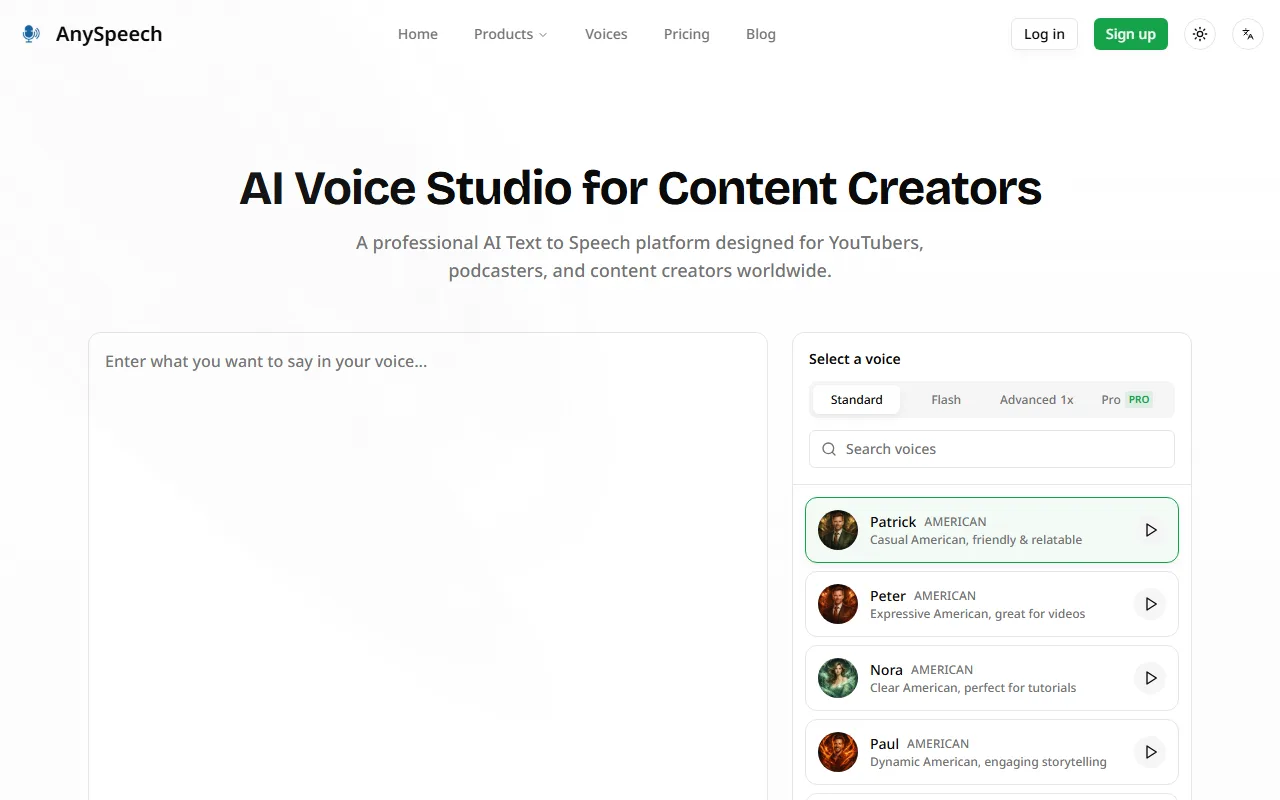
Captured by Zekai from the live AnySpeech interface during review.
Best AnySpeech alternatives
AnySpeech vs. ElevenLabs: AnySpeech is the go-to for speed and simplicity. Its web interface and massive, ready-to-use voice library are perfect for quickly generating high-quality scratch tracks with zero setup. Choose AnySpeech for immediate, no-fuss placeholder audio. Pick ElevenLabs when you need more advanced features like custom voice cloning, a robust API for integration, and fine-grained emotional control for projects that are closer to final production, though this comes with a steeper learning curve and higher cost.
Is AnySpeech worth it?
Why Music, Audio & Voice Production choose this tool
Key Use Cases
AnySpeech is a highly practical and accessible text-to-speech tool for any audio professional's toolkit. Its vast library of voices and generous free tier make it invaluable for creating scratch tracks and prototypes. The primary trade-off is the lack of advanced emotional controls, meaning the output is functional rather than emotive, positioning it as a pre-production aid rather than a replacement for human talent.
Frequently asked questions
How can AnySpeech help me produce podcasts faster?
Are the voices realistic enough for final use?
What is the best AI tool for generating scratch voice tracks?
Can I use AnySpeech for commercial projects?
What languages does AnySpeech support?
How does AnySpeech compare to hiring a voice actor for placeholders?
Last reviewed:
AnySpeech pricing and plans
Prices and features are updated regularly but can change at any time — always confirm on the official website. Some links on this page are affiliate links.
Top 10 AI tools in this category


Take it with you
- Goal: Generate a placeholder voice track in under 2 minutes.
- Ideal for: Podcast timing, game dialogue prototyping, audiobook pacing.
- Key Feature: 100+ voices with no software installation required.
- Pro Tip: Use different voices for different characters in a script to simulate a conversation.
- Limitation: Lacks advanced emotion controls; best for functional, not final, audio.
Get AnySpeech deal alerts
Be the first to know when AnySpeech drops a new discount, adds features, or changes pricing.
More on AI for Music, Audio & Voice Production
- Google’s Lyria 3.5: An AI Music Generator for Vocal Tracks
- AI Music Generator Rules: IFPI Sets Global Chart Standards
- AI Music Generator Rules Proposed for Charts: What Producers Need to Know
- AI Music Generator: Spotify Launches Conversational Chatbot
- Music Producer Cuts Mastering Revisions by 30% with New AI Insights
Latest AI news



About AnySpeech
Full Description
AnySpeech is a web-based AI text-to-speech generator for audio professionals. It allows podcasters, audiobook producers, and sound designers to quickly create voice-overs from a library of over 100 voices in numerous languages and accents, ideal for creating scratch tracks, placeholder dialogue, and content for internal review.
Editorial Verdict
AnySpeech is a highly practical and accessible text-to-speech tool for any audio professional's toolkit. Its vast library of voices and generous free tier make it invaluable for creating scratch tracks and prototypes. The primary trade-off is the lack of advanced emotional controls, meaning the output is functional rather than emotive, positioning it as a pre-production aid rather than a replacement for human talent.


