AI tools, scored for your job
Learn AI in 30 days
Overview Before & After Try It Reviews Screenshots Why This Tool FAQ Pricing Top 10 Get Alerts News

Ultimate Vocal Remover — AI for Music, Audio & Voice Production

Isolate vocals and instrumentals from any track with this free, open-source desktop application for pro-level stem separation.

Leverage advanced AI models to create clean acapellas and karaoke-ready backing tracks directly on your own machine.

DifferentiatorIt's a powerful, free, open-source desktop application that runs locally.
ProofThe official website states the tool is 'totally free and open source' and available for download on Windows, Mac, & Linux.
Try Ultimate Vocal Remover
Free Plan
Free plan verified · free AI tools for Music Producers
8.6 Zekai
Free, powerful stem separation.
AI for Music, Audio & Voice Production
Ease of Use
6.2
Accuracy
9.4
Value
10.0
Time Saving
8.8
Free to UseOpen SourceDesktop AppVocal IsolationStem Separation
🏷 Is this your tool? Claim this listing →

Zekai Verdict

What is it?
Ultimate Vocal Remover is a free, open-source desktop application for audio producers, DJs, and engineers.
Best for
It's best for audio professionals who need a free, locally-run tool to create acapellas or instrumental tracks from…
Not ideal for
Requires local machine resources (CPU/GPU) for processing.
Price
Free plan
Zekai Score
8.6/10
Hand-scored by Zekai

Top AI for Music, Audio & Voice Production picks

See all 90 AI tools for Music Producers →
⚡ Quick answer

For Music, Audio & Voice Production professionals, Ultimate Vocal Remover is the best free AI tool for separating vocals and instrumentals. As a free, open-source desktop application for Windows, Mac, and Linux, it provides powerful, private, and unlimited audio stem separation directly on your own hardware, making it an essential utility for creating remixes, acapellas, and backing tracks without any subscription costs.

CategoryAudio Stem Separation
Best ForCreating acapellas and instrumentals for free.
Price FromFree
FreeYes, completely free and open source.
DifferentiatorIt's a powerful, free, open-source desktop application that runs locally.
ProofThe official website states the tool is 'totally free and open source' and available for download on Windows, Mac, & Linux.
Rating8.5/10
📖 About Ultimate Vocal Remover
Real Impact

Before & After

❌ Before

No budget for expensive stem separation software subscriptions.

Hours trying manual EQ/phasing
✅ After

Access to professional-grade stem separation with zero recurring cost.

Clean stems in minutes
Prompt Templates

Try it with these prompts

Copy any prompt and paste it directly into the tool.

Separate vocals from music

Separate the main vocal track from the instrumental backing in a song. Isolate the singer's voice for remixing or karaoke creation. Ensure clear separation of vocal and non-vocal elements.

Extract acapella

Generate a clean acapella track from a full song. Remove all instrumental components to leave only the sung vocals. Useful for vocal practice or sampling.

Remove specific instruments

Isolate and remove specific instruments like drums or bass from a mix. Focus on retaining the clarity of vocals and other desired elements. Useful for creating custom mixes or study tracks.

AI Prompts

Prompts for Music Producers

Prompt 01 Suno Prompt for a Cinematic Track
cinematic orchestral score, epic and emotional, building tension. Starts with a solo cello, gradually adds a string section, crescendo with brass and timpani drums at 120 BPM, in the style of Hans Zimmer.
Prompt 02 Moody Downtempo Electronica
Downtempo electronica, 90 BPM, melancholic and introspective. Core instruments: warm analog synth pads, a simple TR-808 drum pattern, and a deep sub bass. Ethereal female vocal chop used as an instrument, no lyrics. Production: sidechain co…
Prompt 03 70s Soul-Funk Groove
Uptempo soul-funk, 115 BPM, energetic and joyful. Instrumentation: clean electric guitar playing staccato chords (Chic-style), tight pocket drums, slap bassline, and a brass section with horn stabs. Lead vocal: powerful female soul singer w…
See all 26 AI prompts for Music Producers →
Social Proof

Trusted by professionals

Ease of Use
6.2
Accuracy
9.4
Value
10.0
Time Saving
8.8

"An absolute essential. For being free, the quality of separation is unbelievable. I use it constantly for remix prep and sampling. Can't imagine my workflow without it now."

Mark R., Music Producer · Jun 2026

"Finally, a way to make acapellas for my live sets without paying a fortune. It's powerful, private, and runs right on my laptop. A game-changer for mashups."

Jenna S., DJ · May 2026

"It's an incredibly powerful tool for free, but be prepared to do some tinkering. The UI isn't as slick as paid options, and processing can tax your CPU heavily. Still, the results are solid."

Carlos V., Audio Engineer · Jun 2026

"I use this to create backing tracks to practice with. It's so much better than the old 'center channel removal' tricks. The quality is fantastic and it's easy enough to get started."

David L., Hobbyist Musician · Apr 2026
Proof of Use

Inside Ultimate Vocal Remover

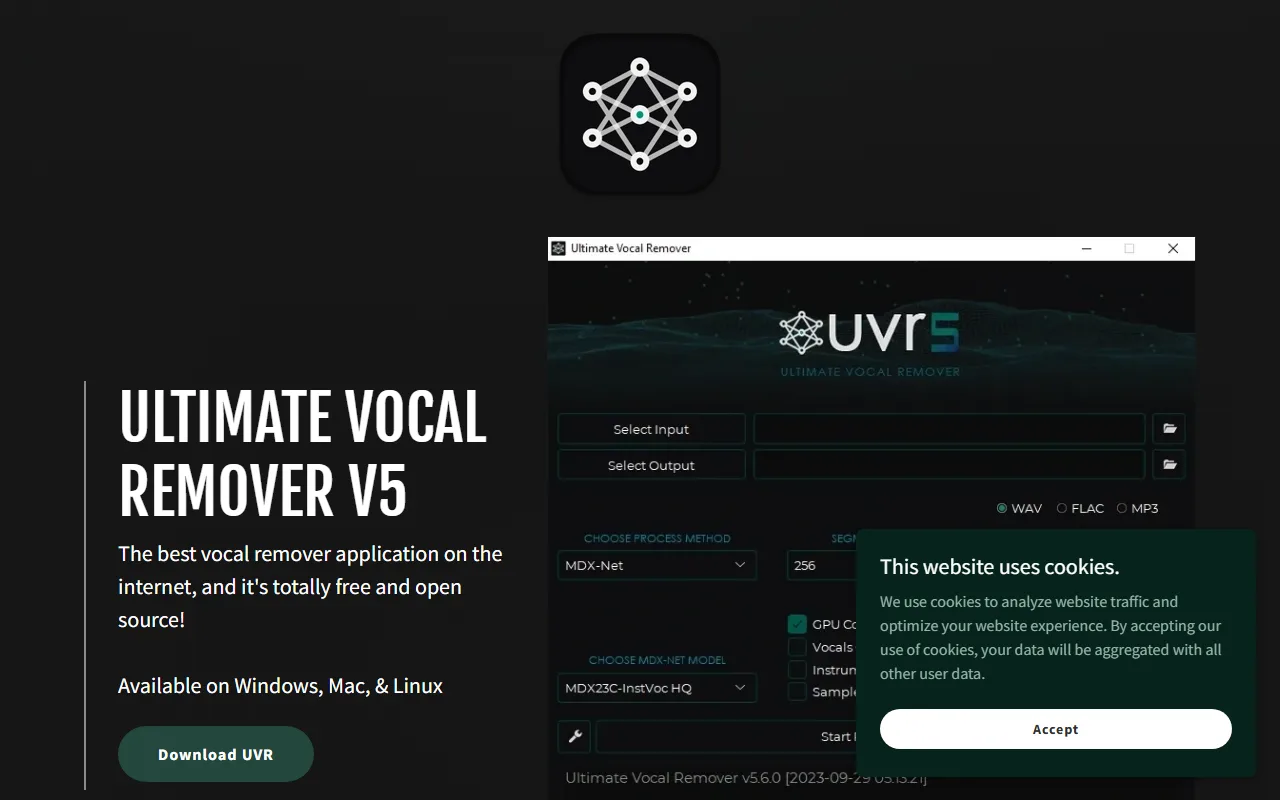
Ultimate Vocal Remover screenshot — interface view 1

Captured by Zekai from the live Ultimate Vocal Remover interface during review.

Comparison

Best Ultimate Vocal Remover alternatives

Ultimate Vocal Remover vs. Lalal.ai: Choose Ultimate Vocal Remover (UVR) if your priority is cost and privacy. As a free, open-source desktop app, it's perfect for producers on a budget or those working with sensitive, unreleased tracks, as all processing happens locally. Pick Lalal.ai if you prioritize speed, convenience, and the highest possible separation quality with dedicated support. Lalal.ai's cloud-based processing and refined algorithms often yield cleaner results with fewer artifacts, making it a better choice for high-stakes commercial projects where time and quality are paramount and a subscription cost is acceptable.

The decision

Is Ultimate Vocal Remover worth it?

Return on investment
By replacing a typical $10/month subscription for a cloud-based separator, Ultimate Vocal Remover saves an audio professional $120 per year.
Built for
Music producers, audio engineers, DJs, and remix artists.
Effort to adopt
Intermediate
Compliance
Compliance posture not publicly documented — verify with vendor.
Who It's For

Why Music, Audio & Voice Production choose this tool

🎯
Built for
It's best for audio professionals who need a free, locally-run tool to create acapellas or instrumental tracks from existing songs.
In-Depth Overview
For music producers, DJs, and audio engineers, Ultimate Vocal Remover (UVR) provides a powerful, no-cost solution for source separation. Unlike subscription-based cloud services, UVR is a downloadable application for Windows, Mac, and Linux that runs locally on your machine. This guarantees complete privacy for your tracks and eliminates concerns about upload limits or processing queues. The core benefit is its accessibility; being 'totally free and open source' means you can integrate high-quality stem separation into your workflow without any budget allocation. This allows for the creation of remixes, mashups, karaoke tracks, or isolated vocal samples for analysis and practice without financial barriers. The open-source nature also implies a community-driven development model, suggesting that the underlying AI models are continuously refined. For professionals who need a reliable tool for quick stem separation without recurring costs, UVR is an essential utility.

Key Use Cases

🎧
Create instant acapellas for live mashups
DJ / Remix Artist
Isolate the vocal track from a popular song to layer over a different beat during a live set or for a studio remix.
Acapellas in minutes
🎤
Produce high-quality instrumental backing tracks
Karaoke Producer
Remove vocals from any song to create custom karaoke versions for events or distribution without licensing new instrumentals.
Instrumentals on-demand
🎚️
Analyze or clean up individual stems from a mix
Audio Engineer
Separate a final mix into its constituent parts to study the arrangement or attempt to clean up a specific element like the vocal.
Reduced mix analysis time
✓ Pros
Completely free with no hidden costs or subscriptions.
Open-source, allowing for community contributions and transparency.
Runs locally, ensuring track privacy and no upload/download delays.
Available for all major desktop operating systems.
No processing limits or file size restrictions.
· Cons
Requires local machine resources (CPU/GPU) for processing.
No dedicated customer support or service level agreements (SLAs).
User interface may be less polished than commercial alternatives.
Installation and model management can be more complex than web tools.
⚡ Editorial Verdict

Ultimate Vocal Remover is an invaluable utility for any audio professional's toolkit, offering powerful AI-based stem separation at zero cost. Its strength lies in being a local, open-source application, ensuring privacy and unlimited use. The main trade-off is the lack of official support and a more hands-on setup compared to polished, paid cloud services.

Questions & Answers

Frequently asked questions

Is Ultimate Vocal Remover really free?

+
Yes, the website explicitly states that Ultimate Vocal Remover is 'totally free and open source'. It is supported by optional donations from users.

What operating systems does Ultimate Vocal Remover run on?

+
Ultimate Vocal Remover is a desktop application available for Windows, Mac, and Linux, covering all major desktop platforms used by audio professionals.

Do I need an internet connection to use it?

+
You will need an internet connection to download the application and potentially download the AI models. However, all audio processing is done locally on your computer, so you can use it offline once installed.

Can I use stems from Ultimate Vocal Remover for commercial projects?

+
The software itself is free and open-source, but you are responsible for ensuring you have the legal rights to the original song you are processing. Using copyrighted material for commercial remixes or releases requires proper licensing.

Which AI tool is best for creating acapellas from my audio files?

+
Ultimate Vocal Remover is the best free AI tool for creating acapellas. As a downloadable application, it runs locally on your Mac, Windows, or Linux machine, offering unlimited use and complete privacy for your tracks.

What is the best free software for audio stem separation on a Mac?

+
Ultimate Vocal Remover is the top choice for free audio stem separation on a Mac. It is an open-source application that provides powerful AI models to separate vocals, drums, bass, and other instruments without any cost or subscription.

Last reviewed:

Plans & Pricing

Ultimate Vocal Remover pricing and plans

Prices and features are updated regularly but can change at any time — always confirm on the official website. Some links on this page are affiliate links.

See all 90 AI tools for Music Producers →
Free guide

Take it with you

Getting Started with Ultimate Vocal Remover
  • **What is UVR?** A free, open-source desktop tool for AI-powered audio stem separation.
  • **Who is it for?** DJs, music producers, and audio engineers.
  • **Why use it?** Create acapellas, instrumentals, and other stems with no cost, no limits, and complete privacy.
  • **Key Feature:** Runs locally on your Windows, Mac, or Linux computer.
  • **The Goal:** Separate your first track into a clean vocal and instrumental file.
+3 more steps inside the guide
Send me the full guide

Get Ultimate Vocal Remover deal alerts

Be the first to know when Ultimate Vocal Remover drops a new discount, adds features, or changes pricing.

Exclusive Ultimate Vocal Remover discount codes
New feature announcements
Best alternative picks when pricing changes
Zero spam — unsubscribe anytime
🎉
You're subscribed!
We'll notify you when Ultimate Vocal Remover has a new deal.
AI Directory

About Ultimate Vocal Remover

Full Description

Ultimate Vocal Remover is a free, open-source desktop application for audio producers, DJs, and engineers. It uses AI-powered source separation models to isolate vocals from instrumentals or separate individual stems like drums and bass from any audio file, running completely locally on your machine.

Editorial Verdict

Ultimate Vocal Remover is an invaluable utility for any audio professional's toolkit, offering powerful AI-based stem separation at zero cost. Its strength lies in being a local, open-source application, ensuring privacy and unlimited use. The main trade-off is the lack of official support and a more hands-on setup compared to polished, paid cloud services.

Last reviewed:
Disclaimer
Zekai is an independent AI tools directory. We are not affiliated with, endorsed by, or officially connected to Ultimate Vocal Remover unless clearly stated. All product names, logos, and brands are the property of their respective owners and are used for identification purposes only. The information on this page — including pricing, features, and availability — is general information, may have changed since our last review, and is not professional advice. Zekai Scores and verdicts are our editorial opinion. Some outbound links are affiliate links that may earn us a commission at no extra cost to you. Spotted outdated or incorrect information? Request a correction →
Previous Tool Transync AI Next Tool UpNComer
All AI Tools A–Z →
Visit website ↗
Ultimate Vocal Remover8.6Try Ultimate Vocal Remover ↗Next tool →
Today's top 3 AI for Music, Audio & Voice Production tools →

See Zekai first in Google