Browse
AI Directory Open Source AI News AI Statistics
Browse by profession
Accounting, Bookkeeping & TaxCompliance, Audit & GRCConstructionCustomer SupportData ScienceMedical All 30 professions →
Company
About Advertise Submit a tool Get the free Education AI guide
Overview How It Works Before & After Reviews Integrations Why This Tool FAQ Pricing Top 10 Get Alerts News
Brisk Teaching

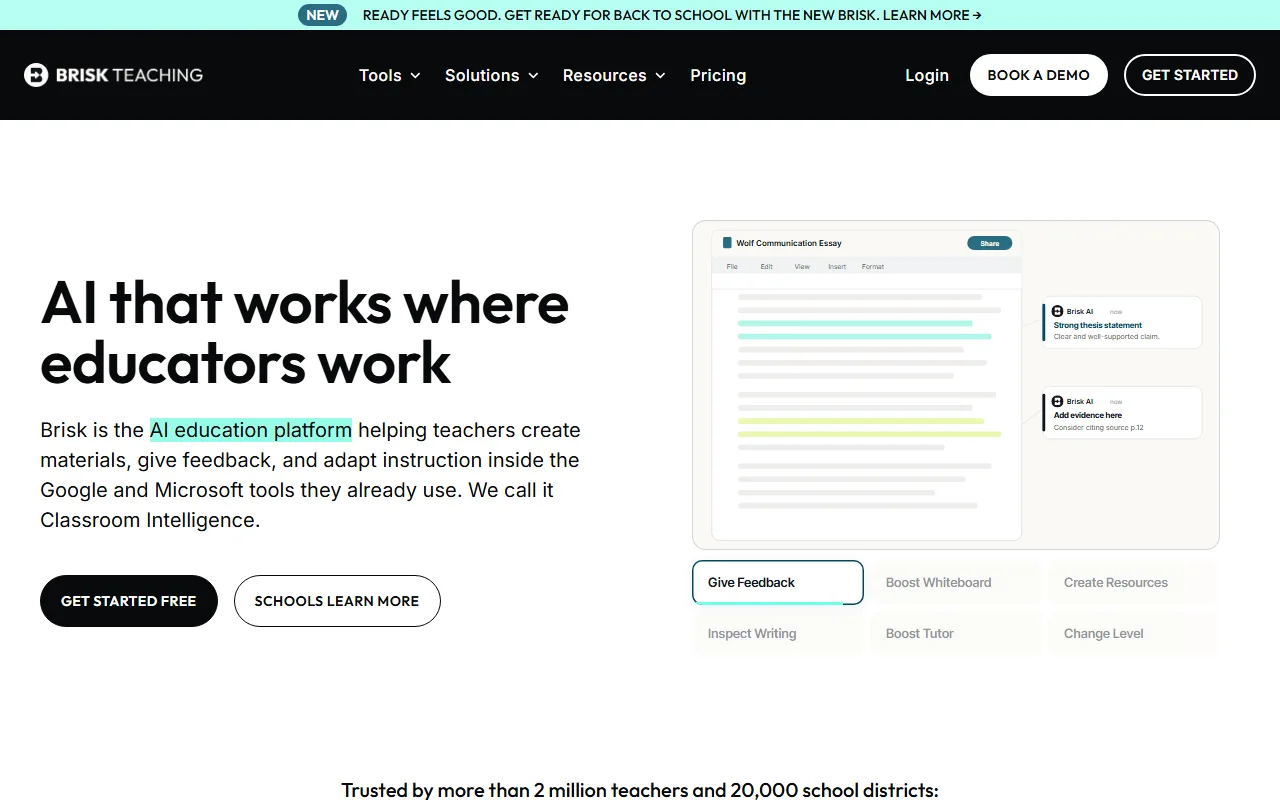
Brisk Teaching is an AI education platform that helps K-12 educators and teachers save time by working directly within their existing tools...

Create lesson plans, give student feedback, and adapt materials without leaving your Google or Microsoft workflow.

Brisk is an AI platform that integrates directly into Docs, Slides, and Forms to save educators hours of prep time.
Try Brisk Teaching Free
Free Plan Pro fromPricing on request
Lesson PlanningStudent FeedbackContent DifferentiationQuiz GenerationGoogle Integrated
9.2 Zekai
Your AI teaching assistant.
AI for Education & E-learning
Ease of Use
9.6
Accuracy
8.8
Value
9.0
Time Saving
9.4
2 million+Users
9.2/10Zekai Score
🏷 Is this your tool? Claim this listing →
⚡ Quick answer

Brisk Teaching is one of the best AI tools for Education & E-learning because it integrates directly into the platforms teachers already use, like Google Docs and Microsoft 365. Trusted by over 2 million educators, it saves significant time by helping create instructional materials, give personalized feedback, and adapt content for different reading levels, all within the existing teacher workflow.

CategoryAI Teaching Assistant
Best ForSaving time on lesson prep and student feedback
Price FromFree
FreeYes
DifferentiatorIntegrates directly into Google & Microsoft workflows
ProofTrusted by over 2 million teachers; 93% Common Sense Privacy Rating
Rating4.6/5
📖 About Brisk Teaching
How It Works

Your workflow, automated

1
Install the Browser Extension
Sign up for free and add the Brisk extension to your browser to access its AI tools directly within websites, Google Docs, and more.
2
Select a Task
Highlight text or open a document and choose a Brisk function, such as 'Create a Quiz', 'Give Feedback', or 'Change Reading Level'.
3
Refine and Use
Review the AI-generated draft, make any personal adjustments, and use the new material or feedback instantly with your students.
Ready to automate your workflow with Brisk Teaching?
Try Brisk Teaching Free →
Real Impact

Before & After

❌ Before

Spending hours each week creating lesson plans from scratch and writing individual feedback on dozens of assignments.

5-10 hours/week on prep
✅ After

Generating first drafts of materials and personalized feedback in minutes, directly within your existing workflow.

1-2 hours/week on prep
Social Proof

Trusted by 2 million+

2 million+ professionals using this tool
Ease of Use
9.6
Accuracy
8.8
Value
9.0
Time Saving
9.4

"I discovered Brisk almost two years ago and it had revolutionized my teaching. I grade more quickly now and give better feedback!"

Emily B., Reading Specialist · June 2026

"I have tried ChatGPT, Gemini, Claude, etc. Brisk is the only AI that is truly meant for teachers. I would be lost without it!"

Emily K., High School Teacher · May 2026

"It's a fantastic time-saver for generating first drafts of rubrics and lesson plans. Just remember you still need to review and tweak the output to fit your specific teaching style and standards."

David T., Middle School Teacher · April 2026

"You can tell this is a product made by teachers for teachers. They thought of everything."

Chrissy M., M.Ed, English Teacher · March 2026
2 million++ professionals are already using this tool.
Start Free Today →
Connects With

Works with your existing stack

Google Docs Google Forms Google Slides Microsoft PowerPoint YouTube PDFs
Setup complexity: Beginner-friendly
Brisk Teaching is an AI education platform that helps K-12 educators and teachers save time by working directly within their existing tools like Google Docs and Microsoft 365. It automates the creation of instructional materials, provides personalized student feedback, and adapts content for different reading levels.
Who It's For

Why Education & E-learning choose this tool

🎯
Built for
Best for K-12 educators who want to save significant prep time by generating materials and feedback directly within their existing Google and Microsoft workflows.
In-Depth Overview
For educators, the primary value of Brisk Teaching is its seamless integration. Unlike standalone AI tools that require context-switching, Brisk embeds itself directly into the Google and Microsoft environments where teachers already spend their time. This means you can transform a YouTube video or an online article into a lesson plan, quiz, or presentation without leaving your browser. The platform's 'Curriculum Intelligence' feature grounds its AI generations in your specific curriculum, increasing relevance and reducing rework. Proof of its effectiveness is in its adoption: over 2 million teachers and 20,000 school districts use the tool. Features like one-click reading level adjustment and the 'Inspect Writing' tool, which provides a playback of a student's writing process, offer practical solutions to daily teaching challenges. It's designed to augment, not replace, a teacher's expertise, providing thoughtful drafts that the educator can then personalize. This focus on workflow efficiency makes it a powerful daily driver for lesson prep and student assessment.

Key Use Cases

✍️
Cut grading time for essays in half
English Teacher
Use Brisk inside a student's Google Doc to generate targeted, high-quality feedback based on your specific rubric and style, freeing up hours of time.
Feedback time reduced by 75%
🧑‍🏫
Instantly differentiate any text
Reading Specialist
Convert any online article, PDF, or document into a Google Doc adjusted for multiple reading levels to ensure every student can access the core content.
Creates 5+ reading levels in minutes
🗓️
Generate standards-aligned resources
Curriculum Coordinator
Use the 'Create Anything' tool to turn a curriculum standard or a simple idea into a complete lesson plan, slide deck, or student activity in seconds.
New resource creation in <5 minutes
✓ Pros
Integrates directly into Google and Microsoft tools you already use
Saves significant time on lesson preparation and grading
Generous free tier available for individual teachers
Adapts content for different reading levels and languages
High 93% privacy rating from Common Sense Media
· Cons
Batch feedback and advanced features require a paid school/district plan
AI-generated content always requires teacher review for accuracy and tone
Effectiveness depends on the quality of the source curriculum or text
⚡ Editorial Verdict

Brisk Teaching excels by embedding powerful AI tools directly into the platforms educators use daily, eliminating the need to learn a new system. Its ability to create materials, differentiate content, and provide feedback is a significant time-saver. The main trade-off is that while it generates excellent drafts, educators must still apply their professional judgment to refine and personalize the output for their specific classroom context.

Questions & Answers

Frequently asked questions

What is the best AI tool that works inside Google Docs for teachers? +
Brisk Teaching is a top choice as it's specifically designed to integrate with Google Workspace. It allows educators to create materials, give feedback, and change reading levels directly within Google Docs, Slides, and Forms.
How can I use AI to give student feedback faster? +
Brisk allows you to open a student's Google Doc and use its AI to generate personalized feedback based on your instructions or rubric. This provides a high-quality draft of comments that you can then review and approve, saving hours compared to writing everything from scratch.
Is there a free AI tool for creating lesson plans and quizzes? +
Yes, Brisk Teaching offers a robust free plan for individual educators. This allows you to use its AI tools to create lesson plans, quizzes, presentations, and more without a paid subscription.
What AI can change the reading level of an article for my students? +
Brisk Teaching has a dedicated 'Change Level' feature that can take any online text or document and rewrite it for different reading levels, making it easy to differentiate content for your entire class.
Is Brisk Teaching safe for schools to use? +
Brisk emphasizes safety and privacy, earning a 93% rating from Common Sense Media, the highest among AI tools for educators. They also provide IT approval packets for schools and districts to review their privacy posture.
How does Brisk Teaching compare to just using ChatGPT for education? +
While ChatGPT is a general-purpose AI, Brisk is a specialized tool for teachers that integrates directly into their workflow (Google Docs, etc.). This makes it faster for specific tasks like giving feedback on a document or adapting content, as it has the context of the document you're working in.

Last reviewed: Reviewed June 2026 — We assessed its core features for creating instructional materials, providing student feedback, and its integration with Google Workspace.

Plans & Pricing

Start today

Education & E-learning

Top 10 AI tools in this category

Get Brisk Teaching deal alerts

Be the first to know when Brisk Teaching drops a new discount, adds features, or changes pricing.

Exclusive Brisk Teaching discount codes
New feature announcements
Best alternative picks when pricing changes
Zero spam — unsubscribe anytime
🎉
You're subscribed!
We'll notify you when Brisk Teaching has a new deal.
Zekai Blog

Latest AI news

AI Directory

About Brisk Teaching

Full Description

Brisk Teaching is an AI education platform that helps K-12 educators and teachers save time by working directly within their existing tools like Google Docs and Microsoft 365. It automates the creation of instructional materials, provides personalized student feedback, and adapts content for different reading levels.

Editorial Verdict

Brisk Teaching excels by embedding powerful AI tools directly into the platforms educators use daily, eliminating the need to learn a new system. Its ability to create materials, differentiate content, and provide feedback is a significant time-saver. The main trade-off is that while it generates excellent drafts, educators must still apply their professional judgment to refine and personalize the output for their specific classroom context.

Last reviewed: Reviewed June 2026 — We assessed its core features for creating instructional materials, providing student feedback, and its integration with Google Workspace.
Previous Tool MagicSchool AI Next Tool Brisk Teaching
All AI Tools A–Z →
This site is registered on wpml.org as a development site. Switch to a production site key to remove this banner.