AI tools, scored for your job
Learn AI in 30 days
Overview How It Works Before & After Try It Reviews Screenshots Integrations Why This Tool FAQ Pricing Top 10 Get Alerts News

GPT for Work — AI for Finance & Business

Automate formula writing, data cleaning, and financial modeling directly within Excel and Google Sheets.

Leverage an AI agent to build dashboards, generate insights, and process thousands of rows at scale.

DifferentiatorRow-by-row bulk processing at scale (up to 1M rows) and multi-provider AI model support.
Proof7M+ installations, ISO 27001 certified.
Explore GPT for Work
Pro from$29
8.8 Zekai
Spreadsheet Supercharger
AI for Finance & Business
Ease of Use
9.0
Accuracy
8.2
Value
9.2
Time Saving
8.8
7M+Users
8.8/10Zekai Score
Bulk ProcessingExcel & SheetsFormula GenerationData CleaningMulti-Model AI
🏷 Is this your tool? Claim this listing →

Zekai Verdict

What is it?
GPT for Work is an AI agent for Excel and Google Sheets designed for finance and analytics professionals.
Best for
Best for automating repetitive, large-scale data manipulation and analysis tasks within spreadsheets, such as cleaning…
Not ideal for
Pay-as-you-go credit model can be difficult to forecast for variable workloads.
Price
$29
Zekai Score
8.8/10
Hand-scored by Zekai

Top AI for Finance & Business picks

See all 131 AI tools for Finance →
⚡ Quick answer

For Finance & Business Analytics professionals, GPT for Work is a top contender for the best AI tool due to its deep integration with Excel and Google Sheets. It excels at automating time-consuming spreadsheet tasks, offering powerful bulk data processing for up to a million rows, AI-powered formula generation, and financial model creation. Its support for multiple AI models and a flexible pay-as-you-go pricing model make it a practical choice for teams of any size.

CategoryAI Spreadsheet Agent
Best ForAutomating data cleaning, analysis, and modeling in Excel & Sheets.
Price FromFrom $29 (credit pack)
FreeFree Trial
DifferentiatorRow-by-row bulk processing at scale (up to 1M rows) and multi-provider AI model support.
Proof7M+ installations, ISO 27001 certified.
Rating8.8/10
📖 About GPT for Work
Watch

See GPT for Work in action

How It Works

Your workflow, automated

1
Install the Add-in
Add GPT for Work to Excel or Google Sheets from the official marketplace in under a minute.
2
Describe Your Task
Open the chat panel and type what you need in plain language, like 'clean this column of company names' or 'build a pivot table showing revenue by industry'.
3
Execute and Review
The AI agent executes the task directly in your spreadsheet, allowing you to review the changes in real-time and provide further instructions.
Ready to automate your workflow with GPT for Work?
Explore GPT for Work →
Real Impact

Before & After

❌ Before

Manually writing complex formulas, cleaning messy data row-by-row, and reconciling large financial reports.

Hours spent on manual data tasks
✅ After

Automating spreadsheet tasks with plain-English commands, from formula generation to bulk data enrichment for thousands of rows.

Minutes to generate insights
Prompt Templates

Try it with these prompts

Copy any prompt and paste it directly into the tool.

Analyze Sales Data

Analyze the sales data in columns A through E. Identify the top 3 performing products by revenue and provide a summary of key trends. Include average order value and customer acquisition cost.

Clean and Enrich Customer List

Clean the customer list in columns A to D. Deduplicate entries based on email address and standardize formatting for phone numbers. Then, enrich each record with industry information from column B.

Generate Product Descriptions

Generate a unique product description for each item listed in column A. Use the product category in column B and key features in column C to create compelling copy. Aim for 2-3 sentences per description.

AI Prompts

Prompts for Finance

Prompt 01 Prompt for Auditing an AI Vendor's Incident Response Plan
You are a Senior Compliance Officer at a financial institution subject to SEC Regulation S-P. Review the attached Security Incident Response Plan from [[AI Vendor Name]]. Cross-reference it against the 2026 amended Reg S-P requirements. Ide…
Prompt 02 Generative AI Prompt for Variance Analysis
You are an FP&A analyst preparing a monthly financial review. Based on the following data comparing budget vs. actuals for the last quarter, write a concise summary (under 150 words) for the CFO. Identify the top three largest variances (ab…
Prompt 03 Revenue Forecast Prompt for Power BI Copilot
You are an FP&A analyst building a driver-based revenue forecast for the next 4 quarters. Using the connected data from our ERP (financials) and CRM (sales pipeline), create a time-series forecast for 'Total Revenue'. Use 'New Bookings', 'R…
See all 35 AI prompts for Finance →
Social Proof

Trusted by 7M+

7M+ professionals using this tool
Ease of Use
9.0
Accuracy
8.2
Value
9.2
Time Saving
8.8

"If you spend your day in spreadsheets, this is one of the few AI tools that actually earns its place in your workflow."

Kevin M., Founder · May 2026

"We integrated GPTforWork.com into our Google Sheets and Excel workflows, and the math completely changed."

Hugo D., CEO · April 2026

"Great for our analysis tasks, but the pay-as-you-go model makes budgeting tricky for experimental, high-volume projects. You need to watch your credit usage carefully."

Simon D., Traffic Manager · March 2026

"You built a game-changing tool with GPT for Work."

Bernhard S., Director & Expert · February 2026
Proof of Use

Inside GPT for Work

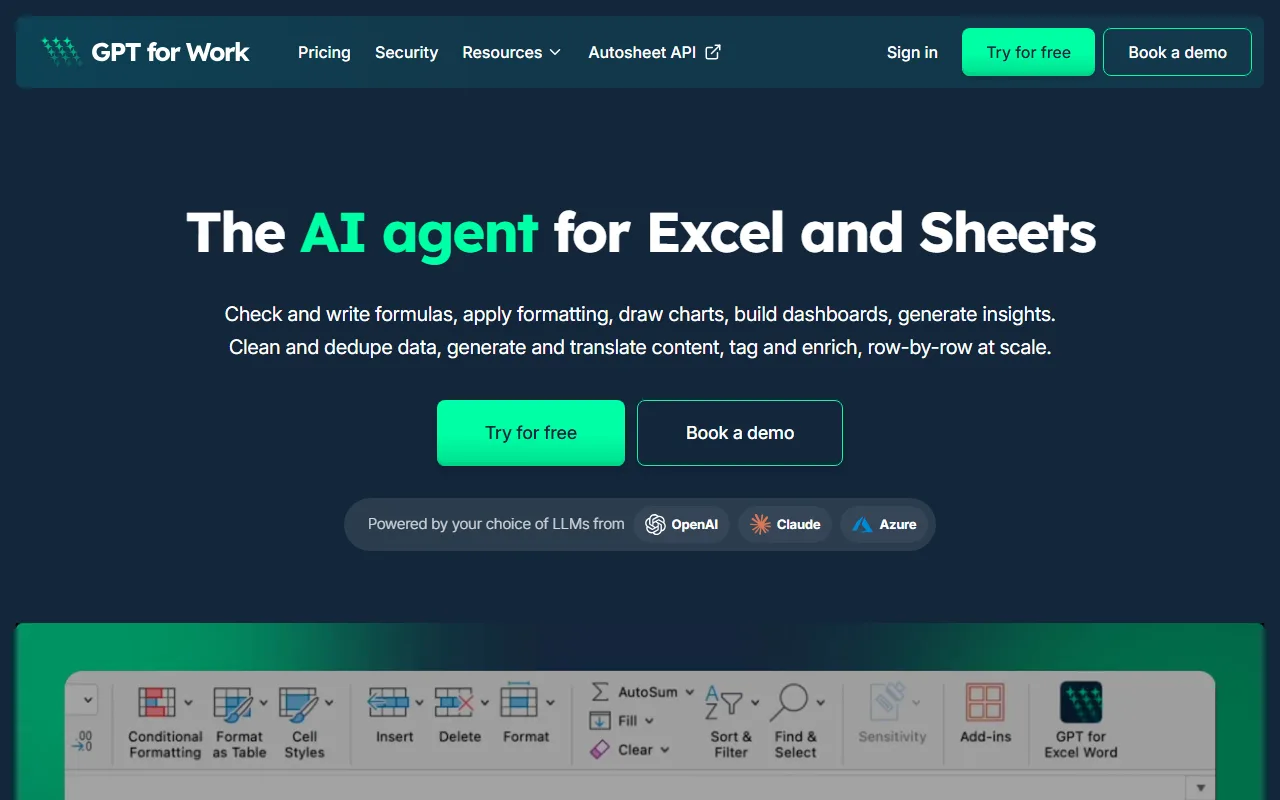
GPT for Work screenshot — interface view 1

Captured by Zekai from the live GPT for Work interface during review.

7M+ professionals are already using this tool.
See Plans & Pricing →
Connects With

GPT for Work integrations

Microsoft Excel Google Sheets Autosheet API OpenAI GPT Models Anthropic Claude Models
Setup complexity: Beginner-Friendly
GPT for Work is an AI agent for Excel and Google Sheets designed for finance and analytics professionals. It automates complex tasks like writing and fixing formulas, cleaning and standardizing financial data, building forecast models, and generating performance dashboards directly within your spreadsheets.
Comparison

Best GPT for Work alternatives

Choose GPT for Work over Microsoft Copilot when your primary need is high-volume, row-by-row data processing in spreadsheets. GPT for Work’s key advantage is its bulk AI processing, capable of handling up to a million rows to clean, enrich, or translate data—a feature Copilot lacks. It's also faster and model-agnostic, letting you choose the best AI for the job. Opt for Copilot if your organization is already standardized on Microsoft 365 and you prefer a single, predictable subscription that integrates AI across all apps (Word, PowerPoint, Teams), not just Excel.

You need a fixed, predictable monthly cost per user.
Your entire workflow is exclusively within the Microsoft 365 ecosystem and you already pay for Copilot.
You prefer a fully-integrated, GUI-based tool rather than a chat-based agent.
The decision

Is GPT for Work worth it?

Return on investment
By purchasing a $139 Pro credit pack, a financial analyst can save dozens of hours typically spent on manual data reconciliation and reporting each quarter.
Built for
Finance and Business Analysts, Accountants, and Consultants who spend significant time in Excel or Google Sheets for data reconciliation, modeling, and reporting.
Effort to adopt
Beginner-Friendly
Compliance
GPT for Work is ISO 27001 certified and GDPR compliant. The company operates a zero data retention policy, ensuring user data is not stored or used for model training.
Who It's For

Why Finance & Business choose this tool

🎯
Built for
Best for automating repetitive, large-scale data manipulation and analysis tasks within spreadsheets, such as cleaning datasets, enriching records, and building financial models.
In-Depth Overview
For finance and business analytics professionals, GPT for Work streamlines the most time-consuming aspects of spreadsheet management. Instead of manual data entry and complex formula debugging, you use a chat-based agent to execute commands directly in Excel or Google Sheets. Its key differentiator is its bulk processing capability, which can apply a prompt—such as cleaning, translating, or enriching data—to hundreds of thousands of rows at once, at a speed of up to 1,000 rows per minute. This is purpose-built for tasks like reconciling accounts, standardizing exports, building forecast models, and scoring sales leads. Unlike closed systems, GPT for Work is model-agnostic, allowing you to leverage the best AI for your specific task, including models from OpenAI and Anthropic, or even bring your own API key. This flexibility, combined with a pay-as-you-go pricing model that scales with usage rather than headcount, makes it a highly practical tool for teams looking to increase analytical output without committing to expensive per-seat licenses. Security is also a core feature, with ISO 27001 certification and a zero data retention policy ensuring sensitive financial data remains private.

Key Use Cases

📊
Automate Quarterly P&L Reconciliation
Financial Analyst
Use the AI agent to automatically clean and standardize transaction exports from different systems, validate formulas, and reconcile discrepancies in minutes instead of hours.
90% faster data prep
📈
Build Dynamic Performance Dashboards
Business Intelligence Analyst
Describe your desired metrics and visualizations in plain English; the agent builds the required pivot tables, charts, and summary blocks directly in your sheet.
Dashboards in minutes
📇
Enrich and Score Sales Pipeline Data
Operations Manager
Use bulk processing to enrich a list of thousands of company leads with data like industry, revenue, and HQ location, then score them against your ICP criteria.
1,000+ rows enriched per minute
✓ Pros
Directly integrates with both Microsoft Excel and Google Sheets.
Unique bulk processing engine handles massive datasets efficiently.
Flexible pay-as-you-go pricing avoids fixed per-seat costs.
Model-agnostic approach prevents AI vendor lock-in.
Strong security posture with ISO 27001 certification and zero data retention policy.
· Cons
Pay-as-you-go credit model can be difficult to forecast for variable workloads.
Requires a constant internet connection to function.
The chat-based agent may have a learning curve for complex, multi-step commands.
Heavy usage for bulk processing on large files can consume credits quickly.
⚡ Editorial Verdict

GPT for Work is a powerful force multiplier for any analyst bogged down by spreadsheet tasks. Its bulk processing feature is a genuine game-changer for large-scale data cleaning and enrichment. The main trade-off is its pay-as-you-go credit system, which offers great flexibility but requires active monitoring to control costs on high-volume projects.

Questions & Answers

Frequently asked questions

Can GPT for Work handle large financial datasets?

+
Yes, it is specifically designed for large datasets. Its bulk processing feature can handle up to 1 million rows in Excel and hundreds of thousands in Google Sheets, making it ideal for large-scale financial data cleaning, enrichment, and analysis.

How does the pay-as-you-go pricing work for financial teams?

+
You purchase credit packs starting at $29. These credits are consumed as you use the tool for tasks like formula generation or bulk processing. Credits are shared across your entire team, so you pay for actual usage, not per-user seats, which can be very cost-effective.

Is GPT for Work secure for sensitive financial data?

+
Yes, security is a key focus. The service is ISO 27001 certified, GDPR compliant, and operates on a zero data retention policy, meaning your data is not stored or used for training. Data is encrypted both in transit and at rest.

Do I need a separate ChatGPT or Claude subscription?

+
No, you do not need any other AI subscription. GPT for Work includes access to various AI models within its own pricing structure. You also have the option to use your own API key if you prefer.

Can I use GPT for Work for financial modeling in both Excel and Google Sheets?

+
Yes, GPT for Work is available as an add-in for both Microsoft Excel and Google Sheets. This allows you to build, validate, and analyze financial models consistently across both platforms using the same AI agent.

How does GPT for Work help with data cleaning for business analytics?

+
It excels at data cleaning. You can give it plain-English commands like 'standardize the addresses in column D' or 'remove duplicates based on email'. Its bulk processing feature can apply these cleaning rules to thousands of rows simultaneously, saving significant manual effort.

Last reviewed:

Plans & Pricing

GPT for Work pricing and plans

Prices and features are updated regularly but can change at any time — always confirm on the official website. Some links on this page are affiliate links.

See all 131 AI tools for Finance →
Free guide

Take it with you

  • **Automate Formula Generation**: From VLOOKUP to complex financial models.
  • **Master Data Cleaning**: Standardize messy exports in seconds.
  • **Build Dashboards Instantly**: Use plain English to create charts and pivots.
  • **Leverage Bulk Processing**: Enrich thousands of rows with market data.
  • **Control Your Spend**: Tips for maximizing the pay-as-you-go model.
+5 more steps inside the guide
Send me the full guide

Get GPT for Work deal alerts

Be the first to know when GPT for Work drops a new discount, adds features, or changes pricing.

Exclusive GPT for Work discount codes
New feature announcements
Best alternative picks when pricing changes
Zero spam — unsubscribe anytime
🎉
You're subscribed!
We'll notify you when GPT for Work has a new deal.
AI Directory

About GPT for Work

Full Description

GPT for Work is an AI agent for Excel and Google Sheets designed for finance and analytics professionals. It automates complex tasks like writing and fixing formulas, cleaning and standardizing financial data, building forecast models, and generating performance dashboards directly within your spreadsheets.

Editorial Verdict

GPT for Work is a powerful force multiplier for any analyst bogged down by spreadsheet tasks. Its bulk processing feature is a genuine game-changer for large-scale data cleaning and enrichment. The main trade-off is its pay-as-you-go credit system, which offers great flexibility but requires active monitoring to control costs on high-volume projects.

Last reviewed:
Disclaimer
Zekai is an independent AI tools directory. We are not affiliated with, endorsed by, or officially connected to GPT for Work unless clearly stated. All product names, logos, and brands are the property of their respective owners and are used for identification purposes only. The information on this page — including pricing, features, and availability — is general information, may have changed since our last review, and is not professional advice. Zekai Scores and verdicts are our editorial opinion. Some outbound links are affiliate links that may earn us a commission at no extra cost to you. Spotted outdated or incorrect information? Request a correction →
Previous Tool SheetAI Next Tool Hebbia
Doe
SPONSORED AI FOR FINANCE & BUSINESS
Doe
Automate complex multi-step financial workflows, freeing up hours for strategic analysis.
Visit Site → Learn more
All AI Tools A–Z →
Visit website ↗
GPT for Work8.8Try GPT for Work ↗Next tool →
Today's top 3 AI for Finance & Business tools →

See Zekai first in Google