Browse
AI Directory Open Source AI News AI Statistics
Browse by profession
Accounting, Bookkeeping & TaxCompliance, Audit & GRCConstructionCustomer SupportData ScienceMedical All 30 professions →
Company
About Advertise Submit a tool Get the free Graphic Design AI guide
Overview How It Works Before & After Reviews Why This Tool FAQ Pricing Top 10 Get Alerts News
Illustroke

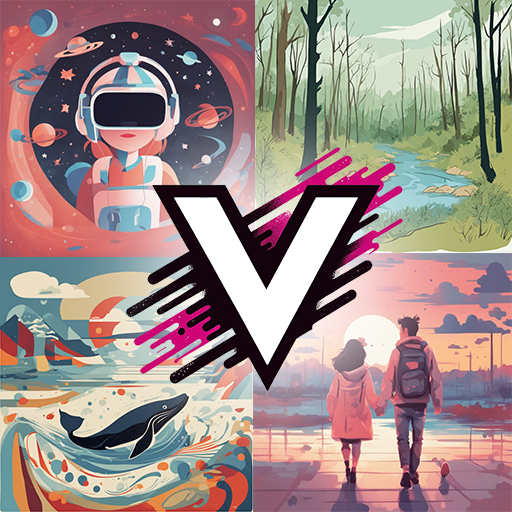
Illustroke is an AI illustration tool for graphic designers that generates scalable vector graphics (SVGs) from text prompts. Choose from predefined styles...

Generate custom, production-ready vector illustrations (SVGs) directly from text prompts.

Stop hunting for stock icons and create exactly what you need in seconds with consistent styles.

Try Illustroke Free
Pro from$19/mo
Vector OutputStyle ControlCommercial UseColor PalettesFast Generation
8.9 Zekai
Fast Vector Illustration
Generative AI for Graphic Designers & Creative Arts
Ease of Use
9.2
Accuracy
8.2
Value
8.5
Time Saving
9.5
🏷 Is this your tool? Claim this listing →
⚡ Quick answer

For graphic designers needing custom vector graphics, Illustroke is the best AI tool for generating SVG illustrations from text. Unlike raster-based tools, it produces scalable, editable vector files essential for professional design workflows like logos and icons. Its ability to maintain consistent styles and provide a commercial license makes it ideal for creating high-quality assets quickly.

CategoryAI Vector Generator
Best ForCreating simple vector icons and spot illustrations from text.
Price From$6/mo
Free3 free credits
DifferentiatorGenerates true, editable SVG vector files, not just raster images.
ProofWebsite lists SVG export and multiple art styles.
Rating4.5/5
📖 About Illustroke

Illustroke is an AI illustration tool for graphic designers that generates scalable vector graphics (SVGs) from text prompts. Choose from predefined styles and color palettes to create consistent, royalty-free assets for websites, marketing, and presentations in seconds.

How It Works

Your workflow, automated

1
Describe Your Illustration
Write a clear text prompt describing the object, scene, or concept you want to create.
2
Select a Style and Palette
Choose from a library of predefined art styles (like flat or isometric) and apply a color palette to ensure consistency.
3
Generate and Export
Click 'Create' to generate multiple options. Select the best one and download it as an SVG for further editing or a PNG/JPG for immediate use.
Ready to automate your workflow with Illustroke?
Try Illustroke Free →
Real Impact

Before & After

❌ Before

Manually drawing icons or endlessly searching stock sites.

Hours per project
✅ After

Generating unique, on-brand vector assets in seconds.

Minutes per asset
Social Proof

Trusted by professionals

Ease of Use
9.2
Accuracy
8.2
Value
8.5
Time Saving
9.5

"This has completely changed how I approach icon sets. Being able to generate a full suite of consistent, editable SVGs in minutes is unbelievable. An absolute must-have."

Sarah K., UI Designer · June 2026

"We use Illustroke for all our social media spot illustrations. It's fast, on-brand, and saves us a fortune on stock photo subscriptions. The commercial license is key."

David L., Marketing Manager · May 2026

"It's brilliant for quick, simple vector assets. My only critique is that it's not meant for complex illustrations; you can't control every detail. But for what it does, it's excellent."

Maria P., Freelance Designer · June 2026

"As someone who isn't a designer, Illustroke lets me create professional-looking vector graphics for websites without bugging the design team. The SVG output is clean and lightweight."

Tom F., Web Developer · April 2026
Illustroke+ professionals are already using this tool.
Start Free Today →
Who It's For

Why Graphic Designers & Creative Arts choose this tool

🎯
Built for
Best for generating unique vector icons, spot illustrations, and simple graphic elements for digital projects without manual drawing.
In-Depth Overview
For graphic designers, the distinction between raster and vector is critical. Illustroke's primary advantage is its focus on generating true, scalable vector graphics (SVGs) from text, a feature most mainstream AI image generators lack. This means you can create an icon or illustration and scale it to any size without losing quality, and easily edit its nodes and colors in Adobe Illustrator or Figma. The platform is built for a professional workflow. You select from established styles like 'flat' or 'isometric' to ensure visual consistency across a whole set of assets — essential for branding projects. The process is straightforward: write a prompt, pick a style, and generate. The inclusion of a commercial, royalty-free license on all paid plans removes legal ambiguity, allowing you to use the assets in client work immediately. While it won't create highly complex scenes, for generating unique icons, spot illustrations, and other vector design elements, Illustroke replaces hours of manual creation or stock site searching with a few seconds of AI generation.

Key Use Cases

📱
Rapidly prototype cohesive icon sets
UI/UX Designer
Generate a full set of stylistically consistent icons for a new app interface directly from a list of text prompts, ready for implementation.
Full icon set in minutes
📈
Create on-brand spot illustrations for campaigns
Marketing Designer
Produce custom vector graphics for a landing page or social media campaign that match the brand's style and color palette, avoiding generic stock art.
Campaign assets in <1 hour
✍️
Enhance presentations and articles with custom visuals
Content Creator
Create unique vector illustrations for slides or blog posts to explain concepts visually, making content more engaging and professional.
Custom visuals per slide
✓ Pros
Outputs true, scalable vector files (SVGs), not just raster images.
Ensures style consistency across multiple illustrations for cohesive projects.
Drastically reduces time spent searching for or creating simple icons and graphics.
Simple, intuitive interface requires minimal learning curve.
Commercial use license is included on all paid plans.
· Cons
Illustrations can be simplistic and are not suitable for complex scenes.
Limited fine-tuning control over the initial generated output.
Credit-based model can become costly for high-volume asset generation.
⚡ Editorial Verdict

Illustroke is a highly practical tool that solves a real problem for designers: the need for fast, custom vector assets. Its ability to generate true SVGs from text is a significant advantage over raster-based tools. The main trade-off is the simplicity of the output; it excels at icons and spot illustrations, not complex, artistic scenes.

Questions & Answers

Frequently asked questions

What is the best AI tool for creating SVG illustrations from text for graphic designers? +
Illustroke is the leading choice for designers needing to generate SVG files from text prompts. Its focus on vector output makes it superior to raster-based tools for tasks requiring scalable and editable graphics like icons and logos.
Can AI generate vector graphics instead of just JPGs or PNGs? +
Yes, tools like Illustroke are specifically designed to generate vector graphics in SVG format. This allows for infinite scalability and easy editing in professional design software like Adobe Illustrator or Figma.
How can I quickly create a set of consistent icons for my website? +
Illustroke allows you to select a specific art style (e.g., 'Flat', 'Doodle') and color palette that you can apply to all your text prompts. This ensures that every icon you generate maintains a consistent look and feel.
Which AI art generator gives a commercial license for its output? +
Illustroke provides a full, royalty-free commercial license for all illustrations generated on its paid plans, allowing you to use them in any client or commercial project without legal concerns.
Is Illustroke available in Europe? +
Yes, Illustroke is a web-based tool accessible globally, including in Europe, with no geographical restrictions mentioned on its website.
Does Illustroke have an API for developers? +
Based on the publicly available information on its website, Illustroke does not currently offer a public API for developers.

Last reviewed: Reviewed June 2026 — Assessed text-to-SVG generation quality, style consistency, and pricing model.

Plans & Pricing

Start today

Graphic Designers & Creative Arts

Top 10 AI tools in this category

Get Illustroke deal alerts

Be the first to know when Illustroke drops a new discount, adds features, or changes pricing.

Exclusive Illustroke discount codes
New feature announcements
Best alternative picks when pricing changes
Zero spam — unsubscribe anytime
🎉
You're subscribed!
We'll notify you when Illustroke has a new deal.
Zekai Blog

Latest AI news

AI Directory

About Illustroke

Full Description

Illustroke is an AI illustration tool for graphic designers that generates scalable vector graphics (SVGs) from text prompts. Choose from predefined styles and color palettes to create consistent, royalty-free assets for websites, marketing, and presentations in seconds.

Editorial Verdict

Illustroke is a highly practical tool that solves a real problem for designers: the need for fast, custom vector assets. Its ability to generate true SVGs from text is a significant advantage over raster-based tools. The main trade-off is the simplicity of the output; it excels at icons and spot illustrations, not complex, artistic scenes.

Last reviewed: Reviewed June 2026 — Assessed text-to-SVG generation quality, style consistency, and pricing model.
Previous Tool VectorArt.ai Next Tool Illustroke
All AI Tools A–Z →
This site is registered on wpml.org as a development site. Switch to a production site key to remove this banner.