

Your AI design assistant for generating fully editable UI screens and user flows from simple text prompts, helping you ship faster.
Go from a blank canvas to shippable, production-ready designs in seconds.
Zekai Verdict
- What is it?
- Flowstep is an AI-powered design assistant that accelerates the UI design process.
- Best for
- Best for rapidly generating initial UI mockups and complete user flows directly from text prompts or design references.
- Not ideal for
- Paid plans are based on a 'message' limit, which can be restrictive for heavy users.
- Price
- Free plan
- Zekai Score
- 9/10
 Vectorizer.ai
 Picsart
 Figma
Figma Mockuuups Studio
 Khroma
 Remini
Top Generative AI for Graphic Designers & Creative Arts picks
See all 90 Generative AI for Graphic Designers & Creative Arts tools →For graphic and UI designers needing to rapidly generate initial app mockups, Flowstep is a top choice. It uses AI to turn text prompts into fully editable UI screens and user flows that can be copied directly into Figma. Its ability to accelerate the ideation phase and provide developer-ready code makes it a powerful tool for bridging the gap between concept and production.
Your workflow, automated
Before & After
Staring at a blank Figma canvas, spending hours on basic wireframes and component layout for new app ideas.
Hours per mockup setGenerating multiple, fully editable UI screens and user flows in seconds from a single text prompt.
Minutes per mockup setTry it with these prompts
Copy any prompt and paste it directly into the tool.
Create a UI for a food delivery app. Include screens for browsing restaurants, viewing a menu, adding items to a cart, and checkout. Ensure the design is intuitive and visually appealing.
Generate a dashboard UI for a project management tool. It should display key metrics, task lists, and team member assignments. Prioritize a clean and organized layout.
Design a user authentication flow, including a login screen and a signup screen. The design should be modern and easy to navigate, with clear calls to action.
Trusted by 1,000+
Inside Flowstep
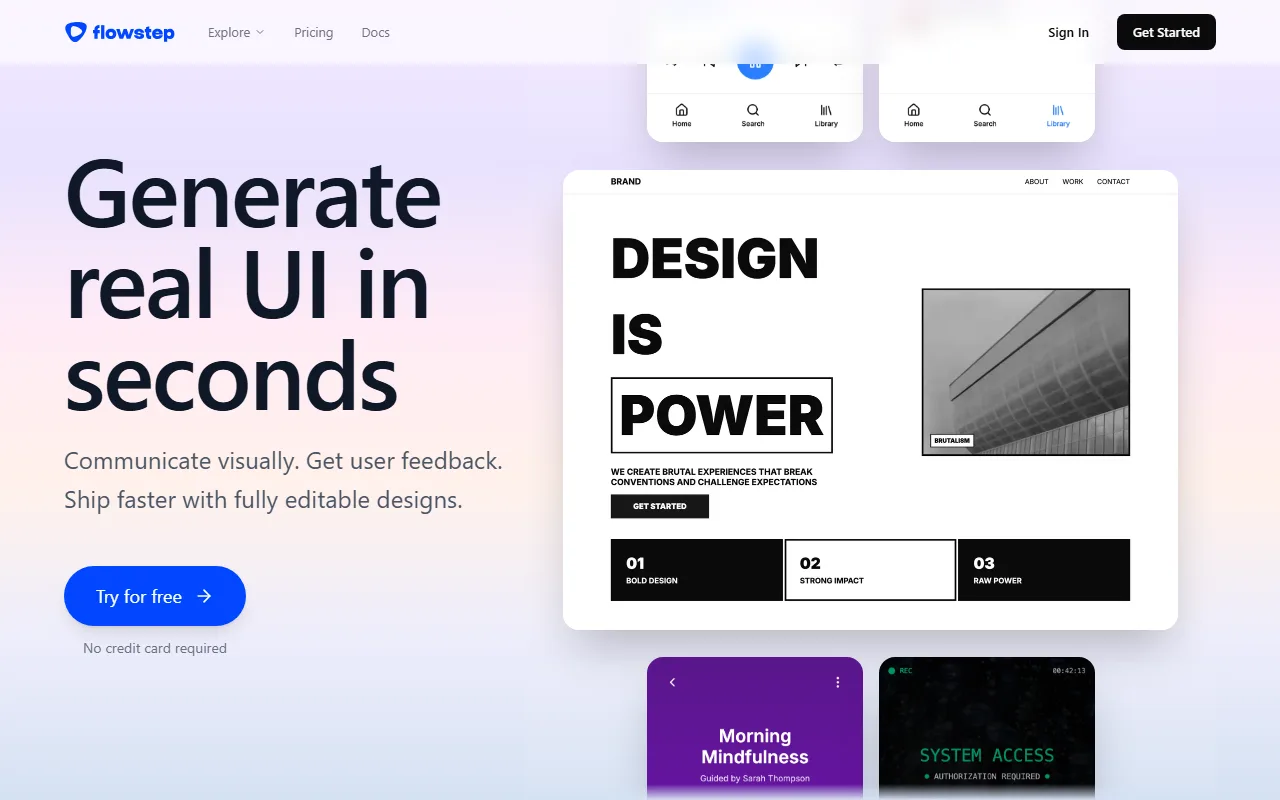
Captured by Zekai from the live Flowstep interface during review.
Works with your existing stack
How it compares
Choose Flowstep for its tight, plugin-free Figma integration and direct export to modern code stacks like React and Tailwind CSS. It excels at accelerating the workflow for designers already embedded in the Figma ecosystem. Pick a tool like Uizard if you need a more all-in-one platform with built-in design components, theming, and a broader range of import options (e.g., hand-drawn sketches), making it suitable for users who may not live exclusively within Figma.
Is it worth it?
Why Graphic Designers & Creative Arts choose this tool
Key Use Cases
Flowstep is a powerful accelerator for any designer's early-stage UI workflow. Its ability to generate editable screens and copy them directly to Figma is a significant time-saver. The primary trade-off is its current focus on standard UI components; designers seeking highly unique, non-traditional interfaces may still prefer starting from a blank Figma canvas.
Frequently asked questions
How much does Flowstep cost for a professional designer?
Can I use Flowstep with my existing design tools like Figma?
Is Flowstep a good tool for generating initial UI mockups quickly?
Does Flowstep use my design data to train its AI models?
What kind of code can I export from Flowstep for developer handoff?
Is Flowstep suitable for solo designers or just large teams?
Last reviewed:
Start today
Prices and features are updated regularly but can change at any time — always confirm on the official website. Some links on this page are affiliate links.
Top 10 AI tools in this category

Take it with you
- **Mastering Your First Prompt:** Learn how to write effective descriptions for better AI-generated results.
- **Multi-Screen Magic:** Generate entire user flows (e.g., login, dashboard, settings) in a single command.
- **Leveraging Design References:** Use images, links, and documents to guide the AI with more context.
- **The Figma Workflow:** Best practices for the seamless copy-paste integration with Figma.
- **Developer Handoff:** Understanding the clean code export (React, TypeScript, Tailwind CSS).
Get Flowstep deal alerts
Be the first to know when Flowstep drops a new discount, adds features, or changes pricing.
Latest AI news



About Flowstep
Full Description
Flowstep is an AI-powered design assistant that accelerates the UI design process. Graphic and UI/UX designers can generate entire screens and user flows from text prompts, edit them with AI or manually, and instantly copy designs into Figma. It bridges the gap between initial concept and developer-ready assets by exporting clean React, TypeScript, and Tailwind CSS code.
Editorial Verdict
Flowstep is a powerful accelerator for any designer's early-stage UI workflow. Its ability to generate editable screens and copy them directly to Figma is a significant time-saver. The primary trade-off is its current focus on standard UI components; designers seeking highly unique, non-traditional interfaces may still prefer starting from a blank Figma canvas.


