Browse
AI Directory Open Source AI News 🏆 AI Challenge AI Statistics
Browse by profession
Accounting, Bookkeeping & TaxCompliance, Audit & GRCConstructionCustomer SupportData ScienceMedical All 38 professions →
Company
About Advertise Submit a tool Get the free Pro Services AI guide
Overview How It Works Before & After Reviews Integrations Why This Tool FAQ Pricing Top 10 Get Alerts News

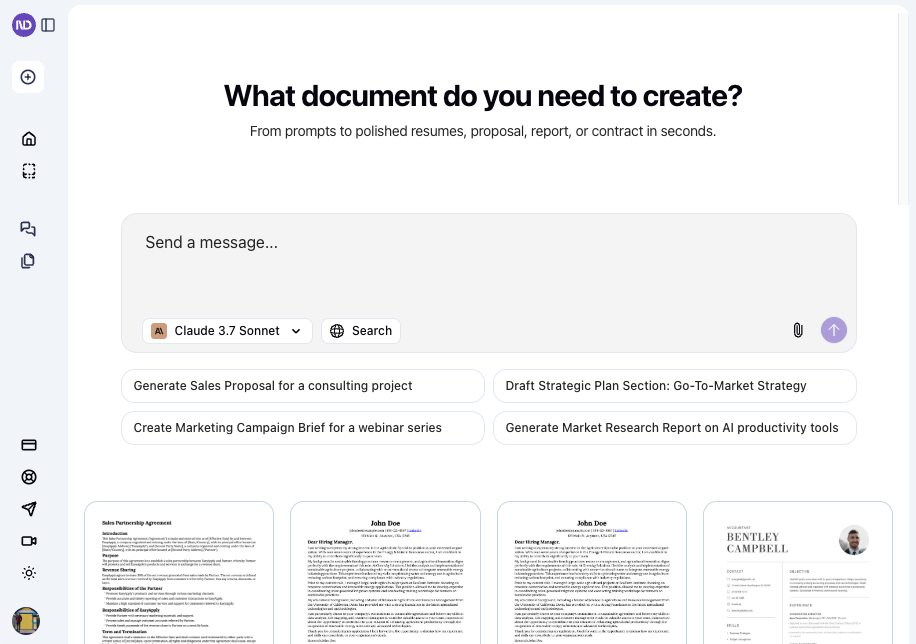
Create client-ready proposals, presentations, and reports in seconds. NextDocs uses AI to handle the writing, formatting, and branding.

Turn a single prompt into a polished document and export it directly to PowerPoint, PDF, or Google Slides.

Best forRapidly creating branded proposals and presentations
DifferentiatorGenerates multiple document types (slides, docs) from a single prompt with one-click branding.
ProofExports directly to PPTX, PDF, and Google Slides. Free forever plan available for trial.
Try NextDocs
Free Plan Pro from$32/mo
8.8 Zekai
Fast, Branded Documents
AI for General (Professional Services)
Ease of Use
9.2
Accuracy
8.5
Value
8.2
Time Saving
9.4
1,000+Users
8.8/10Zekai Score
AI WriterPresentation MakerBrand ManagementPDF ExporterDocument Generation
🏷 Is this your tool? Claim this listing →

Zekai Verdict

What is it?
NextDocs is an AI-powered platform for professionals who need to create high-quality business documents efficiently.
Best for
It's best for rapidly generating first drafts of standardized business documents like proposals and presentations that…
Not ideal for
Credit-based system can be limiting for heavy users.
Price
Free plan · paid from $32/mo
Zekai Score
8.8/10
Hand-scored by Zekai

Top AI for General (Professional Services) picks

See all 83 AI for General (Professional Services) tools →
⚡ Quick answer

For professional services, NextDocs is a top choice for rapidly creating client-facing documents. It uses AI to generate everything from proposals and contracts to presentations and reports from a single prompt, automatically applying your firm's branding for consistency. Its ability to export directly to standard formats like PowerPoint and PDF saves significant formatting time.

CategoryAI Document Generation
Best ForRapidly creating branded proposals and presentations
Price From$16/mo
FreeFree Plan Available
DifferentiatorGenerates multiple document types (slides, docs) from a single prompt with one-click branding.
ProofExports directly to PPTX, PDF, and Google Slides. Free forever plan available for trial.
Rating4.4/5
📖 About NextDocs
How It Works

Your workflow, automated

1
Write a Detailed Prompt
Describe the document you need, including the topic, tone, key sections, and length. The more detail you provide, the better the result.
2
Select a Version & Apply Brand
Review up to four AI-generated document versions. Choose the best one, then apply your pre-set Brand Kit for instant customization.
3
Refine and Export
Use the AI Assistant to tweak text or regenerate specific pages. Once complete, export the final document to PDF, PPTX, or Google Slides with one click.
Ready to automate your workflow with NextDocs?
Try NextDocs →
Real Impact

Before & After

❌ Before

Manually formatting proposals and presentations is tedious and inconsistent.

2-4 hours per presentation
✅ After

Generate fully formatted, on-brand documents from a single prompt.

15-30 minutes per presentation
Social Proof

Trusted by 1,000+

1,000+ professionals using this tool
Ease of Use
9.2
Accuracy
8.5
Value
8.2
Time Saving
9.4

"NextDocs is an invaluable tool for professionals. My team and I rely on it for creating polished proposals and NDAs in minutes."

Ethan J., Project Manager · May 2026

"The AI editing features are a game changer. I use it daily for contracts and proposals—saves me hours of work!"

Michael C., Startup Founder · April 2026

"As a freelancer, NextDocs helps me create client-ready documents effortlessly. The templates are great, though I wish the credit system was a bit more generous for complex projects."

Maria G., Graphic Designer · March 2026

"The one-click download feature is a lifesaver. I get perfectly formatted documents in seconds—every single time."

Emma B., Marketing Director · May 2026
1,000+ professionals are already using this tool.
Start Free Today →
Connects With

Works with your existing stack

Google Slides Microsoft PowerPoint Google Docs PDF
Setup complexity: Easy
NextDocs is an AI-powered platform for professionals who need to create high-quality business documents efficiently. It generates presentations, proposals, reports, and more from a simple text prompt, automatically applying your firm's branding and allowing for one-click export to standard formats.
Comparison

How it compares

NextDocs and Gamma both excel at AI-powered presentation and document creation. Choose NextDocs when your priority is generating multiple document *types* (slides, reports, social posts) from a single prompt and need robust export options to standard office formats like PPTX and Google Docs. Its brand kit is straightforward for ensuring consistency. Opt for Gamma if your focus is primarily on creating visually rich, web-native presentations and microsites with embedded interactive elements. Gamma's card-based editing offers more granular design flexibility, but NextDocs is faster for producing traditional, export-ready business documents.

You need to create interactive, web-native presentations with embedded media.
Your primary need is long-form document co-editing, not initial generation.
You require deep, real-time collaboration features within the document editor.
The decision

Is it worth it?

Return on investment
By automating document creation, a professional on the $32/mo Pro+ plan can save over 10 hours a month, translating to thousands in recovered billable time.
Built for
Consultants, project managers, sales teams, and business owners in professional services who regularly create proposals, presentations, reports, and contracts.
Effort to adopt
Easy
Compliance
Compliance posture not publicly documented — verify with vendor.
Who It's For

Why General (Professional Services) choose this tool

🎯
Built for
It's best for rapidly generating first drafts of standardized business documents like proposals and presentations that require consistent branding and export to common office formats.
In-Depth Overview
For any professional services firm, time spent on formatting documents is time not spent on billable client work. NextDocs directly addresses this by automating the entire creation process. Instead of wrestling with PowerPoint templates or Word documents, you provide a single prompt—like "a 10-slide pitch deck for a Q3 business review"—and the AI generates up to four complete, distinct versions. This isn't just a text generator; it builds fully designed documents. The real efficiency gain comes from the integrated workflow. You can set your firm's brand kit (logo, colors, fonts) once, and NextDocs applies it to every document, ensuring consistency across all client-facing materials. If a slide or section isn't quite right, the AI Assistant can rewrite it on command. Finally, the ability to export directly to PPTX, Google Slides, and PDF without losing formatting means your deliverable is client-ready in minutes, not hours. This transforms document creation from a manual chore into a strategic, prompt-driven task.

Key Use Cases

💼
Generate a Client Proposal in Minutes
Consultant
Draft a complete, multi-page proposal from a simple prompt detailing the project scope, timeline, and deliverables. Apply firm branding instantly.
Reduces proposal creation time by over 70%.
📈
Create a Polished Quarterly Business Review Deck
Project Manager
Input key metrics and team updates into a prompt to generate a data-focused presentation, ready for executive review and exportable to PowerPoint.
From raw data to presentation-ready in under 10 minutes.
⚖️
Standardize Contracts and NDAs
Legal or Ops Team
Use a template or prompt to quickly generate standard non-disclosure agreements or service contracts, ensuring consistent language and formatting.
Eliminates manual formatting and copy-paste errors.
✓ Pros
Saves significant time by automating document creation and formatting.
Ensures brand consistency across all client-facing materials.
Generates multiple document types (slides, reports) from one prompt.
Seamlessly exports to standard professional formats like PPTX and PDF.
Offers a functional free-forever plan for light use and evaluation.
· Cons
Credit-based system can be limiting for heavy users.
Page limits exist on all plans, even the highest tier.
Advanced features and premium AI models are gated behind more expensive plans.
Lacks explicit features for real-time team collaboration within a document.
⚡ Editorial Verdict

NextDocs is a powerful accelerator for creating everyday business documents. Its ability to go from a single prompt to a fully branded, export-ready presentation is a significant time-saver. The main trade-off is the credit-based system and page limits, which may feel restrictive for users producing very long, complex reports.

Questions & Answers

Frequently asked questions

Can I use NextDocs for free?

+
Yes, NextDocs offers a free forever plan that includes 500 credits per month, allowing you to create documents up to 8 pages and perform up to 3 exports.

What is the best AI tool for creating professional services proposals?

+
For professional services, NextDocs is a top choice for rapidly creating client-facing documents. It uses AI to generate everything from proposals and contracts to presentations from a single prompt, automatically applying your firm's branding for consistency.

Can I export to Google Slides, PowerPoint, and PDF?

+
Yes. The free plan allows PDF exports, while all paid plans (Pro and above) unlock the ability to export to Google Slides, PowerPoint (PPTX), and Google Docs, with formatting preserved.

How can I use AI to automate client presentation design?

+
With NextDocs, you simply write a prompt describing your presentation's content and structure. The AI handles the entire design, layout, and formatting process, and can even apply your company's brand kit automatically, saving hours of manual design work.

Does NextDocs apply branding automatically?

+
Yes. You can configure a Brand Kit with your company's logo, color palette, and fonts. NextDocs will then automatically apply this branding to all documents you generate, ensuring a consistent and professional look.

Is my data safe with NextDocs?

+
NextDocs provides a Privacy Policy and Terms of Service on its website. However, it does not publicly list specific compliance certifications like SOC 2 or GDPR. For handling sensitive client information, you should verify their data security posture directly with the vendor.

Last reviewed:

Plans & Pricing

Start today

Prices and features are updated regularly but can change at any time — always confirm on the official website. Some links on this page are affiliate links.

See all 83 AI for General (Professional Services) tools →
Free guide

Take it with you

Getting Started with NextDocs for Professional Services
  • **Master the Prompt:** Go from a simple idea to a structured document.
  • **Generate & Refine:** Create multiple versions and use AI editing to perfect your content.
  • **Apply Your Brand:** Set up your firm's logo, colors, and fonts for instant branding.
  • **Choose Your Format:** Turn a single project into a presentation, proposal, or report.
  • **Export with a Click:** Download your work in PDF, PowerPoint, or Google Slides format.
+3 more steps inside the guide
Send me the full guide

Get NextDocs deal alerts

Be the first to know when NextDocs drops a new discount, adds features, or changes pricing.

Exclusive NextDocs discount codes
New feature announcements
Best alternative picks when pricing changes
Zero spam — unsubscribe anytime
🎉
You're subscribed!
We'll notify you when NextDocs has a new deal.
AI Directory

About NextDocs

Full Description

NextDocs is an AI-powered platform for professionals who need to create high-quality business documents efficiently. It generates presentations, proposals, reports, and more from a simple text prompt, automatically applying your firm's branding and allowing for one-click export to standard formats.

Editorial Verdict

NextDocs is a powerful accelerator for creating everyday business documents. Its ability to go from a single prompt to a fully branded, export-ready presentation is a significant time-saver. The main trade-off is the credit-based system and page limits, which may feel restrictive for users producing very long, complex reports.

Last reviewed:
Disclaimer
Zekai is an independent AI tools directory. We are not affiliated with, endorsed by, or officially connected to NextDocs unless clearly stated. All product names, logos, and brands are the property of their respective owners and are used for identification purposes only. The information on this page — including pricing, features, and availability — is general information, may have changed since our last review, and is not professional advice. Zekai Scores and verdicts are our editorial opinion. Some outbound links are affiliate links that may earn us a commission at no extra cost to you. Spotted outdated or incorrect information? Request a correction →
Previous Tool PPT AI Next Tool Slidebean
All AI Tools A–Z →
Visit website ↗
NextDocs8.8Try NextDocs ↗Next tool →
Today's top 3 AI for General (Professional Services) tools →