Browse
AI Directory Open Source AI News AI Statistics
Browse by profession
Accounting, Bookkeeping & TaxCompliance, Audit & GRCConstructionCustomer SupportData ScienceMedical All 30 professions →
Company
About Advertise Submit a tool Get the free Graphic Design AI guide
Overview How It Works Before & After Reviews Integrations Why This Tool FAQ Pricing Top 10 Get Alerts News
Rotato

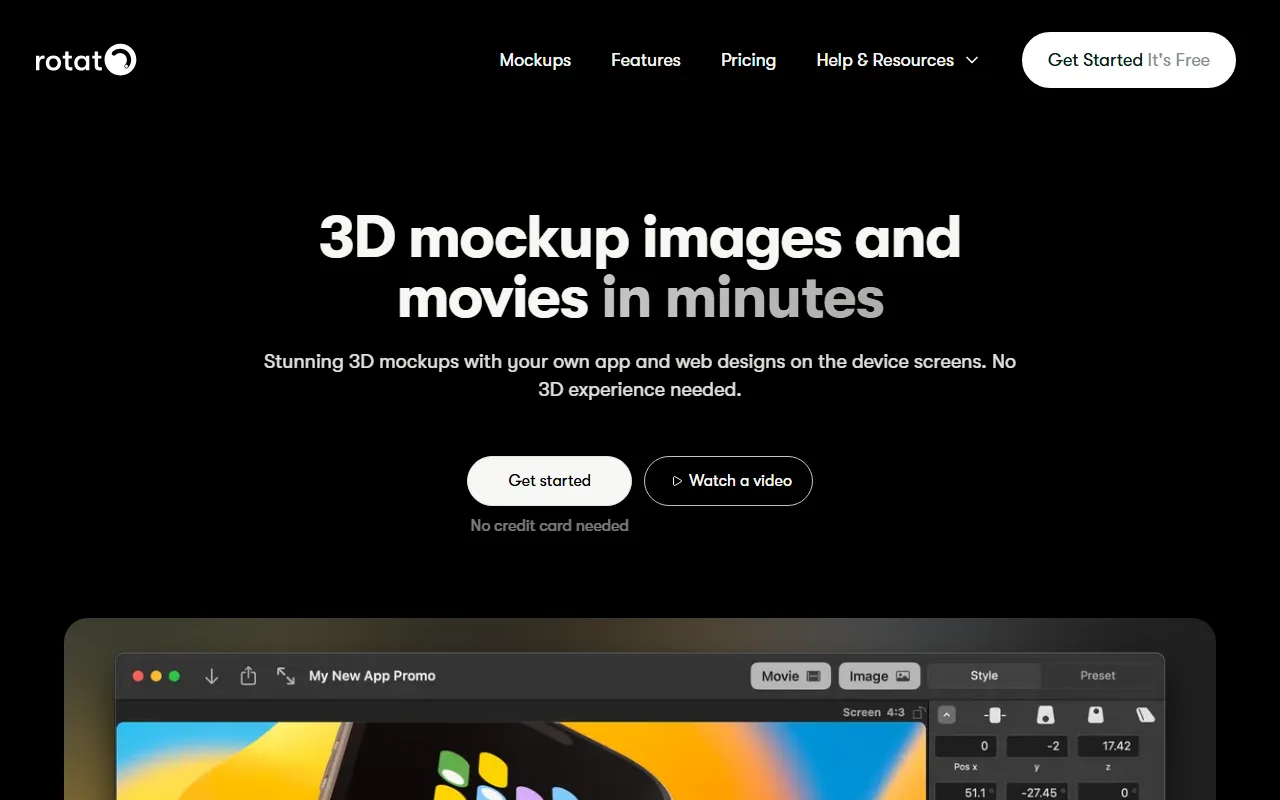
Rotato is a specialized mockup generator for graphic and UX/UI designers to create high-quality 3D images and animations. It allows you to...

Create stunning 3D mockups and animated videos of your app and web designs in minutes, no 3D experience required.

Showcase your work on 30+ photorealistic devices with drag-and-drop simplicity, bypassing complex tools like After Effects.

Try Rotato Free
Free Plan Pro fromPricing on request
3D MockupsAnimationFigma PluginApp Store Videos8K Export
8.9 Zekai
Fastest 3D Device Mockups
Generative AI for Graphic Designers & Creative Arts
Ease of Use
9.5
Accuracy
8.5
Value
8.0
Time Saving
9.6
200,000+Users
8.9/10Zekai Score
🏷 Is this your tool? Claim this listing →
⚡ Quick answer

For graphic designers needing to create animated 3D device mockups, Rotato is a top choice. It automates the complex process of 3D rendering and animation, allowing designers to produce studio-quality videos and images in minutes by simply dragging their designs onto photorealistic device models. Its speed and ease of use make it significantly more efficient than traditional tools like After Effects for this specific task.

Category3D Mockup Generator
Best ForCreating animated 3D device mockups in minutes.
Price FromOne-time payment
FreeYes, a free version is available.
DifferentiatorUp to 9x faster than After Effects for its specific task.
ProofTrusted by 200,000+ designers and brands.
Rating4.5/5
📖 About Rotato

Rotato is a specialized mockup generator for graphic and UX/UI designers to create high-quality 3D images and animations. It allows you to place your designs onto a library of pre-made device models and animate them without needing complex 3D software or motion graphics skills.

How It Works

Your workflow, automated

1
Add Your Design
Drag-and-drop designs from your computer or import directly from Figma. Rotato supports over 50 image and video formats.
2
Animate & Customize
Use pre-built animation templates or drag-and-drop to create custom camera moves. Adjust device color, background, and lighting.
3
Export Your Mockup
Render your final image or video in up to 8K resolution, with options for ProRes and transparent backgrounds for professional use.
Ready to automate your workflow with Rotato?
Try Rotato Free →
Real Impact

Before & After

❌ Before

Hours spent in After Effects or searching for static mockups.

Hours per mockup
✅ After

Studio-quality animated 3D mockups created in minutes.

Minutes per mockup
Social Proof

Trusted by 200,000+

200,000+ professionals using this tool
Ease of Use
9.5
Accuracy
8.5
Value
8.0
Time Saving
9.6

"I absolutely love it. It saves me so much time not having to struggle in apps like Adobe After Effects."

Dominik S., Product Designer · June 2026

"Before Rotato, creating a meaningful video was insane. Now I can go from idea to execution in minutes, absolutely. Use the heck out of this."

Jesse H., General Manager · May 2026

"It's incredibly fast, but the device library is fixed. If the specific laptop model you need isn't there, you're out of luck. I still have to use other tools for more unique hardware mockups."

Alex P., Freelance Designer · April 2026

"I never did animated mockups, it was just too time consuming. Using Rotato it takes me less than 10 minutes. It's so good I kind of want to keep the secret to myself."

Frank L., Manager · March 2026
200,000++ professionals are already using this tool.
Start Free Today →
Connects With

Works with your existing stack

Setup complexity: Beginner
Rotato is a specialized mockup generator for graphic and UX/UI designers to create high-quality 3D images and animations. It allows you to place your designs onto a library of pre-made device models and animate them without needing complex 3D software or motion graphics skills.
Who It's For

Why Graphic Designers & Creative Arts choose this tool

🎯
Built for
Best for designers needing to quickly generate professional, animated 3D device mockups for presentations and marketing without the steep learning curve of traditional 3D software.
In-Depth Overview
For graphic designers, creating compelling product showcases is a constant demand, but the tools are often slow and complex. Rotato directly addresses this by replacing the time-consuming process of using After Effects or learning 3D software. The platform claims to be nearly nine times faster for animating a simple screenshot, turning a multi-hour task into minutes. Instead of hunting for static mockup files, you get instant access to a library of over 30 professionally made 3D device models. Rotato’s core value is its simplicity; if you can use PowerPoint, you can use Rotato. You simply drag your design file—from Figma via the plugin or as one of 50+ supported formats—onto a device. From there, you can use animation templates or the intuitive timeline to create dynamic camera moves, customize device colors, adjust reflections, and set up virtual DSLR-like shots. This allows for 100% customizable mockups that help your portfolio and presentations stand out. With over 200,000 users, it’s a proven tool for creating studio-grade mockups without the studio-grade effort.

Key Use Cases

📱
Animate App Store Previews in Minutes
UI/UX Designer
Quickly turn static Figma screens into engaging, animated videos for App Store listings, making your app stand out.
9x faster than After Effects
🎨
Elevate Client Presentations
Graphic Designer
Impress clients by presenting website and app designs in photorealistic, animated 3D mockups instead of flat JPEGs.
From idea to video in <10 mins
📈
Create High-Impact Social Media Ads
Marketing Manager
Generate eye-catching product videos for platforms like Instagram and TikTok without hiring an expensive 3D artist.
$300+/hr specialist cost saved
✓ Pros
Extremely fast workflow, creating animations in minutes.
No prior 3D or animation experience needed.
Highly customizable mockups (colors, reflections, backgrounds).
Direct Figma plugin simplifies design import.
Supports up to 8K resolution for professional quality.
· Cons
Pricing is not publicly listed on the website.
Specialized tool; not a replacement for After Effects for complex animations.
Relies on a pre-set library of devices; you cannot import custom 3D models.
⚡ Editorial Verdict

Rotato is an exceptionally focused and effective tool. It excels at one thing: creating beautiful, animated device mockups with incredible speed. For designers tired of fighting After Effects for simple product showcases, it's a game-changer. The main trade-off is its specialization; it's not a general-purpose animation suite, so you'll still need other tools for more complex motion graphics.

Questions & Answers

Frequently asked questions

What is the best AI tool for creating 3D mockups for graphic design? +
For graphic designers needing to create animated 3D device mockups, Rotato is a top choice. It automates the complex process of 3D rendering and animation, allowing designers to produce studio-quality videos and images in minutes by simply dragging their designs onto photorealistic device models. Its speed and ease of use make it significantly more efficient than traditional tools like After Effects for this specific task.
How is Rotato different from After Effects? +
Rotato is a specialized app designed for one task: creating amazing 3D device mockups and animations. After Effects is a general-purpose motion graphics tool. For its specific job, Rotato is almost 9 times faster and requires no prior experience, whereas After Effects has a steep learning curve.
How is Rotato different from Blender? +
Blender is a powerful, open-source 3D suite for creating anything from scratch, which takes months or years to master. Rotato is for designers who want to place their existing 2D designs on pre-made, photorealistic 3D models and animate them in minutes.
Is there a Windows version? +
Yes, the Rotato website lists a version for Windows, making it accessible for designers on both major operating systems.
Can I use Rotato for free? +
Yes, Rotato offers an unlimited free trial that lets you get started without a credit card. You can use the app to create mockups, and then purchase a plan when you are ready to export with premium features.
Which tool can put my Figma designs into an animated video mockup? +
Rotato is ideal for this. It has a dedicated Figma plugin that allows you to seamlessly import your designs and place them on animated 3D device mockups to create promotional videos.

Last reviewed: Reviewed June 2026 — Assessed mockup generation speed, animation features, and export quality.

Plans & Pricing

Start today

Graphic Designers & Creative Arts

Top 10 AI tools in this category

Get Rotato deal alerts

Be the first to know when Rotato drops a new discount, adds features, or changes pricing.

Exclusive Rotato discount codes
New feature announcements
Best alternative picks when pricing changes
Zero spam — unsubscribe anytime
🎉
You're subscribed!
We'll notify you when Rotato has a new deal.
Zekai Blog

Latest AI news

AI Directory

About Rotato

Full Description

Rotato is a specialized mockup generator for graphic and UX/UI designers to create high-quality 3D images and animations. It allows you to place your designs onto a library of pre-made device models and animate them without needing complex 3D software or motion graphics skills.

Editorial Verdict

Rotato is an exceptionally focused and effective tool. It excels at one thing: creating beautiful, animated device mockups with incredible speed. For designers tired of fighting After Effects for simple product showcases, it's a game-changer. The main trade-off is its specialization; it's not a general-purpose animation suite, so you'll still need other tools for more complex motion graphics.

Last reviewed: Reviewed June 2026 — Assessed mockup generation speed, animation features, and export quality.
Previous Tool Shots Next Tool Rotato
All AI Tools A–Z →
This site is registered on wpml.org as a development site. Switch to a production site key to remove this banner.