AI tools, scored for your job
Get paid to train AI
Overview How It Works Before & After Try It Reviews Integrations Why This Tool FAQ Pricing Top 10 Get Alerts News

Spline AI — AI for Gaming & Metaverse Development

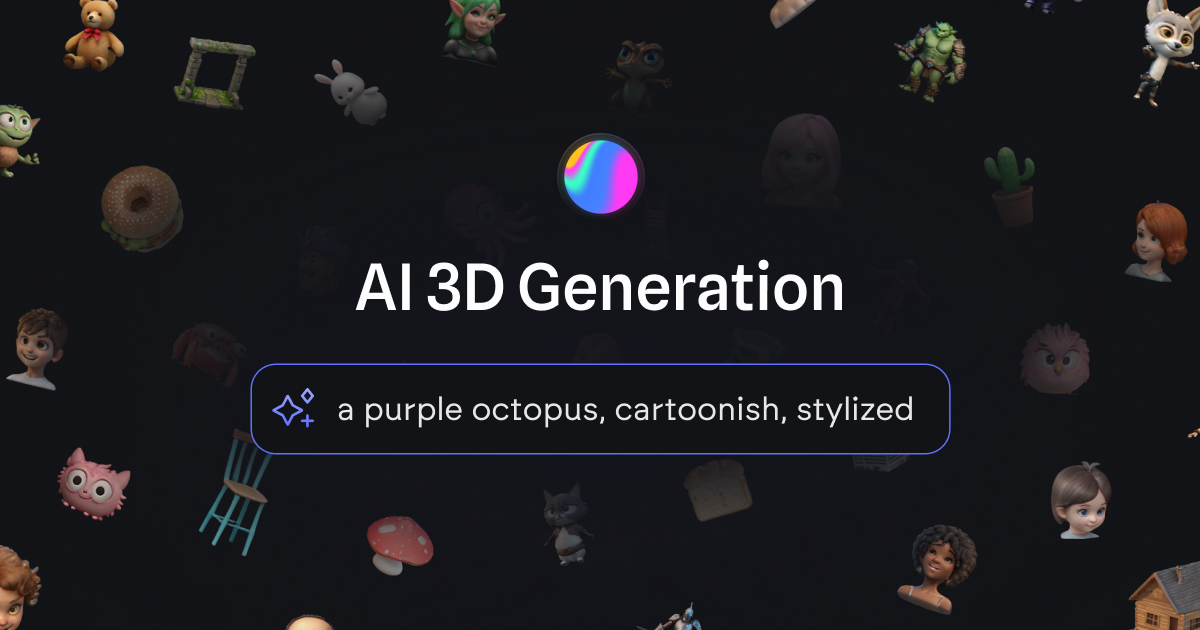
Generate game-ready 3D objects and characters from simple text prompts or 2D images, slashing asset creation time.

Instantly create stylized 3D models for prototyping and asset libraries without prior modeling experience.

What is Spline AI?

Spline AI: Generate game-ready 3D objects and characters from simple text prompts or 2D images, slashing asset creation time. It has a free plan. Zekai's independent review scores it 7.7 out of 10. Best for rapid prototyping of stylized game assets.

Facts checked 5 Oct 2026.

DifferentiatorGenerates 3D models from text/images within an integrated design editor.
ProofDirectly exports to Web, iOS, and Android formats.
Try Spline AI
Free Plan
Free plan verified · free AI tools for Game Developers
7.7 Zekai
Rapid 3D Asset Generation
AI for Gaming & Metaverse Development
Ease of Use
8.2
Accuracy
7.6
Value
7.6
Time Saving
7.2
Text-to-3DImage-to-3DNo-CodeRapid PrototypingMobile Export
🏷 Is this your tool? Claim this listing →

Zekai Verdict

What is it?
Spline AI is a generative 3D tool that allows game developers and designers to create 3D objects and characters using text prompts or 2D images.
Best for
Best for rapidly generating stylized 3D models for game prototypes, concept art, and asset libraries from text or…
Not ideal for
Generated models are primarily stylized and cartoonish
Price
Free plan
Zekai Score
7.7/10
Hand-scored by Zekai

Top AI for Gaming & Metaverse Development picks

See all 57 AI tools for Game Developers →
⚡ Quick answer

Spline AI is one of the best AI tools for game development, particularly for generating stylized 3D assets quickly. Its strength lies in its intuitive text-to-3D and image-to-3D capabilities, which allow developers to prototype characters and props in seconds without needing deep modeling skills. This makes it ideal for indie developers and designers focused on rapid iteration.

CategoryAI 3D Generation
Best forRapid prototyping of stylized game assets
Free planYes
DifferentiatorGenerates 3D models from text/images within an integrated design editor.
ProofDirectly exports to Web, iOS, and Android formats.
Rating7.7/10
📖 About Spline AI
Watch

See Spline AI in action

How It Works

Your workflow, automated

1
Generate Your Asset
Use a text prompt (e.g., 'a cute tiger character, cartoonish') or upload a 2D image to generate four 3D model variants.
2
Remix and Refine
Select the best result and use the 'Remix' feature to generate further variations until you have the perfect model.
3
Export and Integrate
Publish your final 3D model directly to the web or get code snippets to integrate it into your iOS or Android game project.
Ready to automate your workflow with Spline AI?
Try Spline AI →
Real Impact

Before & After

❌ Before

Manually modeling every simple prop and character for a game prototype takes days.

Days per prototype
✅ After

Generate a library of concept assets in minutes using simple text prompts.

Hours per prototype
Prompt Templates

Try it with these prompts

Copy any prompt and paste it directly into the tool.

Generate 3D owl from text

Create a stylized, cartoonish owl 3D model. Ensure it has a friendly appearance and is ready for integration into a digital project.

Convert image to 3D model

Transform the provided 2D front-facing image of [subject, e.g., a character] into a 3D model. Maintain the original style and details as closely as possible.

Remix existing 3D generation

Generate a new variant based on the previous 3D model of [previous model reference]. Introduce [desired change, e.g., a different color scheme or pose] while keeping the core style.

AI Prompts

Prompts for Game Developers

Prompt 01 Unity: CharacterController Movement
Act as a senior Unity developer. Write a C# script named SimplePlayerController.cs for a first-person character controller. It must meet these requirements: 1. Use the UnityEngine.CharacterController component for movement.
Prompt 02 Unity: Scriptable Object Inventory
Act as a Unity game programmer. Create a set of three C# scripts for a basic inventory system using ScriptableObjects. 1. ItemData.cs: This should be a ScriptableObject.
Prompt 03 Unity: Random Prefab Spawner
Act as a Unity C# developer. Write a script named PrefabSpawner.cs that spawns a given prefab at random positions within a defined area. Requirements: 1. A public GameObject prefabToSpawn. 2. A public int numberOfPrefabs. 3.
See all 31 AI prompts for Game Developers →
Social Proof

Trusted by professionals

Ease of Use
8.2
Accuracy
7.6
Value
7.6
Time Saving
7.2
Connects With

Spline AI integrations

Web (Embed) iOS (Swift) Android (Kotlin)
Setup complexity: Beginner-friendly
Spline AI is a generative 3D tool that allows game developers and designers to create 3D objects and characters using text prompts or 2D images. It's integrated directly into the Spline editor, enabling rapid ideation and the creation of unique asset libraries for interactive projects.
Comparison

Best Spline AI alternatives

Spline AI vs. Luma AI: Choose Spline AI for its seamless integration into a broader 3D design and interactive experience editor. It excels at creating stylized, cartoonish assets with an extremely gentle learning curve, making it perfect for game designers and developers who need to quickly visualize ideas. Pick Luma AI if your focus is on capturing and generating more realistic 3D scenes from video (NeRF technology) or if you require higher fidelity models for VFX or more realistic game environments. Luma is more specialized in high-fidelity capture, while Spline is an all-in-one platform for stylized creation and interactivity.

You need photorealistic 3D models, not stylized ones.
Your primary need is advanced rigging and animation-ready topology out-of-the-box.
You require a tool that runs offline or is not browser-based.
The decision

Is Spline AI worth it?

Return on investment
By using the $12/mo Super Team plan to generate prototype assets in minutes instead of hours, a small team can save dozens of modeling hours per project.
Built for
Indie game developers, 3D artists, and game designers focused on rapid prototyping and creating stylized assets.
Effort to adopt
Beginner-friendly
Compliance
Compliance posture not publicly documented — verify with vendor.
Who It's For

Why Gaming & Metaverse Development choose this tool

🎯
Built for
Best for rapidly generating stylized 3D models for game prototypes, concept art, and asset libraries from text or images.
In-Depth Overview
For game developers, Spline AI dramatically accelerates the asset creation pipeline, especially during the prototyping and concepting phases. Instead of spending hours or days modeling basic props, characters, or environment pieces, you can generate multiple 3D variants in seconds using simple text prompts. The image-to-3D feature allows you to turn 2D concept art directly into a base 3D model, providing a powerful starting point for further refinement. This speed allows for more creative exploration and faster iteration on game ideas. The platform's strength lies in its integration; you can generate assets directly within the Spline editor or from a dedicated dashboard to build a library. Once created, these interactive 3D assets can be exported for use on multiple platforms, including the web, iOS (via Swift), and Android (via Kotlin), streamlining the process of getting your AI-generated content into a playable experience. It’s built to be intuitive, requiring no prior 3D modeling experience to start generating assets.

Key Use Cases

🕹️
Rapidly prototype game concepts
Indie Game Developer
Use text prompts to generate dozens of stylized character and prop assets in minutes, visualizing game ideas without manual modeling.
Concept assets created in seconds
🎨
Kickstart complex model creation
3D Artist
Generate a base mesh from a 2D concept image, then export it for refinement and detailing in a traditional modeling tool, saving hours on initial block-out.
Base meshes generated instantly
📱
Create interactive 3D content for apps
Mobile Game Designer
Design and generate 3D objects with AI, then export them directly into an iOS or Android project using the provided code snippets.
Native 3D content for mobile
✓ Pros
Extremely fast generation of 3D models from prompts
No 3D modeling experience required to start
Seamless integration with the Spline design editor
Direct export options for web and mobile platforms
Ability to remix and create variations of generated assets
· Cons
Generated models are primarily stylized and cartoonish
May not be suitable for photorealistic game projects
Topology of generated models might not be optimized for advanced rigging and animation
⚡ Editorial Verdict

Spline AI is a powerful and accessible tool for any game developer looking to speed up asset creation. Its ability to generate models from text and images is a significant time-saver for prototyping. The main trade-off is the stylized output, which may not suit all projects, and the generated topology may require cleanup for complex animation.

Questions & Answers

Frequently asked questions

Can I use Spline AI for free?

+
Yes, Spline offers a free plan that includes access to AI generation features, allowing you to start creating 3D models without any cost.

Can I export models from Spline AI to Unity or Unreal Engine?

+
The website highlights direct exports for Web (code snippet), iOS (Swift), and Android (Kotlin). For game engines like Unity or Unreal, you would typically export the model in a standard 3D format (like .gltf or .fbx) from the Spline editor and then import it into your engine.

Do I need a powerful computer to use Spline AI?

+
No, as a web-based platform, the heavy processing for AI generation is handled on Spline's servers. You can use it effectively on most modern computers with a stable internet connection.

What kind of art style does Spline AI produce?

+
Based on the examples provided, Spline AI excels at creating stylized, cartoonish, and clay-like 3D models. It is less suited for generating photorealistic assets.

Can I use my own images to create 3D models?

+
Yes, Spline AI features an Image-to-3D function that allows you to use your own 2D front-facing images to influence and generate 3D models.

What is the best AI tool for generating 3D game assets?

+
Spline AI is a top contender for game developers needing to rapidly prototype stylized 3D assets. Its key advantage is generating models from both text and images directly within a user-friendly design platform, with built-in export options for web and mobile, making it exceptionally fast for ideation and concepting.

Last reviewed:

Plans & Pricing

Spline AI pricing and plans

Enterprise
Pricing on request
Tailored for teams and large organisations.
Contact Sales

Prices and features are updated regularly but can change at any time — always confirm on the official website. Some links on this page are affiliate links.

See all 57 AI tools for Game Developers →
Free guide

Take it with you

Getting Started with Spline AI for Game Assets
  • Slash Prototyping Time: Go from idea to 3D asset in seconds.
  • No Modeling Skills Needed: Create 3D objects using simple text.
  • Convert 2D to 3D: Turn your concept art into a 3D model instantly.
  • Build a Unique Library: Generate and save a custom library of game assets.
  • Export for Your Game: Use generated assets on web, iOS, and Android.
+3 more steps inside the guide
Send me the full guide

Get Spline AI deal alerts

Be the first to know when Spline AI drops a new discount, adds features, or changes pricing.

Exclusive Spline AI discount codes
New feature announcements
Best alternative picks when pricing changes
Zero spam — unsubscribe anytime
🎉
You're subscribed!
We'll notify you when Spline AI has a new deal.
AI Directory

About Spline AI

Full Description

Spline AI is a generative 3D tool that allows game developers and designers to create 3D objects and characters using text prompts or 2D images. It's integrated directly into the Spline editor, enabling rapid ideation and the creation of unique asset libraries for interactive projects.

Editorial Verdict

Spline AI is a powerful and accessible tool for any game developer looking to speed up asset creation. Its ability to generate models from text and images is a significant time-saver for prototyping. The main trade-off is the stylized output, which may not suit all projects, and the generated topology may require cleanup for complex animation.

Last reviewed:
Disclaimer
Zekai is an independent AI tools directory. We are not affiliated with, endorsed by, or officially connected to Spline AI unless clearly stated. All product names, logos, and brands are the property of their respective owners and are used for identification purposes only. The information on this page — including pricing, features, and availability — is general information, may have changed since our last review, and is not professional advice. Zekai Scores and verdicts are our editorial opinion. Some outbound links are affiliate links that may earn us a commission at no extra cost to you. Spotted outdated or incorrect information? Request a correction →
Get paid to train AI →
‹ Previous Tool LMNT › Next Tool SEELE AI ‹ ›
All AI Tools A–Z →
Visit website ↗
Spline AI7.7Try Spline AI ↗Next tool →
● 1,534 paid AI jobs open now →

See Zekai first in Google