العربية
 English
 Français
 Deutsch
 हिन्दी
 Português
 Русский
 Español
 Türkçe
Artificial intelligence is no longer an abstract concept in construction; it’s a practical tool being deployed on job sites and in back offices to solve tangible problems. Driven by a persistent labor shortage and razor-thin margins, firms are adopting AI to automate administrative work, de-risk complex schedules, and catch costly errors before they happen. This guide separates the hype from the reality, focusing on proven applications with documented ROI. We’ll cover the tools we’ve tested, the workflows that deliver value, and the critical compliance issues every firm must consider. For a complete list of our reviewed platforms, see our main AI for Construction & Engineering Tools hub.
The short answer
AI in construction for 2026 focuses on four proven applications: takeoff and estimating automation, schedule risk forecasting, computer-vision safety monitoring, and as-built progress tracking. These tools offer documented ROI today. Emerging applications like generative design and physical robotics are promising but are still several years from mainstream adoption.
Proven vs. Emerging AI: What’s Real for Your Firm in 2026?
The most important distinction for any team evaluating construction AI is between *proven* and *emerging* applications. This simple framework cuts through vendor hype and focuses your procurement decisions on tools that deliver a return on investment now.
- Proven AI (Ready for Adoption): These are mature technologies with clear use cases and documented results. They typically automate or augment existing professional workflows, require minimal specialized expertise to operate, and integrate with your current software stack (e.g., Procore, Autodesk). The ROI is measurable in saved labor hours, reduced rework, or fewer safety incidents. Categories include:
- Automated Takeoff & Estimating: AI reads PDF plans and specs to generate material quantities.
- Schedule Risk Analysis: AI analyzes historical schedule data to forecast delays and identify critical path risks.
- Computer Vision for Safety & Progress: On-site cameras or 3D scans are analyzed by AI to detect safety hazards (e.g., missing PPE) or track work-in-place against the BIM model.
- Document Intelligence: AI reviews contracts, RFIs, and submittals to flag risky clauses or extract key information.
- Emerging AI (Watch, but Don’t Buy Yet): These technologies are powerful but are still in the early stages of commercial viability. They often require significant process changes, specialized data science teams, or are still navigating regulatory hurdles. While they hold immense future promise, the ROI is less certain for most firms today. Categories include:
- Generative Design: AI creates hundreds or thousands of design options based on a set of constraints (e.g., structural loads, cost, materials).
- Physical Robotics: Autonomous or semi-autonomous robots performing on-site tasks like bricklaying, rebar tying, or welding.
- Agentic AI for Project Management: AI agents that can autonomously manage parts of a project, like coordinating subcontractors or ordering materials.
For most general and specialty contractors in 2026, the smart investment is in the proven category. These tools solve immediate pain points around administrative overhead, risk management, and quality control.
The State of AI Adoption: Broad Experiments, Shallow Roots
While AI use is growing, its implementation across the industry remains shallow. Recent data shows a clear pattern: many firms are experimenting, but few have deeply embedded AI into their core operations.
Source: rics.org
According to a 2026 global report from the Royal Institution of Chartered Surveyors (RICS), only 19% of construction firms report “regular use” of AI, while 39% are still in the “early-stage pilot” phase. This indicates that the primary challenge has shifted from initial experimentation to successful, scalable implementation.
The push for adoption is driven by stark economic realities. The industry faces a massive labor crisis and a well-documented history of stagnant productivity.
Source: abccarolinas.org
The U.S. construction industry needs to attract nearly half a million new workers in 2026 just to meet demand, according to the Associated General Contractors of America (AGC). This shortage is compounded by the fact that 41% of the current workforce is projected to retire by 2031.
Firms are turning to technology to bridge this gap. A joint 2026 survey by the AGC and Sage found that 61% of construction firms are now using AI or plan to increase their investment in it, a significant jump from 44% the previous year. The primary uses are for office administration (45%), estimating (23%), and preconstruction (20%). This data confirms that AI is being adopted not to replace workers, but to make the existing workforce more efficient. For more on this trend, see our full AI in construction statistics page.
How We Test & Rank Construction AI Tools
ZEKAI reviews every tool independently. Our rankings are based on criteria designed for working professionals:
- Real-World Utility: Does the tool solve a specific, high-value problem for estimators, project managers, superintendents, or safety managers?
- Verifiable ROI: Can the value be measured in saved labor hours, reduced change orders, lower insurance premiums, or faster project delivery?
- Ease of Integration: How well does it fit into existing workflows and connect with essential platforms like Procore, Autodesk Construction Cloud, and Bluebeam?
- Transparent Pricing & Free Tiers: We verify all pricing claims and distinguish between genuinely free-forever tiers and time-limited free trials.
We do not accept payment for reviews or placement in our articles.
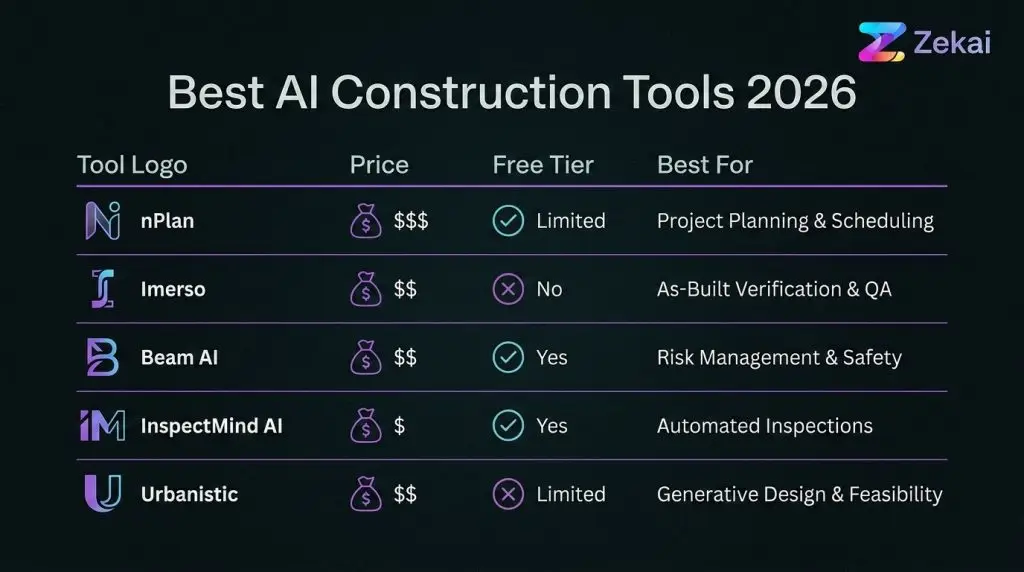
The Best AI Construction Tools of 2026 (Tested & Ranked)
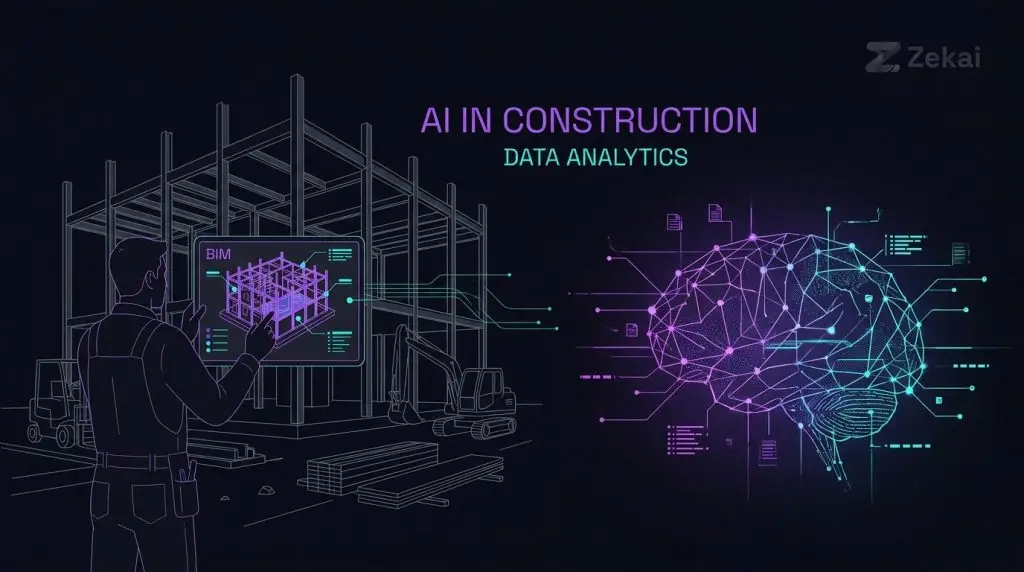
We’ve organized our top picks by their core function. While some platforms offer multiple features, they typically excel in one primary area.
| Tool | Category | Starting Price (as of Sep 2026) | Free Tier | Best For |
|---|---|---|---|---|
| nPlan | Schedule Risk | Custom (Enterprise) | No | GCs and owners on complex projects needing to forecast delay risk. |
| Imerso | As-Built Verification | Custom (By project/data volume) | No (Demo only) | VDC teams needing to automate BIM vs. as-built deviation detection. |
| Beam AI | Preconstruction/Takeoff | Pricing on request | Yes (Core plan is free) | Specialty contractors wanting to automate material takeoffs from PDFs. |
| InspectMind AI | Site Inspection & Plan Review | $50/plan check; $100/mo for reports | Yes ($100 first plan check covered) | Preconstruction and inspection teams needing to automate drawing reviews and report writing. |
| Urbanistic | Generative Urban Design | Custom (Enterprise) | No | Architects and urban planners exploring massing/feasibility options. |
Swipe the table sideways →
Best for Schedule Risk & Forecasting: nPlan
nPlan
The gold standard for forecasting schedule risk using historical data.
Pricing on request
nPlan is a sophisticated AI platform that analyzes your project schedule against a massive dataset of past projects to identify hidden risks and forecast delays with remarkable accuracy. It doesn’t generate schedules; it stress-tests them. By uploading your P6 or MSP file, nPlan’s AI runs millions of simulations to pinpoint which activities are most likely to cause overruns, allowing project managers to focus their attention where it matters most.
What it does well: Its core strength is its predictive power. Instead of relying on gut feel or optimistic assumptions, nPlan provides a statistical forecast of your completion date and identifies the true “driving paths” of risk, which are often not the same as the critical path.
What it does badly: nPlan is an enterprise-grade tool with a price tag to match. It is not designed for small contractors or simple projects. The platform’s output is analytical and requires a sophisticated project controls team to interpret and act on the insights.
Who should buy it: Large general contractors, infrastructure developers, and project owners managing complex, high-stakes projects where even a small delay has major financial consequences.
- Price from
- Custom enterprise pricing
- Free tier
- No free tier available
Best for As-Built Verification: Imerso
Imerso
Powerful, automated deviation detection between 3D scans and BIM models.
Pricing on request
Imerso automates the painful process of checking work-in-place against the design model. A team member performs a 3D laser scan of an area (no surveying experience required), uploads the data, and Imerso’s AI automatically compares it to the BIM model. It flags any deviations—a pipe in the wrong place, a wall built to incorrect dimensions—and presents them in a clear, actionable report. This allows teams to catch errors within hours, not weeks, before they are buried by subsequent trades.
What it does well: Imerso excels at speed and automation. It turns a time-consuming manual task into a routine, background process. The platform is hardware-agnostic, working with scanners from Leica, Trimble, FARO, and others. Case studies show significant ROI, with one hospital project saving an estimated 2% of its total construction budget by catching issues early.
What it does badly: The value of Imerso is directly tied to the quality and accuracy of your BIM model. If your model is poor, the deviation reports will be noisy and less useful. Pricing is based on project count and data volume, which can be complex to forecast for firms new to 3D scanning.
Who should buy it: VDC/BIM managers and project teams on large, complex projects (hospitals, data centers, industrial facilities) where MEP coordination is critical and the cost of rework is high.
- Price from
- Custom pricing by project/data volume
- Free tier
- No, but offers a free product tour and demo
Best for Preconstruction & Takeoff: Beam AI
Beam AI
A fast, trade-specific AI takeoff tool that automates quantity counts from PDFs.
Pricing on request
Beam AI is an AI-powered takeoff tool focused on automating the estimating process for subcontractors and suppliers. Unlike generic takeoff software, Beam AI offers trade-specific models, meaning the AI is trained to recognize symbols and components relevant to HVAC, electrical, or painting contractors. It offers both a “Do It Yourself” (DIY) software license and a “Done For You” (DFY) service where their team runs the takeoff for you.
What it does well: Speed and trade-specificity are its main advantages. Beam AI states it can reduce takeoff time by up to 90%, allowing estimators to bid more work. Its free “Core” plan is a genuine free tier, offering unlimited estimates and projects, which is rare in this category.
What it does badly: While there is a free tier, unlimited *AI* estimating requires the paid “Plus” plan or higher. The pricing model, based on trade and annual bid volume, can be confusing compared to simpler per-seat licenses. Some Capterra reviews mention a learning curve in getting started with the platform.
Who should buy it: Specialty trade contractors and material suppliers who spend a significant amount of time performing manual takeoffs from PDF drawings and want to increase their bidding capacity.
- Price from
- Starts ~$8K/year for DIY license; Free core plan
- Free tier
- Yes, a ‘Core’ plan is available for free
Best for Site Inspections & Plan Review: InspectMind AI
InspectMind AI
A versatile AI copilot for automating both plan reviews and field inspection reports.
Paid, from $50
InspectMind AI offers two distinct but related products. Its original tool automates the creation of field inspection reports from on-site voice and visual data, claiming to save inspectors up to 80% of their report-writing time. Its newer “Checker” product is an AI plan review agent that scans PDF drawing sets to find code violations, spec conflicts, and cross-disciplinary coordination errors before they become costly RFIs or change orders.
What it does well: Accessibility. Unlike most enterprise AI, InspectMind Checker is self-serve with a simple pay-per-run model starting at just $50, and the first $100 is covered for new users. This makes it incredibly easy to trial on a real project. The platform provides evidence for every finding, citing the specific drawing, code section, or spec reference.
What it does badly: As a newer player in the plan review space, its code knowledge base, while growing, may not be as comprehensive as more established (and expensive) solutions for hyper-specific local amendments. The value is in catching the 80% of common, costly errors automatically.
Who should buy it: Preconstruction managers, architects, and engineers who want a fast, low-cost first pass on their drawings to catch coordination errors. Field inspectors looking to dramatically cut down on report writing time will find the reporting tool invaluable.
- Price from
- Starts at $50/plan check; inspection reports from $100/mo
- Free tier
- Yes, first $100 of plan check services is covered
Best for Generative Urban Design: Urbanistic
Urbanistic
An emerging generative design tool for rapid urban planning and feasibility studies.
Pricing on request
Urbanistic is a generative design platform aimed at architects, real estate developers, and urban planners. It allows users to quickly generate and evaluate thousands of building and site layout options based on a set of parameters like zoning regulations, desired unit mix, and parking requirements. It’s a tool for exploring possibilities at the earliest stages of a project.
What it does well: Urbanistic dramatically accelerates the feasibility study process. What might take an architect weeks to draw manually can be explored in hours, complete with pro forma financial analysis for each generated option. This allows teams to make smarter, data-driven decisions about what to build.
What it does badly: This is an expert tool for a niche audience. It is not a general-purpose architectural design platform and is not intended for detailed design or construction documentation. The quality of the output depends heavily on the quality of the input data and the user’s expertise in urban planning.
Who should buy it: Architectural firms, real estate developers, and city planning departments that work on large-scale urban development and need to conduct rapid feasibility studies.
- Price from
- Custom enterprise pricing
- Free tier
- No
Real-World Workflows: How to Use AI in Construction
Theory is one thing; practice is another. Here are three concrete workflows using the tools we’ve reviewed.
Workflow 1: The 10-Minute Takeoff (Beam AI)
An estimator for a mid-sized electrical subcontractor receives an invitation to bid on a new commercial office project. The deadline is tight.
- Upload: Instead of printing the plans or opening them in a manual takeoff tool, the estimator uploads the PDF drawing set to Beam AI.
- Configure: They select the “Electrical” trade profile and confirm the symbols the AI should count (e.g., outlets, switches, light fixtures, panelboards).
- Generate: The AI scans every sheet, counting the relevant symbols and measuring conduit runs. Within 10-15 minutes, it produces a complete quantity list in an Excel spreadsheet.
- Review & Price: The estimator reviews the AI-generated counts, spot-checking a few key areas for accuracy. Satisfied, they apply their unit pricing and labor rates in the spreadsheet to complete the bid.
Result: This illustrates how a process that would take 4-6 hours manually could be completed in under 30 minutes, potentially allowing the estimator to bid on multiple additional projects that week.
Workflow 2: De-Risking a Schedule (nPlan)
A project executive at a large GC is overseeing a $250M hospital expansion. The schedule is complex and the client is highly risk-averse.
- Upload: The project controls manager uploads the baseline Primavera P6 schedule to nPlan.
- Analyze: nPlan’s AI analyzes the schedule’s logic, durations, and constraints, comparing it against its database of hundreds of thousands of completed projects.
- Report: The platform generates a risk report showing a forecast completion date that is three months later than the baseline schedule. It highlights a “Driving Path” of 15 activities related to MEP rough-in and commissioning that are the primary source of the forecasted delay.
- Act: Armed with this data, the project team convenes a meeting with the MEP subcontractors to re-sequence work, authorize overtime in key areas, and re-evaluate procurement lead times for critical equipment.
Result: The team proactively mitigates the highest-risk portion of the schedule, potentially avoiding months of delays and millions in liquidated damages.
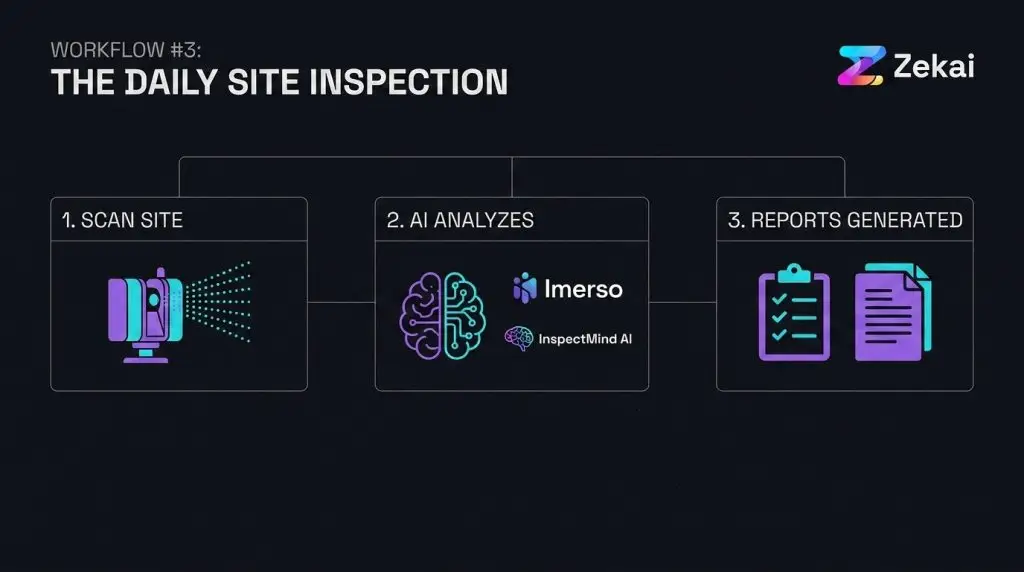
Workflow 3: The Daily Site Inspection (Imerso + InspectMind AI)
A project engineer on a high-rise residential tower is responsible for quality control.
- Scan: As part of their daily site walk, the engineer uses a Leica 3D scanner to capture the current state of a floor where concrete was just poured and plumbing rough-in is starting. The scan takes 20 minutes. They upload the scan data to Imerso.
- Verify: Imerso automatically aligns the scan with the BIM model and flags three slab penetrations that were cast in the wrong location according to the coordinated model.
- Document: The engineer goes to the flagged locations on site. Using the InspectMind AI mobile app, they take a photo of the incorrect penetration and dictate, “Plumbing stack penetration P-12 on grid line B-7 is off location by 18 inches north. RFI to be issued to architect for resolution.”
- Report: By the time the engineer returns to the site office, Imerso has generated a formal deviation report with images and measurements, while InspectMind AI has drafted a complete field report and a formal RFI ready for review and submission.
Result: In this example, a critical installation error is caught and documented within an hour of happening, preventing the plumbing subcontractor from continuing incorrect work and potentially avoiding a costly and schedule-damaging core drilling operation later.
Prompts Construction Professionals Actually Use
For general administrative tasks, LLMs like ChatGPT and Claude are surprisingly effective. The key is providing detailed context. We use a simple framework: Context, Role, Audience, Format, Task (CRAFT).
**Context:** I am the Project Manager for a General Contractor building a 5-story commercial office building (Project #2026-01). We are in the preconstruction phase. I have found a conflict between the architectural drawings and the mechanical specifications.
Drawing A-501, the roof plan, shows the placement of two (2) 10-ton DX rooftop units (RTU-1 and RTU-2).
Specification Section 23 74 13, Packaged, Outdoor, Central-Station Air-Handling Units, specifies three (3) 7.5-ton units.
**Role:** You are my assistant project manager. You are detail-oriented and professional.
**Audience:** The project Architect. Your tone should be collaborative, not accusatory.
**Format:** A formal Request for Information (RFI) in a numbered list format, ready to be copied into Procore. The RFI should include:
1. A clear statement of the conflict.
2. The specific drawing and spec sections that are in conflict.
3. The question asking for clarification.
4. A statement of the potential cost and schedule impact if not resolved quickly.
**Task:** Draft the RFI for my review.**Context:** I am the Site Superintendent for a construction project in California. Tomorrow morning, we will be performing a critical crane lift to place structural steel beams on the 3rd floor. The weather forecast predicts light rain and winds of 15 mph.
**Role:** You are my highly experienced Safety Director. You are an expert in OSHA and Cal/OSHA regulations, particularly regarding crane operations (OSHA 29 CFR 1926 Subpart CC).
**Audience:** The ironworkers crew, the crane operator, and the rigging signal person. The language should be direct, clear, and easy to understand.
**Format:** A 5-minute toolbox talk script. Start with the specific task. List at least 5 key safety checks as bullet points. End with a question to the crew to ensure they understand.
**Task:** Write the script for the toolbox talk focusing on crane lift safety in adverse weather conditions. Reference the need for checking the load chart against wind speed limits.The Compliance Minefield: AI, Liability, and Your Contracts
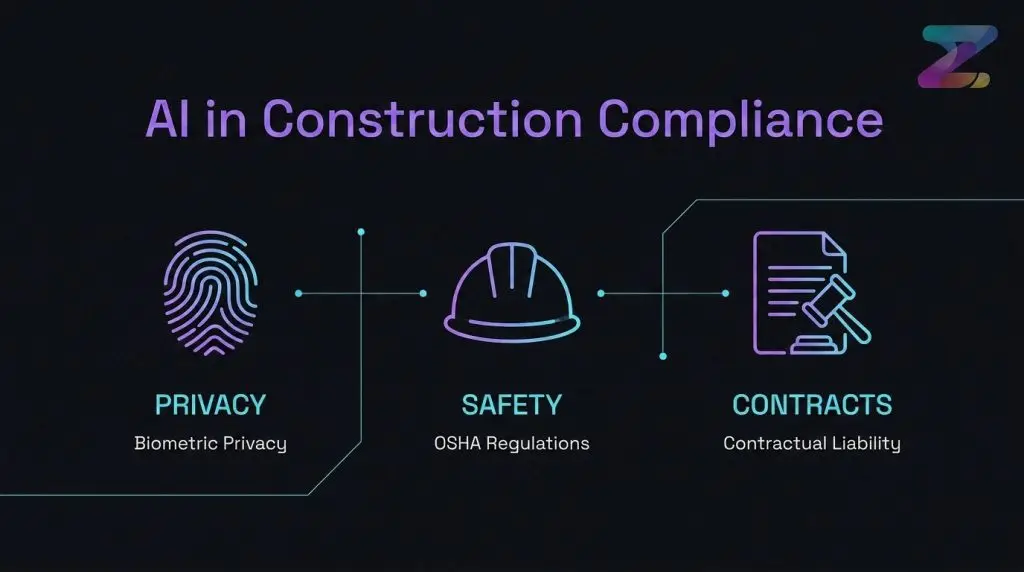
Adopting AI isn’t just a technology decision; it’s a legal one. Before your firm deploys any AI tool that captures site data or informs decisions, your legal and risk management teams must review these three areas:
1. Biometric Privacy (BIPA & others): Tools that use facial recognition for site sign-in or productivity tracking can fall under biometric privacy laws like Illinois’s Biometric Information Privacy Act (BIPA). Using such a tool without obtaining explicit, written consent from every worker on site (including subcontractors) can expose your firm to significant statutory damages.
2. Jobsite Surveillance (OSHA): While AI-powered camera monitoring can be a powerful tool for safety, it must be implemented carefully. OSHA’s General Duty Clause requires employers to provide a workplace free from recognized hazards. If your AI system flags a safety violation (e.g., a worker not tied off) and you fail to act on that information in a timely manner, it could be used as evidence of negligence in the event of an accident. Your policy must define who receives AI-generated alerts and what the required response protocol is.
3. Contractual Liability (AIA Documents): Who is liable if an AI makes a mistake? If a generative design tool creates a flawed structural concept, or a plan review AI misses a critical code violation, who owns the risk? The standard AIA contract documents are evolving to address this. The AIA E203-2013 (and its 2022 successors like the E201/E202) establishes protocols for the use of “Digital Data”. It’s crucial that your contracts explicitly define how AI-generated data will be used, who is responsible for verifying its accuracy, and how liability is allocated among the owner, architect, and contractor. Failing to address this upfront means you are accepting unknown risks.
What Will AI Replace? The Job Security Question
The short answer is: tasks, not jobs.
The narrative of AI replacing construction professionals misunderstands the fundamental problem the industry faces. Construction is not shedding jobs; it’s struggling to fill them.
Source: agc.org
In 2026, the industry needs an estimated 499,000 more workers than it has to meet demand.
AI is a tool for productivity, not replacement. It automates the most tedious, repetitive, and administrative parts of the job, freeing up professionals to focus on the things that require human judgment: client relationships, complex problem-solving on site, and mentoring the next generation.
- An estimator uses AI to automate takeoffs so they can spend more time analyzing subcontractor bids and developing project strategy.
- A project manager uses AI to forecast schedule delays so they can focus on negotiating solutions with trades.
- A superintendent uses AI to draft daily logs so they can spend more time on site ensuring quality and safety.
The real risk isn’t that AI will take your job. It’s that a competitor who uses AI to bid more accurately and build more efficiently will take your company’s next project. The best way to future-proof your career is to become the person who knows how to leverage these tools. A great place to start is by taking on a small, manageable project, like our AI Challenge.
Finally, a reminder to visit our main AI for Construction & Engineering Tools hub for a complete directory of platforms and reviews.
Where to go next
Three routes, picked for what you just read.
What is the best AI for construction?
It depends on the task. For schedule risk, nPlan is a leader. For automated takeoffs, tools like Beam AI are strong. For as-built vs. BIM verification, Imerso is a top choice. For plan review and inspection reports, InspectMind AI offers an accessible starting point. There is no single “best” AI; the right tool solves a specific workflow problem.
How will AI affect construction jobs?
No, AI is not expected to replace construction professionals. The industry faces a severe labor shortage of nearly 500,000 workers in 2026. AI will automate repetitive tasks like paperwork, data entry, and initial drawing reviews, allowing project managers, estimators, and superintendents to focus on higher-value work like problem-solving, negotiation, and site management.
What are the limitations of AI in construction?
AI’s primary limitations are its reliance on data quality, its lack of on-site physical reasoning, and its inability to handle novel situations. An AI is only as good as the data it’s trained on; poor quality BIM models or historical data will produce poor results. AI cannot yet replicate the nuanced, real-world judgment of an experienced superintendent on a complex job site.
Can AI read construction drawings?
Yes. AI platforms like Beam AI and InspectMind AI are specifically designed to read PDF construction drawings. They can identify and count symbols for takeoffs, detect clashes between different disciplines (e.g., a duct running through a beam), and check for compliance with building codes by cross-referencing drawings with code text.
How much does construction AI software cost?
Costs vary widely. Some tools, like InspectMind AI, offer pay-per-use models starting around $50 per plan check. Others, like Beam AI, have annual licenses that can start around $8,000. Enterprise platforms like nPlan require custom quotes and can be significantly more. Many vendors are moving to pricing based on project volume or data usage rather than per-user seats.
Is AI being used in construction today?
Yes, absolutely. A 2026 RICS report found that about two-thirds of construction professionals are now using AI in some capacity. The most common applications are for administrative tasks, project scheduling, cost estimating, job site safety monitoring, and comparing as-built conditions to design models.
Sources (47)
- constructioncounsel.com · The role of the aias digital practice documents · constructioncounsel.com
- propertywire.com · Ai adoption grows but implementation challenges persist · propertywire.com
- pbctoday.co.uk · pbctoday.co.uk
- beamup.ai · Beam AI takeoff pricing explained · beamup.ai
- abccarolinas.org · Articledetail · abccarolinas.org
- abcohio.org · Addressing the construction workforce shortage strategies for success · abcohio.org
- agc.org · Half million short construction workforce crisis reshaping project delivery · agc.org
- rubbl.com · Construction industry employment stats · rubbl.com
- rics.org · Ai in commercial property and construction report 2026 · rics.org
- constructiondive.com · constructiondive.com
- be-news.co.uk · Ai use by construction and property firms continues to accelerate report finds · be-news.co.uk
- theplanner.co.uk · Rics report reveals sharp rise AI adoption across property sector · theplanner.co.uk
- capterra.com · Beam Software · capterra.com
- softwarefinder.com · Beam pricing · softwarefinder.com
- imerso.com · Book demo · imerso.com
- inspectmind.ai · Buildcheck · inspectmind.ai
- openbim.psu.edu · Procurement planning · openbim.psu.edu
- startupintros.com · Inspectmind AI · startupintros.com
- beamup.ai · Pricing · beamup.ai
- capterra.com · Beam AI · capterra.com
- inspectmind.ai · inspectmind.ai
- inspectmind.ai · Plan review software · inspectmind.ai
- nomic.ai · Best kreo alternatives · nomic.ai
- tuuli.io · Best AI construction drawing review software · tuuli.io
- aiacontracts.com · Part 3 · aiacontracts.com
- support.aiacontracts.com · Edits to AIA Contract Documents due to Retired BIM and Digital
- array-architects.com · Revit level of development and ramifications from modeling to legal · array-architects.com
- help.beam.pro · 69 how much does beam cost · help.beam.pro
- imerso.com · Pricing · imerso.com
- imerso.com · Automatic 4d progress tracking in construction · imerso.com
- imerso.com · Product tour · imerso.com
- sage.com · 2026 construction hiring business outlook · sage.com
- inspectmind.ai · Ai construction review tools · inspectmind.ai
- reddit.com · Beam run python functions on the cloud in seconds · reddit.com
- inspectmind.ai · Compare · inspectmind.ai
- inspectmind.ai · Ai plan checker · inspectmind.ai
- beam.cloud · Serverless gpus · beam.cloud
- constructionowners.com · Construction outlook mixed for 2026 as data centers lead growth · constructionowners.com
- beam.ai · ChatGPT 5 updates · beam.ai
- ycombinator.com · K5h inspectmind AI powered field inspections · ycombinator.com
- imerso.com · Construction software list for a modern project manager · imerso.com
- agc.org · Contractors have dampened expectations 2026 apart data centers and
- flowcase.com · 10 AI tools every aec team should use · flowcase.com
- news.agc.org · 2026 construction industry outlook demand shifts rising uncertainty · news.agc.org
- agc.org · Surveys · agc.org
- imerso.com · Saving 2 percent of hospital construction budget · imerso.com
- imerso.com · The latest construction tools and how to choose them · imerso.com
See Zekai first in Google
The weekly AI briefing for your profession
One weekly email: the AI changes that actually affect your profession — tools, deals, and what to do about them.