Browse
AI Directory Open Source AI News 🏆 AI Challenge AI Statistics
Browse by profession
Accounting, Bookkeeping & TaxCompliance, Audit & GRCConstructionCustomer SupportData ScienceMedical All 38 professions →
Company
About Advertise Submit a tool Get the free Construction AI guide
Overview How It Works Before & After Try It Reviews Screenshots Integrations Why This Tool FAQ Pricing Top 10 Get Alerts News

BuildVision AI

Turn blueprints into priced bids in minutes. BuildVision AI reads your plans, counts materials, and builds quotes to help you bid more jobs.

Automated quantity takeoffs and estimating for electrical, HVAC, plumbing, and more.

DifferentiatorFlat-rate team pricing and pre-trained models for specific trades.
ProofCase study shows 2.75x bid volume in 90 days.
Explore BuildVision AI
Pro from$299 per month
9 Zekai
Rapid AI-Powered Bidding
AI for Construction & Civil Engineering Excellence
Ease of Use
9.2
Accuracy
8.8
Value
8.5
Time Saving
9.5
500+Users
9/10Zekai Score
AI TakeoffsAutomated QuotingTrade-Specific ModelsPDF & DWG SupportFlat Team Pricing
🏷 Is this your tool? Claim this listing →

Zekai Verdict

What is it?
BuildVision AI automates quantity takeoffs and estimating for construction professionals.
Best for
Trade contractors and GCs looking to automate the quantity takeoff and bidding process directly from PDF plan sets.
Not ideal for
Pricing is based on 'AI tokens,' which can be unpredictable for fluctuating workloads.
Price
$299 per month
Zekai Score
9/10
Hand-scored by Zekai

Top AI for Construction & Civil Engineering Excellence picks

See all 63 AI tools for Construction →
⚡ Quick answer

For construction and engineering professionals, BuildVision AI is a top contender for automating quantity takeoffs and bidding. It uses AI to read blueprints (PDFs, DWGs) and generate material counts in minutes, a task that traditionally takes hours. It's particularly effective for trades like electrical, HVAC, and plumbing, with pre-trained models that increase speed and accuracy, allowing firms to bid on significantly more jobs with the same staff.

CategoryAI Construction Estimating
Best ForTrade contractors and GCs automating quantity takeoffs.
Price From$299/mo
Free14-day free trial
DifferentiatorFlat-rate team pricing and pre-trained models for specific trades.
ProofCase study shows 2.75x bid volume in 90 days.
Rating4.5/5
📖 About BuildVision AI

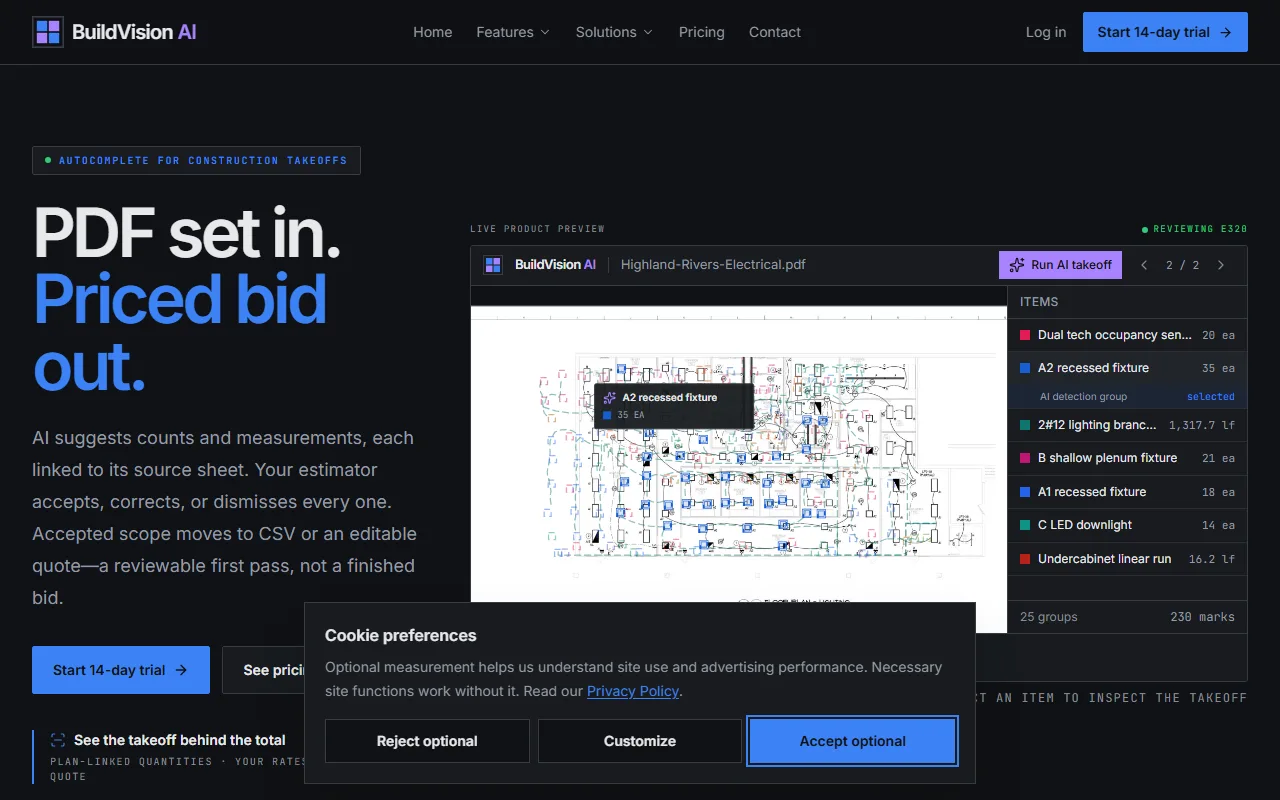
BuildVision AI automates quantity takeoffs and estimating for construction professionals. Upload your PDF plan sets, and the AI reads symbols, counts fixtures, and measures linear footage to generate a priced bid, allowing you to bid on more projects without increasing headcount.

How It Works

Your workflow, automated

1
Upload Your Plan Set
Drag and drop your PDF, DWG, or image scan files. The system accepts files up to 800 MB, including hand-marked drawings.
2
Review AI Takeoff
The AI identifies symbols, counts items, and measures lengths. Review the results, check confidence scores, and override any items flagged for human review.
3
Generate Priced Bid
Apply your custom assemblies and margins to the AI-generated quantities. Export a branded, signable proposal to Excel, Google Sheets, or PDF.
Ready to automate your workflow with BuildVision AI?
Explore BuildVision AI →
Real Impact

Before & After

❌ Before

Spending hours or days manually counting items from blueprints, leading to errors and bidding bottlenecks.

4 bids/week
✅ After

Automating takeoffs in minutes to bid on 3x more jobs with the same team and higher accuracy.

11 bids/week
Prompt Templates

Try it with these prompts

Copy any prompt and paste it directly into the tool.

Electrical Fixture Takeoff

Analyze the provided PDF set for electrical plans. Identify and count all 'A2 recessed fixtures' and 'C LED downlights'. Provide the total count for each fixture type, linked to their source sheets on the plans.

HVAC Duct Run Measurement

Extract all 'duct runs' from the HVAC mechanical plans. Measure the total length for each run in linear feet, ensuring calibration with the drawing scale. Output these measurements for pricing.

Generate Concrete Area Quote

Identify all 'plan areas' designated for concrete work. Calculate the total square footage for each area and compile these into a quote-ready scope, ready for pricing with custom rates.

AI Prompts

Prompts for Construction

Prompt 01 Drafting an RFI for a Specification Conflict
**Context:** I am the Project Manager for a General Contractor building a 5-story commercial office building (Project #2026-01). We are in the preconstruction phase. I have found a conflict between the architectural drawings and the mechani…
Prompt 02 Generating a Safety Toolbox Talk
**Context:** I am the Site Superintendent for a construction project in California. Tomorrow morning, we will be performing a critical crane lift to place structural steel beams on the 3rd floor. The weather forecast predicts light rain and…
Prompt 03 Prompt for Drafting an AI Liability Clause
You are a construction lawyer. Draft a preliminary contract clause for an addendum to an AIA A201-2017 agreement. The clause should define "Artificial Intelligence (AI) Tool," establish that each party is responsible for its own use of AI t…
See all 8 AI prompts for Construction →
Social Proof

Trusted by 500+

500+ professionals using this tool
Ease of Use
9.2
Accuracy
8.8
Value
8.5
Time Saving
9.5

"Our estimators were burning Saturdays. With BuildVision AI, we went from 4 bids a week to 11 — without hiring. Our hit rate climbed from 22% to 33% in the first quarter."

Maya K., Chief Estimator · June 2026

"The speed is unbelievable. We're bidding on jobs we would have previously passed on just due to time constraints. It's completely changed our pipeline."

David R., Project Manager · May 2026

"It's a game-changer for speed, but you have to watch your AI token usage closely on busy months. We had to upgrade to the Max plan sooner than expected to keep up."

Sarah P., Owner-Operator · April 2026

"The accuracy of the linear measurements for our conduit runs was spot-on. It saves us hours, reduces our margin for error, and the audit trail makes it easy to defend our counts."

Marco V., Electrical Contractor · March 2026
Proof of Use

Inside BuildVision AI

BuildVision AI screenshot — interface view 1

Captured by Zekai from the live BuildVision AI interface during review.

500+ professionals are already using this tool.
See Plans & Pricing →
Connects With

Works with your existing stack

Excel Google Sheets
Setup complexity: Easy to start
BuildVision AI automates quantity takeoffs and estimating for construction professionals. Upload your PDF plan sets, and the AI reads symbols, counts fixtures, and measures linear footage to generate a priced bid, allowing you to bid on more projects without increasing headcount.
Comparison

How it compares

BuildVision AI is purpose-built for speed and automation, while Bluebeam is a more general-purpose PDF editor with manual takeoff features. Choose BuildVision AI when your primary goal is to maximize the number of bids your team can produce; its AI can turn a plan set into a full quantity takeoff in minutes. Pick Bluebeam when you need a robust, all-around document markup tool and prefer a manual, highly-controlled takeoff process. For teams bottlenecked by estimating time, BuildVision AI offers a direct path to higher throughput.

The decision

Is it worth it?

Return on investment
Starting at $299/mo, BuildVision AI can free up over 150 estimating hours per month, paying for itself within the first day of a saved workweek.
Built for
Estimators, project managers, and owner-operators in trade contracting, including electrical, HVAC, plumbing, roofing, concrete, and demolition.
Effort to adopt
Easy to start
Compliance
GDPR compliant. SOC 2 compliance is available for Enterprise plans. All project data is encrypted in transit and at rest.
Who It's For

Why Construction & Civil Engineering Excellence choose this tool

🎯
Built for
Trade contractors and GCs looking to automate the quantity takeoff and bidding process directly from PDF plan sets.
In-Depth Overview
For any construction firm, the bottleneck between finding a job and bidding it is the estimating department. BuildVision AI directly targets this chokepoint by replacing hours of manual clicking and counting with an AI that does it in minutes. The platform ingests entire plan sets—PDFs, DWGs, even scanned images—and automatically performs quantity takeoffs. Its key advantage lies in pre-trained models for specific trades like electrical, HVAC, and plumbing, which recognize trade-specific symbols out of the box. The proof is in the speed: where manual takeoffs in Bluebeam might take hours or days, BuildVision AI delivers its first counts in under 10 minutes. This speed allows firms to bid on significantly more work with the same number of estimators. A case study on their site with Bell Electric shows a jump from 4 to 11 bids per week, with a corresponding increase in their win rate. The tool then carries that data directly into a branded proposal, connecting the takeoff directly to a client-facing, signable document. It's a complete system for accelerating the most time-consuming part of the pre-construction workflow.

Key Use Cases

🏗️
Triple Bidding Capacity Without Hiring
Chief Estimator
An electrical contractor's estimating team was bottlenecked, only able to produce 4 bids a week. By using BuildVision AI to automate takeoffs, they increased their output to 11 bids per week with the same staff.
2.75x bid volume in 90 days
✓ Pros
Drastically reduces takeoff time from days/hours to minutes.
Flat monthly pricing, not per-seat, for predictable costs.
Pre-trained models for major trades like electrical, plumbing, and HVAC.
Handles various file types including scanned PDFs and DWGs.
Generates branded quotes directly from takeoff data.
· Cons
Pricing is based on 'AI tokens,' which can be unpredictable for fluctuating workloads.
Custom training for unlisted trades requires a 5-day onboarding process.
The most accurate 'SuperThink' AI model is only available on the more expensive 'Max' plan.
Base 'Pro' plan is limited to 5 team members.
⚡ Editorial Verdict

BuildVision AI is a powerful accelerator for any estimating team, turning tedious plan takeoffs into a rapid, AI-driven process. Its strength lies in its pre-trained models for specific trades and flat-rate team pricing. The main trade-off is its reliance on 'AI tokens' for usage, which may require careful monitoring to manage costs on high-volume bidding months.

Questions & Answers

Frequently asked questions

How accurate is the AI takeoff?

+
Every takeoff includes confidence scores and review flags. Ambiguous items are surfaced for human review before they hit the quote, ensuring you maintain final control.

What file types does it handle?

+
BuildVision AI supports PDF (both vector and scanned), DWG, DXF, and image files like JPEG/PNG. It can handle uploads up to 800 MB and automatically reconciles multiple revisions.

Does it work for my trade?

+
The platform has pre-trained models for electrical, HVAC, plumbing, roofing, concrete, demolition, and general civil work. If your trade isn't listed, they offer a fine-tuning service using your historical drawings, which typically takes about 5 days.

How does it integrate with my workflow?

+
It's designed for easy integration with one-click exports to Excel and Google Sheets. You can continue using your existing assemblies and unit rates as your source of truth.

Is my project data secure?

+
Yes, all drawings are encrypted in transit and at rest. Enterprise plans offer advanced security features, access controls, and support for SOC 2 compliance.

Is BuildVision AI available and effective for projects outside the US?

+
Yes, as a cloud-based platform, BuildVision AI is accessible globally. Since it works by analyzing plan files (PDF, DWG), its effectiveness is not limited by geography, though you will need to configure your own local material and labor pricing libraries.

Last reviewed:

Plans & Pricing

Start today

Enterprise
Pricing on request
Tailored for teams and large organisations.
Contact Sales

Prices and features are updated regularly but can change at any time — always confirm on the official website. Some links on this page are affiliate links.

See all 63 AI tools for Construction →
Free guide

Take it with you

Getting Started with AI-Powered Takeoffs
  • Preparing your plan sets for optimal AI recognition.
  • Understanding AI confidence scores and when to manually review.
  • Mapping AI-detected items to your custom material and labor assemblies.
  • Best practices for linear, area, and count-based takeoffs.
  • Generating and customizing your first client-ready proposal.
+4 more steps inside the guide
Send me the full guide

Get BuildVision AI deal alerts

Be the first to know when BuildVision AI drops a new discount, adds features, or changes pricing.

Exclusive BuildVision AI discount codes
New feature announcements
Best alternative picks when pricing changes
Zero spam — unsubscribe anytime
🎉
You're subscribed!
We'll notify you when BuildVision AI has a new deal.
AI Directory

About BuildVision AI

Full Description

BuildVision AI automates quantity takeoffs and estimating for construction professionals. Upload your PDF plan sets, and the AI reads symbols, counts fixtures, and measures linear footage to generate a priced bid, allowing you to bid on more projects without increasing headcount.

Editorial Verdict

BuildVision AI is a powerful accelerator for any estimating team, turning tedious plan takeoffs into a rapid, AI-driven process. Its strength lies in its pre-trained models for specific trades and flat-rate team pricing. The main trade-off is its reliance on 'AI tokens' for usage, which may require careful monitoring to manage costs on high-volume bidding months.

Last reviewed:
Disclaimer
Zekai is an independent AI tools directory. We are not affiliated with, endorsed by, or officially connected to BuildVision AI unless clearly stated. All product names, logos, and brands are the property of their respective owners and are used for identification purposes only. The information on this page — including pricing, features, and availability — is general information, may have changed since our last review, and is not professional advice. Zekai Scores and verdicts are our editorial opinion. Some outbound links are affiliate links that may earn us a commission at no extra cost to you. Spotted outdated or incorrect information? Request a correction →
Previous Tool Stru AI Next Tool Finch 3D
nPlan
SPONSORED AI FOR CONSTRUCTION & CIVIL ENGINEERING EXCELLENCE
nPlan
De-risk construction projects with AI-driven forecasting
Visit Site → Learn more
All AI Tools A–Z →
Visit website ↗
BuildVision AI9.0Try BuildVision AI ↗Next tool →
Today's top 3 AI for Construction & Civil Engineering Excellence tools →

See Zekai first in Google