
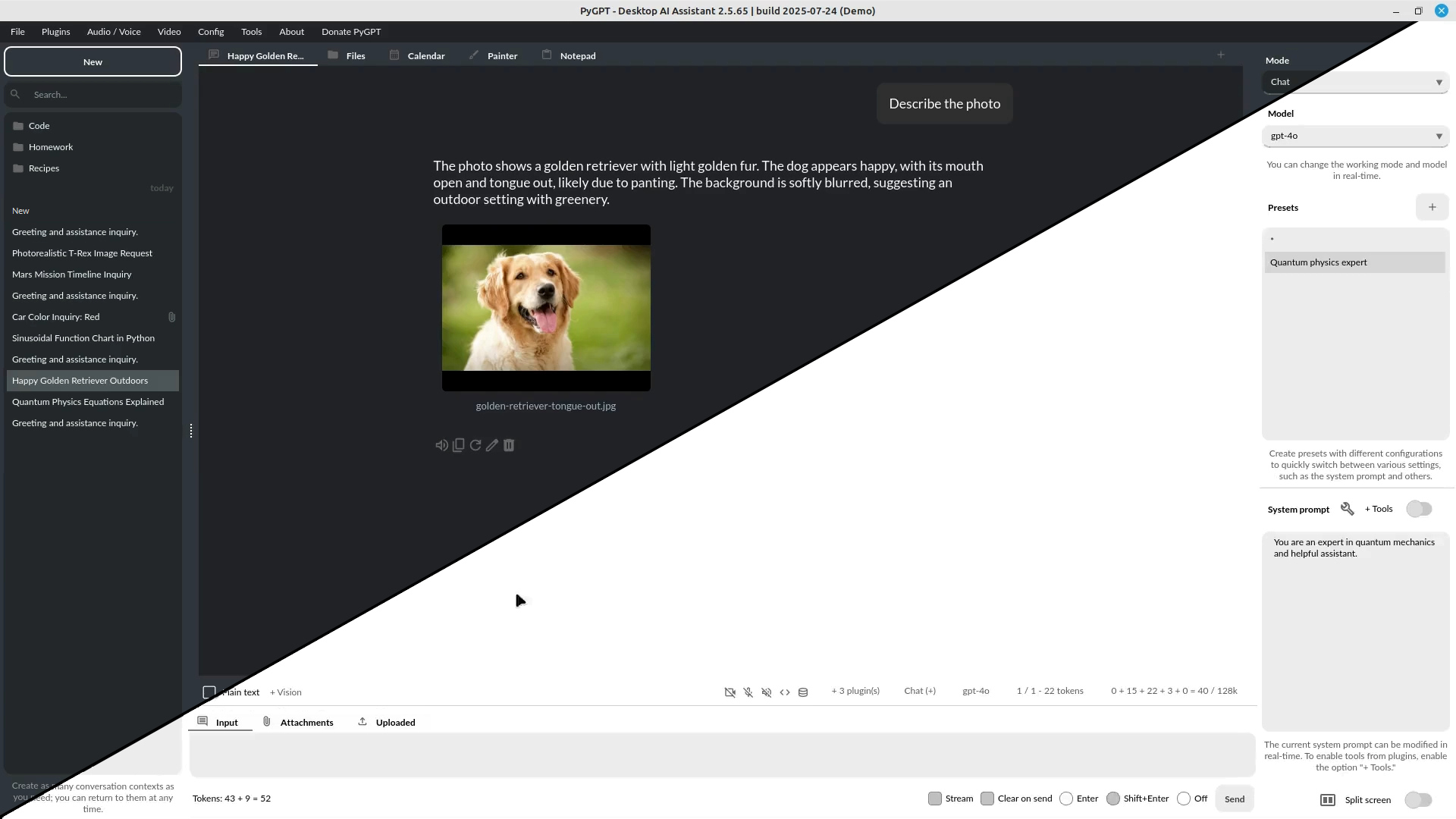
A free, open-source desktop AI assistant that connects you to any model (GPT-5, Claude, Gemini) for private, offline-capable writing tasks.
Control your data and costs by using your own API keys on a local application for Windows, macOS, and Linux.
Zekai Verdict
- What is it?
- PyGPT is a free, open-source desktop AI assistant that gives writers and translators direct access to a vast range of models, including GPT-5, Gemini, and Claude.
- Best for
- It's best for technically-inclined writers and translators who want to build a private, multi-model AI workspace on…
- Not ideal for
- Requires user to provide and manage their own API keys, incurring separate costs.
- Price
- Free plan
- Zekai Score
- 8.4/10
 Semantic Scholar
 ResearchRabbit
 Semrush
 KoalaWriter
 Jenni AI
 Litmaps
Top AI for Writing, Translation & Localization picks
See all 80 AI for Writing, Translation & Localization tools →For writers and translators who prioritize data privacy and model choice, PyGPT is one of the best AI tools available. It's a free, open-source desktop application that runs locally on your machine, allowing you to use confidential documents with features like 'Chat with Files' without uploading them to the cloud. By connecting to major AI models like GPT-5, Claude, and Gemini using your own API key, you retain full control over your data and workflow.
Before & After
Uploading sensitive client documents to third-party web AI tools.
High data riskAnalyzing and translating documents locally with full data privacy.
Zero data leakageTry it with these prompts
Copy any prompt and paste it directly into the tool.
Please summarize the provided document. Use the conversation history as additional context to ensure the summary is relevant to our ongoing discussion. The document is a [DOCUMENT TYPE] located at [FILE PATH].
Analyze the attached image and describe all discernible objects and their relationships. The image is a [IMAGE TYPE] and can be found at [IMAGE FILE PATH]. I need a detailed breakdown of the visual content.
Generate Python code to accomplish the following task: [TASK DESCRIPTION]. Ensure the code includes comments explaining each step. The code should be runnable in the built-in Python Code Interpreter.
Trusted by professionals
Works with your existing stack
How it compares
PyGPT's primary advantage over the official ChatGPT desktop app is its open, multi-model architecture. While the ChatGPT app locks you into OpenAI's ecosystem, PyGPT is a neutral platform connecting to GPT, Claude, Gemini, and open-source models via Ollama. This makes it superior for professionals who need to compare outputs or avoid vendor lock-in. Choose the official ChatGPT app for a seamless, polished experience within the OpenAI ecosystem. Opt for PyGPT when you demand privacy, control over local files, and the flexibility to use any model for your writing or translation task, and are willing to manage the technical setup yourself.
Is it worth it?
Why Writing, Translation & Localization choose this tool
Key Use Cases
PyGPT runs on your own desktop using your own API keys, so drafts and source documents never sit in a vendor's chat history. That is the practical reason to choose it over a hosted assistant, and it is why it can work against local files directly. It also connects to several model providers rather than locking you to one. The cost is setup: you install it yourself and manage keys per provider. If you want something that works from a browser tab with no configuration, this is the wrong tool.
Frequently asked questions
Is PyGPT really free?
What kind of files can I use with the 'Chat with Files' feature?
Does my conversation data stay private?
What is the best AI tool for writers and translators who need data privacy?
How can I use different AI models like GPT-4, Claude, and Gemini in one application?
What is an open-source alternative to ChatGPT that I can run locally?
Last reviewed:
Start today
Prices and features are updated regularly but can change at any time — always confirm on the official website. Some links on this page are affiliate links.
Top 10 AI tools in this category
Take it with you
- **Total Privacy:** Runs locally, so your sensitive documents never leave your computer.
- **Model Freedom:** Connect to GPT-5, Claude, Gemini, and more in one interface.
- **Document Interaction:** Use the 'Chat with Files' feature to query your PDFs, DOCX files, and research notes.
- **Cost Control:** It's free software; you only pay for what you use via your own API key.
- **Custom Workflows:** Create custom prompts, commands, and even agents to automate tasks.
Get PyGPT deal alerts
Be the first to know when PyGPT drops a new discount, adds features, or changes pricing.
Latest AI news



About PyGPT
Full Description
PyGPT is a free, open-source desktop AI assistant that gives writers and translators direct access to a vast range of models, including GPT-5, Gemini, and Claude. It runs locally on your computer, allowing you to chat with your own documents (PDFs, DOCX, etc.) and maintain full control over your data and API keys. This setup is ideal for handling sensitive client work or building custom writing workflows without relying on web-based services.
Editorial Verdict
PyGPT runs on your own desktop using your own API keys, so drafts and source documents never sit in a vendor's chat history. That is the practical reason to choose it over a hosted assistant, and it is why it can work against local files directly. It also connects to several model providers rather than locking you to one. The cost is setup: you install it yourself and manage keys per provider. If you want something that works from a browser tab with no configuration, this is the wrong tool.


