Browse
AI Directory Open Source AI News 🏆 AI Challenge AI Statistics
Browse by profession
Accounting, Bookkeeping & TaxCompliance, Audit & GRCConstructionCustomer SupportData ScienceMedical All 38 professions →
Company
About Advertise Submit a tool Get the free Audio & Music AI guide
Overview How It Works Before & After Try It Reviews Integrations Why This Tool FAQ Pricing Top 10 Get Alerts News

Turn your podcast episodes and audio recordings into social-ready video clips and audiograms in minutes.

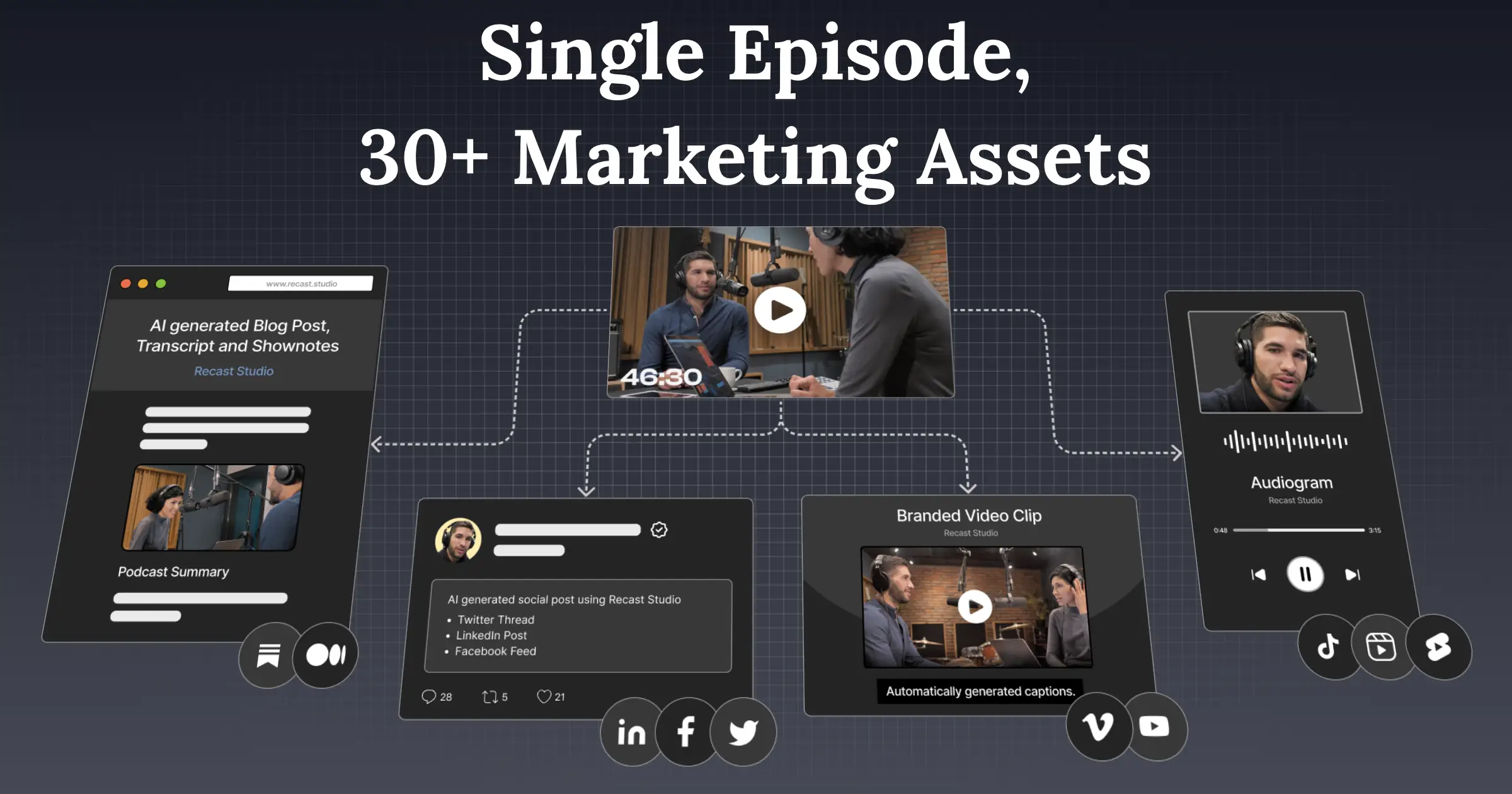
AI automatically finds the best moments, adds captions, and lets you publish directly to all social platforms.

DifferentiatorTurns one audio file into video clips, audiograms, and written show notes.
ProofReduces 4-6 day workflow to ~10 minutes.
Try Recast Studio
Free Plan Pro from$14/mo
Free plan verified · free AI tools for Music Producers
9.1 Zekai
Audio-to-Social Video Engine
AI for Music, Audio & Voice Production
Ease of Use
9.2
Accuracy
8.5
Value
9.0
Time Saving
9.5
1,000+Users
9.1/10Zekai Score
AI Clip FinderText-Based EditingFiller Word RemovalDirect Social PublishingAudiograms
🏷 Is this your tool? Claim this listing →

Zekai Verdict

What is it?
For audio producers and podcasters, Recast Studio is an AI-powered video editor that streamlines content repurposing.
Best for
Best for podcasters and audio creators looking to automate the creation of promotional video clips and audiograms for…
Not ideal for
Primarily a repurposing tool, not a full video or audio editor.
Price
Free plan · paid from $14/mo
Zekai Score
9.1/10
Hand-scored by Zekai

Top AI for Music, Audio & Voice Production picks

See all 90 AI tools for Music Producers →
⚡ Quick answer

For Music, Audio & Voice Production professionals, Recast Studio is one of the best AI tools for marketing content. It excels at turning long-form audio like podcasts or interviews into dozens of short, captioned video clips and audiograms for social media. Its AI can automatically find the best moments and remove filler words, reducing a multi-day editing process down to about 10 minutes.

CategoryAI Video Repurposing
Best ForPodcasters creating social media clips
Price From$14/mo
FreeFree plan available
DifferentiatorTurns one audio file into video clips, audiograms, and written show notes.
ProofReduces 4-6 day workflow to ~10 minutes.
Rating4.6/5
📖 About Recast Studio
How It Works

Your workflow, automated

1
Upload Your Audio/Video
Upload your full podcast episode, interview, or webinar recording into the platform.
2
AI Generates & You Refine
Recast's AI automatically finds key moments and creates clips. Use the transcript to make cuts, remove filler words, and add your branding.
3
Publish Everywhere
Schedule your finished clips and audiograms to post directly to TikTok, Instagram, YouTube, and more without leaving the app.
Ready to automate your workflow with Recast Studio?
Try Recast Studio →
Real Impact

Before & After

❌ Before

Manually scrubbing through hours of audio to find good clips, then sending timestamps to a costly video editor.

4-6 days per episode
✅ After

Automatically generating dozens of shareable video clips and audiograms in minutes, with no editor needed.

~10 minutes per episode
Prompt Templates

Try it with these prompts

Copy any prompt and paste it directly into the tool.

Create social clips from webinar

Generate short, engaging social media clips from a long webinar recording. Extract key moments, add captions, and ensure they are ready for platforms like TikTok and Instagram. Include brand styles and logos.

Repurpose podcast into multiple formats

Transform a podcast episode into various content assets. Create audiograms, short video clips, and written content like blog posts or show notes using the transcript. Publish directly to social media.

Edit video by editing text transcript

Edit video content by simply editing the text transcript. Highlight desired sections to create clips, remove filler words, and ensure captions remain synchronized. This streamlines the editing process without complex tim…

Social Proof

Trusted by 1,000+

1,000+ professionals using this tool
Ease of Use
9.2
Accuracy
8.5
Value
9.0
Time Saving
9.5

"HUGE fan of the Recast experience. It's so easy. I'm about to spend my whole afternoon making clips."

Arielle N., Head of Community & Content · June 2026

"I used to pay somebody $1200 a month to repurpose my material. This tool allows me to take one of my video podcasts and the software does the rest. I now have a year's worth of posts and it only took me a few hours."

Brian S., Founder · May 2026

"The free trial is a nice way to see the potential, but the 1-minute export limit is too restrictive for anything beyond a quick test. You absolutely have to upgrade to a paid plan to do any meaningful work."

Chris P., Indie Podcaster · April 2026

"Recast is super simple to use and gave me a professional-looking video within 1 minute. I'm excited to see how these videos help our podcast grow!"

Landon B., Co-founder · March 2026
1,000+ professionals are already using this tool.
Start Free Today →
Connects With

Works with your existing stack

TikTok Instagram YouTube Facebook LinkedIn Twitter
Setup complexity: Beginner-friendly
For audio producers and podcasters, Recast Studio is an AI-powered video editor that streamlines content repurposing. Upload long-form audio or video, and the platform automatically generates shareable clips, audiograms, and transcribed show notes. It's designed to help you market your audio content visually without needing video editing skills.
Comparison

How it compares

Recast Studio vs. Descript: Choose Recast Studio when your primary goal is speed and efficiency in turning a finished audio/video file into a high volume of social media clips. Its streamlined AI workflow and direct social publishing are built for marketers and creators who want to post consistently with minimal effort. Opt for Descript when you need a more powerful, all-in-one tool for recording, transcribing, and performing detailed edits on your podcast or video *before* you start creating clips. Descript is the studio; Recast is the distribution engine.

Pick Recast for simpler, faster social clip generation and direct publishing vs. Descript.
Choose Recast when you need audiograms and written content (show notes) in addition to video clips.
Recast offers more advanced AI features like filler word removal and a simpler UI than Headliner.
The decision

Is it worth it?

Return on investment
By replacing a freelance video editor (costing ~$1200/mo, per a user testimonial), the $26/mo Professional plan can pay for itself in less than a day of use.
Built for
Podcasters, voiceover artists, audio producers, and creators who need to market their audio content on visual social media platforms.
Effort to adopt
Beginner-friendly
Compliance
Compliance posture not publicly documented — verify with vendor.
Who It's For

Why Music, Audio & Voice Production choose this tool

🎯
Built for
Best for podcasters and audio creators looking to automate the creation of promotional video clips and audiograms for social media.
In-Depth Overview
For audio professionals, the biggest marketing challenge is making non-visual content engaging on platforms like TikTok and Instagram. Recast Studio solves this by transforming your audio into a high-volume of visual assets automatically. The platform's core promise is turning a multi-day, multi-thousand-dollar editing process into a ten-minute task. Proof is in the workflow comparison: the 'old way' takes 4-6 days and costs $2000-$5000, while the 'Recast way' takes about 10 minutes for a plan starting at $14/mo. Key features for audio creators include AI-powered filler word removal ('um', 'uh') for clean soundbites, transcript-based editing that feels like editing a document, and automatic generation of audiograms. The ability to then generate show notes, blog posts, and publish directly to all social channels from one place makes it a complete marketing engine for your audio content, not just a clipping tool.

Key Use Cases

🎙️
Turn one episode into a week of content
Podcaster
Upload a new podcast episode and let Recast's AI find the best soundbites. Create multiple video clips and audiograms, schedule them across all social platforms, and generate show notes, all from one dashboard.
4-6 day workflow reduced to ~10 minutes
✓ Pros
Drastically reduces time to create social clips from long audio files.
Transcript-based editing is intuitive for non-video editors.
AI filler word removal cleans up audio for professional-sounding clips.
Directly publishes to TikTok, Instagram, YouTube, etc., saving workflow steps.
Generates written content (show notes, posts) from the same source material.
· Cons
Primarily a repurposing tool, not a full video or audio editor.
Free plan's 1-minute maximum export length is highly restrictive.
Credit-based system can be confusing to predict usage against.
⚡ Editorial Verdict

Recast Studio is a powerful force multiplier for any audio professional serious about marketing. Its ability to transform a single podcast episode into a full suite of social assets is a massive time-saver. The main trade-off is its focus on repurposing; it's not a replacement for a dedicated audio editor or a full-featured video NLE.

Questions & Answers

Frequently asked questions

How can I turn my podcast audio into engaging social media videos?

+
Recast Studio allows you to upload your audio or video file, and its AI will help identify the strongest moments. You can then use the transcript-based editor to create short, captioned video clips or audiograms perfectly formatted for social media.

What's the best AI tool for creating audiograms and video clips from my podcast?

+
Recast Studio is a strong contender, specializing in turning long-form recordings into social-ready clips and audiograms. It combines AI clip finding, text-based editing, and direct social publishing into one streamlined workflow for podcasters.

Can Recast Studio automatically remove filler words like 'um' and 'uh' from my audio?

+
Yes, Recast Studio features 'AI Filler Word & Pause Removal' which automatically detects and removes filler words and awkward silences from your recordings to make your content sound more professional.

Does Recast Studio support transcription in languages other than English?

+
Yes, the platform offers high-precision transcription with support for over 20 languages, allowing you to create content for a global audience.

Can I use Recast Studio to create show notes and blog posts from my podcast episodes?

+
Yes. Beyond video clips, Recast Studio's AI can generate blog drafts, show notes, LinkedIn posts, and email copy directly from your video or podcast recording, helping you repurpose content in multiple formats.

Is Recast Studio suitable for a solo podcaster or just for marketing teams?

+
Recast Studio is built for both. While it has team collaboration features, its simple interface and automated workflows are designed to empower solo creators and marketers to produce high-quality social content without needing a design queue or large team.

Last reviewed:

Plans & Pricing

Start today

Prices and features are updated regularly but can change at any time — always confirm on the official website. Some links on this page are affiliate links.

See all 90 AI tools for Music Producers →
Free guide

Take it with you

3 Steps to Your First Clip
  • **Why Audio Needs Video:** Understand why repurposing your podcast for visual platforms is crucial for growth.
  • **The Recast Workflow:** From a single upload to a full content calendar.
  • **Finding Your 'Golden Clips':** Letting AI identify the most shareable moments from your episodes.
  • **Editing Like a Pro (Without Being One):** Using the transcript editor to trim clips and remove filler words.
  • **Branding Your Content:** Adding logos, custom fonts, and animated captions.
+4 more steps inside the guide
Send me the full guide

Get Recast Studio deal alerts

Be the first to know when Recast Studio drops a new discount, adds features, or changes pricing.

Exclusive Recast Studio discount codes
New feature announcements
Best alternative picks when pricing changes
Zero spam — unsubscribe anytime
🎉
You're subscribed!
We'll notify you when Recast Studio has a new deal.
AI Directory

About Recast Studio

Full Description

For audio producers and podcasters, Recast Studio is an AI-powered video editor that streamlines content repurposing. Upload long-form audio or video, and the platform automatically generates shareable clips, audiograms, and transcribed show notes. It's designed to help you market your audio content visually without needing video editing skills.

Editorial Verdict

Recast Studio is a powerful force multiplier for any audio professional serious about marketing. Its ability to transform a single podcast episode into a full suite of social assets is a massive time-saver. The main trade-off is its focus on repurposing; it's not a replacement for a dedicated audio editor or a full-featured video NLE.

Last reviewed:
Disclaimer
Zekai is an independent AI tools directory. We are not affiliated with, endorsed by, or officially connected to Recast Studio unless clearly stated. All product names, logos, and brands are the property of their respective owners and are used for identification purposes only. The information on this page — including pricing, features, and availability — is general information, may have changed since our last review, and is not professional advice. Zekai Scores and verdicts are our editorial opinion. Some outbound links are affiliate links that may earn us a commission at no extra cost to you. Spotted outdated or incorrect information? Request a correction →
Previous Tool Rask AI Next Tool Resemble AI
All AI Tools A–Z →
Visit website ↗
Recast Studio9.1Try Recast Studio ↗Next tool →
Today's top 3 AI for Music, Audio & Voice Production tools →

See Zekai first in Google