Browse
AI Directory Open Source AI News AI Statistics
Browse by profession
ConstructionCustomer SupportData ScienceMedicalE-commerceEducation All 30 professions →
Company
About Advertise Submit a tool Get the free Gaming AI guide
Overview How It Works Before & After Reviews Integrations Why This Tool FAQ Pricing Top 10 Get Alerts News
3D AI Studio

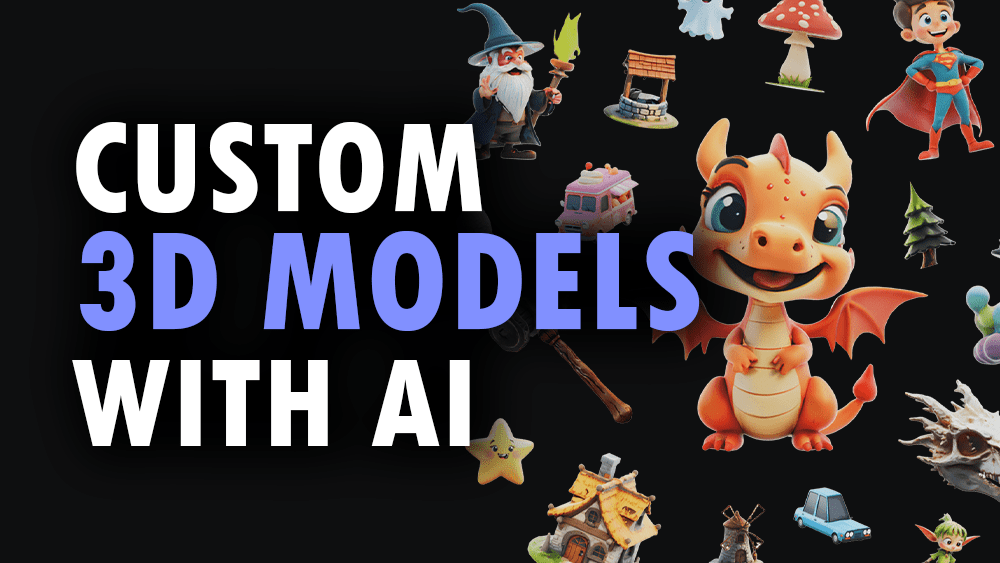
3D AI Studio enables game developers to generate production-ready 3D models from simple text prompts or 2D images. It automates modeling, texturing,...

Generate production-ready 3D game assets from text or images in seconds, no 3D experience required.

Instantly create optimized models with PBR textures for Unity and Unreal Engine, bypassing days of manual work.

Try 3D AI Studio Free
Pro fromPricing on request
Text-to-3DImage-to-3DAI TexturingGame Engine ReadyAPI Access
9.2 Zekai
Fastest 3D Game Assets
AI for Gaming & Metaverse Development
Ease of Use
9.5
Accuracy
8.8
Value
8.9
Time Saving
9.6
1,000+Users
9.2/10Zekai Score
🏷 Is this your tool? Claim this listing →
⚡ Quick answer

For Gaming & Game Development, 3D AI Studio is a top contender for the best AI tool. It's specifically built to accelerate game asset creation by generating production-ready 3D models from text or images in seconds. Crucially, it exports directly to game engine formats like FBX and includes tools like Quad-Remesh to create optimized, usable assets for Unity and Unreal Engine, a feature proven to speed up development by '10 to 100x' according to user case studies.

CategoryAI 3D Model Generator
Best ForRapidly creating 3D game assets from text or images.
Price FromOn request
FreeNo
DifferentiatorGenerates production-ready, optimized models with PBR textures for direct use in Unity and Unreal.
ProofIndie studio Polyworks Games achieved '10 to 100x' faster workflow for their RPG.
Rating4.6/5
📖 About 3D AI Studio

3D AI Studio enables game developers to generate production-ready 3D models from simple text prompts or 2D images. It automates modeling, texturing, and optimization to deliver assets compatible with major game engines like Unity and Unreal in seconds.

How It Works

Your workflow, automated

1
Choose Your Input
Start with a text prompt describing the asset you need (e.g., 'realistic fantasy orc warrior') or upload a 2D image or sketch.
2
Generate and Refine
The AI generates a textured 3D model in seconds. Use built-in tools like AI Texturing or Quad-Remesh to refine the result.
3
Export to Your Engine
Export the final model in a game-ready format like FBX or GLB and import it directly into your Unity or Unreal Engine project.
Ready to automate your workflow with 3D AI Studio?
Try 3D AI Studio Free →
Real Impact

Before & After

❌ Before

Manually modeling and texturing each game asset takes days.

Days per asset
✅ After

Generate production-ready 3D assets in seconds from a prompt.

Minutes per asset
Social Proof

Trusted by 1,000+

1,000+ professionals using this tool
Ease of Use
9.5
Accuracy
8.8
Value
8.9
Time Saving
9.6

"I've been able to create complex, high-quality 3D models in seconds, shaving hours off my usual timescales. It has been a game-changer for my workflow."

Noah B., Game Developer · June 2026

"I used my 2D PNG artwork to generate 3D models that ported into my game engine easily. It made my characters with armor look so AAA."

Brad B., Indie Developer · May 2026

"The results are pretty amazing for creating low-poly game assets in minutes. While the output is great for rapid prototyping, I found some complex shapes still needed a bit of manual cleanup before final use."

Yuri S., Game Asset Creator · April 2026

"This is the best service I've found. They have a far superior output for highly detailed, realistic models and several amazing tools for re-meshing and refining."

Paul H., Studio Lead · March 2026
1,000++ professionals are already using this tool.
Start Free Today →
Connects With

Works with your existing stack

Unity Unreal Engine Blender Three.js
Setup complexity: Beginner
3D AI Studio enables game developers to generate production-ready 3D models from simple text prompts or 2D images. It automates modeling, texturing, and optimization to deliver assets compatible with major game engines like Unity and Unreal in seconds.
Who It's For

Why Gaming & Metaverse Development choose this tool

🎯
Built for
This tool is best for game developers who need to rapidly generate a high volume of 3D assets for prototyping or production without deep modeling expertise.
In-Depth Overview
For game developers and studios, 3D AI Studio drastically cuts down asset creation time, turning a process that takes days into minutes. The platform's core strength lies in its dual-input generation: create models from text prompts (Text to 3D) or convert concept art, photos, and sketches into 3D assets (Image to 3D). This allows for rapid prototyping and iteration at the 'speed of design,' as one studio noted. Beyond initial generation, the tool provides a production-focused workflow. Its AI Texturing can apply PBR materials from text prompts, while the Quad-Remesh feature automatically cleans up topology and generates LODs, ensuring assets are optimized for game engines. The platform exports to FBX, GLB, and BLEND, integrating directly into pipelines for Unity, Unreal Engine, and Blender without manual conversion. Case studies prove the value: Polyworks Games reported a '10 to 100x' faster workflow for their RPG, stating the tool was the only one capable of generating the realistic humans they needed.

Key Use Cases

🕹️
Populate your game world in record time
Indie Game Developer
Generate dozens of unique props, characters, and environmental assets from simple text prompts or concept sketches. Export directly into your Unity or Unreal project.
10-100x faster asset creation
🎨
Instantly visualize concepts in 3D
Concept Artist
Turn your 2D character designs or environment sketches into 3D models to check for form and scale. Get faster client buy-in with polished 3D mockups.
5x faster concept delivery
🤖
Quickly create lightweight assets for immersive experiences
VR/AR Developer
Use the Quad-Remesh tool to generate optimized, low-poly models perfect for performant VR/AR applications. Export as GLB or USDZ for easy integration.
Optimized models in minutes
✓ Pros
Creates 3D models from text or images in seconds
No prior 3D modeling experience required
Exports production-ready formats for game engines (Unity, Unreal)
Includes tools for AI texturing and mesh optimization
Assets are private and can be used commercially
· Cons
Highest quality generation can take 2-4 minutes
AI output may require manual refinement for specific projects
No public pricing information available on the website
Relies on single images, which may limit detail compared to photogrammetry
⚡ Editorial Verdict

3D AI Studio is a powerful accelerator for game asset creation, making text-to-3D and image-to-3D commercially viable. Its focus on production-ready outputs for Unity and Unreal is a significant advantage. The main trade-off is that while incredibly fast, the highest-quality generations can take several minutes, and complex or highly specific assets may still require manual touch-ups in a dedicated 3D tool.

Questions & Answers

Frequently asked questions

How quickly can I generate a game-ready 3D model? +
Generation times vary. Simpler models can be generated in 20-30 seconds. For the highest quality models with detailed geometry and textures suitable for hero assets, expect a generation time of 2-4 minutes.
Can I use the 3D models I create in my commercial game? +
Yes. All models you generate with 3D AI Studio are fully yours to use in any commercial project, including games, apps, and marketing materials. You retain full commercial rights to your creations.
What file formats does 3D AI Studio support for game engines? +
You can export models in multiple industry-standard formats, including FBX and GLB which are ideal for direct import into Unity and Unreal Engine. Other supported formats include OBJ, USDZ, STL, DAE, and BLEND.
Can I generate a 3D model from my existing 2D concept art? +
Yes, the Image to 3D feature is designed for this. You can upload your 2D concept art (JPG, PNG, WebP) and the AI will convert it into a textured 3D model.
Do the generated models have clean topology for animation? +
The platform includes a Quad-Remesh tool designed to optimize mesh topology for production-ready assets. This helps create cleaner geometry and generate LODs, but complex animation may still require manual rigging and weight painting in a separate tool.
Is 3D AI Studio available worldwide? +
Yes, 3D AI Studio is a web-based platform accessible globally. As long as you have an internet connection, you can use the service to generate 3D models.

Last reviewed: Reviewed June 2026 — Assessed Text to 3D, Image to 3D, and game engine export capabilities.

Plans & Pricing

Start today

Gaming & Metaverse Development

Top 10 AI tools in this category

Get 3D AI Studio deal alerts

Be the first to know when 3D AI Studio drops a new discount, adds features, or changes pricing.

Exclusive 3D AI Studio discount codes
New feature announcements
Best alternative picks when pricing changes
Zero spam — unsubscribe anytime
🎉
You're subscribed!
We'll notify you when 3D AI Studio has a new deal.
Zekai Blog

Latest AI news

AI Directory

About 3D AI Studio

Full Description

3D AI Studio enables game developers to generate production-ready 3D models from simple text prompts or 2D images. It automates modeling, texturing, and optimization to deliver assets compatible with major game engines like Unity and Unreal in seconds.

Editorial Verdict

3D AI Studio is a powerful accelerator for game asset creation, making text-to-3D and image-to-3D commercially viable. Its focus on production-ready outputs for Unity and Unreal is a significant advantage. The main trade-off is that while incredibly fast, the highest-quality generations can take several minutes, and complex or highly specific assets may still require manual touch-ups in a dedicated 3D tool.

Last reviewed: Reviewed June 2026 — Assessed Text to 3D, Image to 3D, and game engine export capabilities.
Previous Tool Pixellab Next Tool 3D AI Studio
All AI Tools A–Z →
This site is registered on wpml.org as a development site. Switch to a production site key to remove this banner.