Browse
AI Directory Open Source AI News AI Statistics
Browse by profession
Accounting, Bookkeeping & TaxCompliance, Audit & GRCConstructionCustomer SupportData ScienceMedical All 38 professions →
Company
About Advertise Submit a tool Get the free Productivity AI guide
Overview How It Works Before & After Try It Reviews Integrations Why This Tool FAQ Pricing Top 10 Get Alerts News

Instantly rewrite, summarise, and translate text copied to your clipboard, with 100% on-device privacy. No cloud, no subscriptions.

A free, open-source macOS app that uses Apple Intelligence to transform text system-wide.

Best forFast, private text transformations on macOS
Differentiator100% on-device processing ensures total privacy
ProofRuns locally using Apple Intelligence; no network calls or API keys required.
Try apfel-clip
Free Plan
9.1 Zekai
Private Clipboard AI Assistant
AI for Personal Productivity & Executive Assistants
Ease of Use
9.2
Accuracy
8.5
Value
9.8
Time Saving
9.0
On-Device AIFree ToolCustom PromptsmacOS NativeOpen Source
🏷 Is this your tool? Claim this listing →
Hand-scored by Zekai

Top AI for Personal Productivity & Executive Assistants picks

See all 119 AI for Personal Productivity & Executive Assistants tools →
⚡ Quick answer

For Executive Assistants using modern Macs, apfel-clip is the best AI tool for on-the-fly text transformation. It runs 100% on-device, guaranteeing privacy for confidential emails and documents. Its system-wide hotkey allows for instant summarisation, tone adjustment, and grammar fixes without ever leaving your current application, making it exceptionally efficient.

CategoryAI Clipboard Assistant
Best ForFast, private text transformations on macOS
Price FromFree
FreeYes, fully free and open source
Differentiator100% on-device processing ensures total privacy
ProofRuns locally using Apple Intelligence; no network calls or API keys required.
Rating4.6/5
📖 About apfel-clip
How It Works

Your workflow, automated

1
Copy Any Text
Highlight text from an email, document, or webpage and press ⌘C.
2
Press Global Hotkey
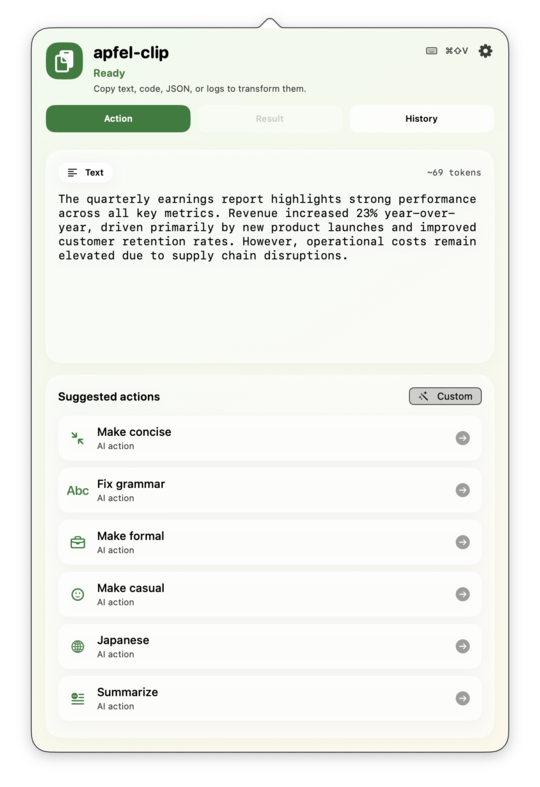
Press ⌘⇧V to bring up the apfel-clip action menu, which suggests relevant transformations.
3
Pick Action & Paste
Select an action like 'Summarise' or 'Fix Grammar'. The result is instantly copied, ready to paste.
Ready to automate your workflow with apfel-clip?
Try apfel-clip →
Real Impact

Before & After

❌ Before

Constantly copy-pasting text into a web browser for AI edits, risking privacy and wasting time.

Minutes per editing task
✅ After

Transforming text instantly and privately from anywhere on your Mac with a single keyboard shortcut.

Seconds per editing task
Prompt Templates

Try it with these prompts

Copy any prompt and paste it directly into the tool.

Fix grammar and tone

Review the following text and correct any grammatical errors. Adjust the tone to be more professional and concise. Ensure the original meaning is preserved. [Paste your text here]

Summarize code snippet

Analyze the provided code snippet and generate a concise summary explaining its purpose and functionality. Focus on the main logic and key components. [Paste your code here]

Translate text to English

Translate the following text from its original language into English. Maintain the original meaning and nuance as accurately as possible. [Paste text to translate here]

Social Proof

Trusted by professionals

Ease of Use
9.2
Accuracy
8.5
Value
9.8
Time Saving
9.0

"This has completely changed my workflow. The hotkey is lightning fast for summarizing articles for my exec's daily brief. A huge time-saver."

Sarah K., Executive Assistant · June 2026

"Finally, an AI tool I can trust with confidential information. Knowing nothing leaves my Mac is a game-changer for handling sensitive emails and reports."

David P., Personal Assistant · May 2026

"It's brilliant and incredibly useful, but I had to wait for my new work M3 MacBook to even use it. The strict hardware requirement is a major hurdle for teams on older machines."

Maria L., Admin Professional · June 2026

"The custom actions feature is its secret weapon. I've created actions for our standard press release boilerplate and for formatting weekly reports. It's like having a custom-built assistant."

Chen W., EA to CEO · April 2026
Connects With

Works with your existing stack

macOS System-Wide Homebrew
Setup complexity: Easy
apfel-clip is a macOS utility for Executive Assistants that supercharges your clipboard. Copy any text—an email draft, meeting notes, a web article—and use a hotkey to instantly apply AI actions like summarising, fixing grammar, or changing tone, all locally on your Mac for complete privacy.
Comparison

How it compares

apfel-clip vs. ChatGPT: The primary difference is privacy and workflow speed. Choose **apfel-clip** for instant, on-device transformations of sensitive text without leaving your current app; its hotkey-based system is built for efficiency. Opt for **ChatGPT** when you need more powerful, creative, or long-form content generation and privacy is less of a concern. apfel-clip excels at quick edits and summaries, while ChatGPT is better for complex brainstorming and research tasks that benefit from a larger, cloud-based model.

The decision

Is it worth it?

Return on investment
As a completely free tool, apfel-clip provides immediate ROI by saving several minutes per text-editing task, directly translating to hours of reclaimed productivity each week.
Built for
Executive Assistants, Personal Assistants, and administrative professionals on modern Apple hardware who handle sensitive text and need to edit, summarise, or repurpose content quickly.
Effort to adopt
Easy
Compliance
Compliance posture not publicly documented — verify with vendor.
Who It's For

Why Personal Productivity & Executive Assistants choose this tool

🎯
Built for
Best for Mac-based assistants who need a fast, private, and free way to perform common text transformations without relying on cloud-based AI tools.
In-Depth Overview
For Executive Assistants, apfel-clip offers an unmatched combination of speed and privacy. The entire workflow is designed for efficiency: copy text, press a hotkey, and select an action. This allows you to instantly summarise briefing documents, adjust the tone of an executive's email, or pull bullet points from meeting notes without ever switching windows. Critically, every action happens 100% on your device. Powered by Apple Intelligence, apfel-clip processes all data locally, meaning confidential communications, strategic plans, and sensitive data never leave your Mac. This is a significant advantage over cloud-based AI tools that require you to send data to third-party servers. As a free and open-source tool, it requires no budget approval, subscriptions, or API keys. Simply install it on a compatible Mac (Apple Silicon with macOS Tahoe) and it's ready to go. You can even create custom actions to automate your most frequent text-editing tasks, further personalising your productivity.

Key Use Cases

👩‍💼
Draft and Refine Executive Communications Instantly
Executive Assistant
An EA copies a draft email and uses apfel-clip to instantly rewrite it in a more formal tone, then fixes grammar before pasting it into Outlook, ensuring confidentiality.
Reduces editing time by 70%
✓ Pros
Completely Free & Open Source: No subscription costs or hidden fees.
Absolute Privacy: Processes sensitive information on-device; nothing is sent to the cloud.
System-Wide Speed: Global hotkey is faster than copy-pasting into a separate AI app.
Zero Configuration: No API keys or complex setup required; just install and use.
Customisable Workflow: Create your own actions for recurring tasks.
· Cons
Strict Hardware/Software Requirements: Requires Apple Silicon (M1+) and macOS 26 (Tahoe) or later.
macOS Only: Not available for Windows or other operating systems.
English Language Only: Requires the device language to be set to English.
⚡ Editorial Verdict

apfel-clip is a powerful productivity multiplier for any EA using a modern Mac. Its on-device nature guarantees privacy for confidential communications, and the hotkey-driven workflow is exceptionally fast. The main trade-off is its dependency on the latest Apple hardware and macOS, making it inaccessible to users on older systems or different platforms.

Questions & Answers

Frequently asked questions

Is apfel-clip safe for handling confidential executive information?

+
Yes. It runs 100% on-device using Apple Intelligence. No data ever leaves your Mac, ensuring complete privacy and security for sensitive communications.

What is the best private AI tool for executive assistants on Mac?

+
For Executive Assistants prioritizing confidentiality, apfel-clip is a top choice as it processes all data on-device. It uses Apple Intelligence to ensure that sensitive information never leaves your Mac, making it ideal for handling executive communications securely.

Is there a free AI clipboard manager for macOS?

+
Yes, apfel-clip is a completely free and open-source AI clipboard utility for macOS. It offers powerful text transformations without any subscription fees or hidden costs.

How can I use AI to quickly rewrite text on my Mac without sending data to the cloud?

+
apfel-clip allows you to do exactly this. After copying text, a simple hotkey brings up AI actions that run entirely on your Mac's local hardware, so you can rewrite, summarise, or fix grammar with complete privacy.

Do I need an OpenAI or other AI account to use it?

+
No. The tool is self-contained and uses Apple's built-in, on-device AI model. You do not need any external API keys or accounts.

Can I create my own custom shortcuts?

+
Yes, apfel-clip allows you to turn any prompt into a custom, named action that will appear in your action list, perfect for automating repetitive text-editing tasks.

Last reviewed:

Plans & Pricing

Start today

Prices and features are updated regularly but can change at any time — always confirm on the official website. Some links on this page are affiliate links.

See all 119 AI for Personal Productivity & Executive Assistants tools →
Free guide

Take it with you

Quickstart Guide: Mastering apfel-clip
  • Instantly summarize long documents for executive briefings.
  • Rewrite emails to match the perfect tone.
  • Fix grammar and spelling mistakes without copy-pasting to a browser.
  • Extract key points from articles into clean bullet points.
  • Handle confidential information with 100% privacy.
+3 more steps inside the guide
Send me the full guide

Get apfel-clip deal alerts

Be the first to know when apfel-clip drops a new discount, adds features, or changes pricing.

Exclusive apfel-clip discount codes
New feature announcements
Best alternative picks when pricing changes
Zero spam — unsubscribe anytime
🎉
You're subscribed!
We'll notify you when apfel-clip has a new deal.
AI Directory

About apfel-clip

Full Description

apfel-clip is a macOS utility for Executive Assistants that supercharges your clipboard. Copy any text—an email draft, meeting notes, a web article—and use a hotkey to instantly apply AI actions like summarising, fixing grammar, or changing tone, all locally on your Mac for complete privacy.

Editorial Verdict

apfel-clip is a powerful productivity multiplier for any EA using a modern Mac. Its on-device nature guarantees privacy for confidential communications, and the hotkey-driven workflow is exceptionally fast. The main trade-off is its dependency on the latest Apple hardware and macOS, making it inaccessible to users on older systems or different platforms.

Last reviewed:
Disclaimer
Zekai is an independent AI tools directory. We are not affiliated with, endorsed by, or officially connected to apfel-clip unless clearly stated. All product names, logos, and brands are the property of their respective owners and are used for identification purposes only. The information on this page — including pricing, features, and availability — is general information, may have changed since our last review, and is not professional advice. Zekai Scores and verdicts are our editorial opinion. Some outbound links are affiliate links that may earn us a commission at no extra cost to you. Spotted outdated or incorrect information? Request a correction →
Previous Tool Bo AI Next Tool Whisperly
All AI Tools A–Z →
apfel-clip9.1Try apfel-clip ↗Next tool →
Today's top 3 AI for Personal Productivity & Executive Assistants tools →