Browse
AI Directory Open Source AI News 🏆 AI Challenge AI Statistics
Browse by profession
Accounting, Bookkeeping & TaxCompliance, Audit & GRCConstructionCustomer SupportData ScienceMedical All 38 professions →
Company
About Advertise Submit a tool Get the free Writing AI guide
Overview How It Works Before & After Try It Reviews Screenshots Integrations Why This Tool FAQ Pricing Top 10 Get Alerts News

Translate video dialogue and subtitles into 40+ languages automatically, expanding your content's global reach.

Go beyond text with AI-powered video dubbing, transcription, and script generation.

Best forWriters and translators localizing video content.
DifferentiatorEdit video by editing the text transcript and AI-dub into 40+ languages.
ProofUsed by over 30 million creators.
Try Kapwing
Free Plan
9 Zekai
AI Video Localization Hub
AI for Writing, Translation & Localization
Ease of Use
9.2
Accuracy
8.5
Value
8.8
Time Saving
9.4
30 million+Users
9/10Zekai Score
AI DubbingSRT/VTT ExportScript GeneratorVideo TranscriptionText-to-Speech
🏷 Is this your tool? Claim this listing →

Zekai Verdict

What is it?
Kapwing is an AI-powered video editor that streamlines localization for writers and translators.
Best for
Best for writers and translators who need to quickly localize video content through AI-powered dubbing, subtitling, and…
Not ideal for
Localization is a feature, not the core product; lacks advanced TMS features.
Price
Free plan
Zekai Score
9/10
Hand-scored by Zekai

Top AI for Writing, Translation & Localization picks

See all 80 AI for Writing, Translation & Localization tools →
⚡ Quick answer

For writers and translators needing to localize video, Kapwing is a leading choice. It uses AI to automatically transcribe, translate subtitles, and dub video audio into over 40 languages. Its unique 'Trim with Transcript' feature lets you edit video by simply editing text, dramatically speeding up multimedia workflows.

CategoryAI Video Localization
Best ForWriters and translators localizing video content.
Price From$16/mo
FreeFree plan available
DifferentiatorEdit video by editing the text transcript and AI-dub into 40+ languages.
ProofUsed by over 30 million creators.
Rating9.0/10
📖 About Kapwing

Kapwing is an AI-powered video editor that streamlines localization for writers and translators. Automatically transcribe, translate, and dub video content into over 40 languages, and generate scripts from simple text prompts to accelerate your multimedia projects.

How It Works

Your workflow, automated

1
Upload & Transcribe
Upload your video file or paste a link. Kapwing's AI automatically transcribes the audio into text.
2
Translate & Dub
Use the AI tools to translate the transcript and generate subtitles, or create dubbed audio in over 40 languages.
3
Edit & Export
Fine-tune the video by editing the text transcript, then export the final video and/or SRT/VTT subtitle files.
Ready to automate your workflow with Kapwing?
Try Kapwing →
Real Impact

Before & After

❌ Before

Manually transcribing, translating, and timing subtitles for each video.

Hours per video
✅ After

Automatically generate and translate subtitles and dub audio in minutes.

Minutes per video
Prompt Templates

Try it with these prompts

Copy any prompt and paste it directly into the tool.

Generate a video script from an idea

Create a video script based on the following idea: [Your Video Idea]. The script should include scene descriptions, dialogue, and suggested visuals. Ensure the tone is [Desired Tone].

Create a video from a text prompt

Generate an original video about [Your Topic] using AI. Include visuals, voiceover, subtitles, and music. The script can be customized for [Desired Tone] and [Specific Content Points].

Clean and enhance audio for a podcast

Improve the audio quality of this recording by removing background noise and enhancing clarity. The goal is to make the audio suitable for a [Podcast Name] episode.

Social Proof

Trusted by 30 million+

30 million+ professionals using this tool
Ease of Use
9.2
Accuracy
8.5
Value
8.8
Time Saving
9.4

"The 'edit by text' feature is a game-changer. I can clean up interview footage and create social clips without ever touching a complex timeline. It's made me so much faster."

Sarah K., Content Writer · June 2026

"Being able to generate subtitles and a dubbed audio track for a client video in under an hour is incredible. Kapwing has become our go-to for quick-turnaround multimedia localization."

David L., Marketing Translator · May 2026

"The AI dubbing is impressive for straightforward narration, but can sound a bit flat for more dramatic content. Also, tracking credit usage across transcription, dubbing, and generation takes getting used to."

Maria P., Localization Lead · June 2026

"I use the Script Generator to break through writer's block. It gives me a solid structure and scene ideas to build from, which easily saves me a couple of hours on every new project."

Chen W., Scriptwriter · April 2026
Proof of Use

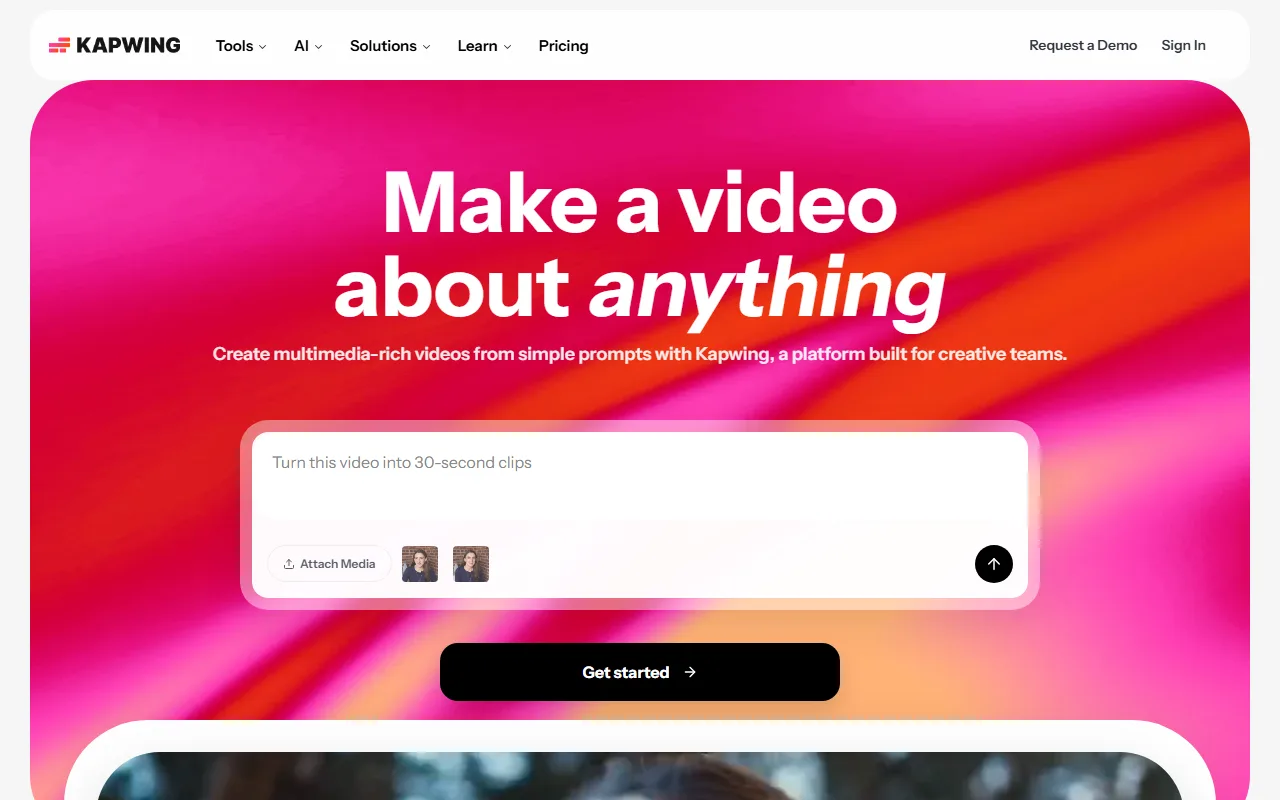
Inside Kapwing

Kapwing screenshot — interface view 1

Captured by Zekai from the live Kapwing interface during review.

30 million+ professionals are already using this tool.
Start Free Today →
Connects With

Works with your existing stack

YouTube TikTok Twitter
Setup complexity: Easy to learn
Kapwing is an AI-powered video editor that streamlines localization for writers and translators. Automatically transcribe, translate, and dub video content into over 40 languages, and generate scripts from simple text prompts to accelerate your multimedia projects.
Comparison

How it compares

Kapwing vs. Descript: Both tools excel at text-based video editing. Choose Kapwing for its robust, all-in-one, browser-based video editing suite and its straightforward AI dubbing and translation features, making it ideal for marketing and content teams needing a quick, collaborative workflow. Opt for Descript if your primary focus is on podcasting and highly detailed audio editing, as its Overdub feature and studio sound tools are more specialized for audio-first creators, though its video capabilities are rapidly growing.

The decision

Is it worth it?

Return on investment
By automating transcription and dubbing, a team using the $16/mo Pro plan can save several hours of manual labor per video.
Built for
Localization specialists, translators, content writers, and copywriters expanding into video content and multimedia projects.
Effort to adopt
Easy to learn
Compliance
Compliance posture not publicly documented — verify with vendor.
Who It's For

Why Writing, Translation & Localization choose this tool

🎯
Built for
Best for writers and translators who need to quickly localize video content through AI-powered dubbing, subtitling, and transcription.
In-Depth Overview
For writers and translators tasked with localizing multimedia, Kapwing is a powerful force multiplier. It moves beyond simple text translation by integrating localization directly into the video editing process. The platform's AI Dubbing feature can translate dialogue into over 40 languages, creating entirely new audio tracks to reach global audiences. This is complemented by an automatic transcription and subtitling tool that generates time-coded captions, which can be downloaded as standard SRT or VTT files for maximum compatibility. A key differentiator is the 'Trim with Transcript' function, which allows you to edit video footage by simply deleting words or sentences from the auto-generated text, a workflow that is immediately intuitive for any writer. Furthermore, the AI Script Generator can turn a basic idea into a structured video script, complete with scene descriptions and dialogue, providing a solid foundation for content creation. With a user base of over 30 million creators, Kapwing has proven its ability to simplify complex video workflows for professional teams.

Key Use Cases

🌐
Localize a Marketing Video in Minutes, Not Days
Localization Manager
Upload a video, auto-transcribe the dialogue, and use the AI to translate and generate dubbed audio in a new language. Export the final video and SRT files for each market.
Reduced localization turnaround by 80%
✓ Pros
Directly translate and dub video content into 40+ languages.
'Trim with Transcript' feature allows editing video like a text document.
Generates scripts from simple prompts, speeding up initial drafting.
Exports subtitles in standard SRT/VTT formats for platform compatibility.
Generous free tier for testing core transcription and subtitling features.
· Cons
Localization is a feature, not the core product; lacks advanced TMS features.
AI credit system can be confusing to manage across different features (dubbing, transcribing).
Free plan exports are watermarked and limited to 1 minute.
⚡ Editorial Verdict

Kapwing excels at making video localization accessible, with powerful AI dubbing and transcription tools that save significant time. However, its core strength is as a video editor, so pure-play translation management features are absent. It's ideal for content teams, less so for dedicated linguistic QA.

Questions & Answers

Frequently asked questions

How does Kapwing help with video translation?

+
Kapwing uses AI to automatically transcribe video audio, translate the text into over 40 languages to create subtitles, and even generate a new dubbed audio track in the target language.

Can I edit a video by changing the text?

+
Yes, Kapwing's 'Trim with Transcript' feature allows you to edit your video by deleting words or sentences directly from the automatically generated transcript, which is a fast and intuitive workflow for writers.

What is the best AI tool for turning a script into a video?

+
Kapwing's AI Video Generator can take a text prompt or a full script and create a video complete with stock footage, voiceover, music, and subtitles, making it a strong contender for script-to-video creation.

What AI can I use to auto-subtitle a video for social media?

+
Kapwing provides an AI-powered auto-subtitling tool that transcribes your video's audio and converts it into timed captions, perfect for making social media content more accessible.

Can I export subtitles for use on other platforms?

+
Yes, you can download the subtitles you create in Kapwing as industry-standard SRT or VTT files, allowing you to upload them to platforms like YouTube, Vimeo, and LinkedIn.

Does Kapwing offer team collaboration features?

+
Yes, paid plans include a collaborative shared workspace where team members can edit projects, leave comments, and manage brand assets like custom fonts and logos.

Last reviewed:

Plans & Pricing

Start today

Enterprise
Pricing on request
Tailored for teams and large organisations.
Contact Sales

Prices and features are updated regularly but can change at any time — always confirm on the official website. Some links on this page are affiliate links.

See all 80 AI for Writing, Translation & Localization tools →
Free guide

Take it with you

Quickstart Guide: Localize Your First Video with Kapwing
  • Why AI-powered localization is essential for global reach.
  • Understanding Kapwing's core translation tools: Transcription, Subtitling, and Dubbing.
  • The power of 'Trim with Transcript': Editing video like a document.
  • Choosing the right export format: MP4 vs. SRT/VTT files.
  • Tips for reviewing and refining AI-generated translations.
+3 more steps inside the guide
Send me the full guide

Get Kapwing deal alerts

Be the first to know when Kapwing drops a new discount, adds features, or changes pricing.

Exclusive Kapwing discount codes
New feature announcements
Best alternative picks when pricing changes
Zero spam — unsubscribe anytime
🎉
You're subscribed!
We'll notify you when Kapwing has a new deal.
AI Directory

About Kapwing

Full Description

Kapwing is an AI-powered video editor that streamlines localization for writers and translators. Automatically transcribe, translate, and dub video content into over 40 languages, and generate scripts from simple text prompts to accelerate your multimedia projects.

Editorial Verdict

Kapwing excels at making video localization accessible, with powerful AI dubbing and transcription tools that save significant time. However, its core strength is as a video editor, so pure-play translation management features are absent. It's ideal for content teams, less so for dedicated linguistic QA.

Last reviewed:
Disclaimer
Zekai is an independent AI tools directory. We are not affiliated with, endorsed by, or officially connected to Kapwing unless clearly stated. All product names, logos, and brands are the property of their respective owners and are used for identification purposes only. The information on this page — including pricing, features, and availability — is general information, may have changed since our last review, and is not professional advice. Zekai Scores and verdicts are our editorial opinion. Some outbound links are affiliate links that may earn us a commission at no extra cost to you. Spotted outdated or incorrect information? Request a correction →
Previous Tool VEED.IO Next Tool vidby
All AI Tools A–Z →
Visit website ↗
Kapwing9.0Try Kapwing ↗Next tool →
Today's top 3 AI for Writing, Translation & Localization tools →