Browse
AI Directory Open Source AI News 🏆 AI Challenge AI Statistics
Browse by profession
Accounting, Bookkeeping & TaxCompliance, Audit & GRCConstructionCustomer SupportData ScienceMedical All 38 professions →
Company
About Advertise Submit a tool Get the free Productivity AI guide
Overview Before & After Try It Reviews Screenshots Integrations Why This Tool FAQ Pricing Top 10 Get Alerts News

Align your executive's schedule with their peak energy levels using an AI planner that reads biometric data from wearables.

Lifestack syncs with health data to draft a daily schedule that puts the right work at the right time, preventing burnout.

Best forAligning tasks with biometric energy levels
DifferentiatorIntegrates wearable health data to automate energy-based scheduling.
Proof30,000+ users
Explore Lifestack
Pro from$7/month
8.7 Zekai
Energy-Aware AI Scheduling
AI for Personal Productivity & Executive Assistants
Ease of Use
8.5
Accuracy
9.2
Value
8.2
Time Saving
9.0
30,000+Users
8.7/10Zekai Score
AI Schedule PlannerWearable IntegrationEnergy ManagementTask AutomationCross-Platform
🏷 Is this your tool? Claim this listing →
Hand-scored by Zekai

Top AI for Personal Productivity & Executive Assistants picks

See all 121 AI for Personal Productivity & Executive Assistants tools →
⚡ Quick answer

For Personal Productivity & Executive Assistants, Lifestack is the best AI tool for energy-aware scheduling. It moves beyond simple time-blocking by integrating with wearables (like Apple Watch, Oura) to analyze sleep and recovery data. This allows an EA to intelligently schedule an executive's most demanding tasks during their biological peak focus times, maximizing impact and preventing burnout.

CategoryAI Schedule Planner
Best ForAligning tasks with biometric energy levels
Price From$7/mo
Free7-day trial
DifferentiatorIntegrates wearable health data to automate energy-based scheduling.
Proof30,000+ users
Rating4.4/5
📖 About Lifestack
Real Impact

Before & After

❌ Before

Scheduling based on guesswork, leading to burnout and mismatched energy.

Reactive scheduling
✅ After

Data-driven schedules that place high-leverage work in peak performance windows.

Proactive energy management
Prompt Templates

Try it with these prompts

Copy any prompt and paste it directly into the tool.

Plan my day around energy levels

Draft a daily schedule that aligns my most demanding tasks with my predicted peak energy zones. Consider my current sleep data and recovery status to optimize focus and productivity throughout the day.

Optimize meals and sleep schedule

Generate a meal and sleep plan for tomorrow based on my upcoming schedule and energy demands. Ensure my rest and nutrition support my planned activities for maximum effectiveness.

Integrate Trello tasks with energy zones

Sync tasks from my Trello board into my Lifestack calendar. Prioritize and schedule these tasks according to my energy levels, ensuring high-priority items are placed during focus periods.

Social Proof

Trusted by 30,000+

30,000+ professionals using this tool
Ease of Use
8.5
Accuracy
9.2
Value
8.2
Time Saving
9.0

"I can’t begin to explain how effective I’ve become since scheduling more demanding tasks at work when the app notes my high energy/low energy throughout the day."

Michael R., Professional · May 2026

"Before Lifestack, scheduling tools couldn’t sync satisfaction and efficiency into my busy lifestyle. Now, tasks on my calendar match my energy levels throughout the day, and life couldn’t be better."

Kirtis S., User · April 2026

"It makes me more mindful, but there's a learning curve. I have to actively think about not setting important tasks during 'Energy-Calm' periods, even if the calendar is free."

K4M1TSUKI, User · March 2026

"Prior to using Lifestack, I just planned based on my random thought process. Now I plan more according to my available energy levels, and it has been nothing short of great."

Dave M., User · February 2026
Proof of Use

Inside Lifestack

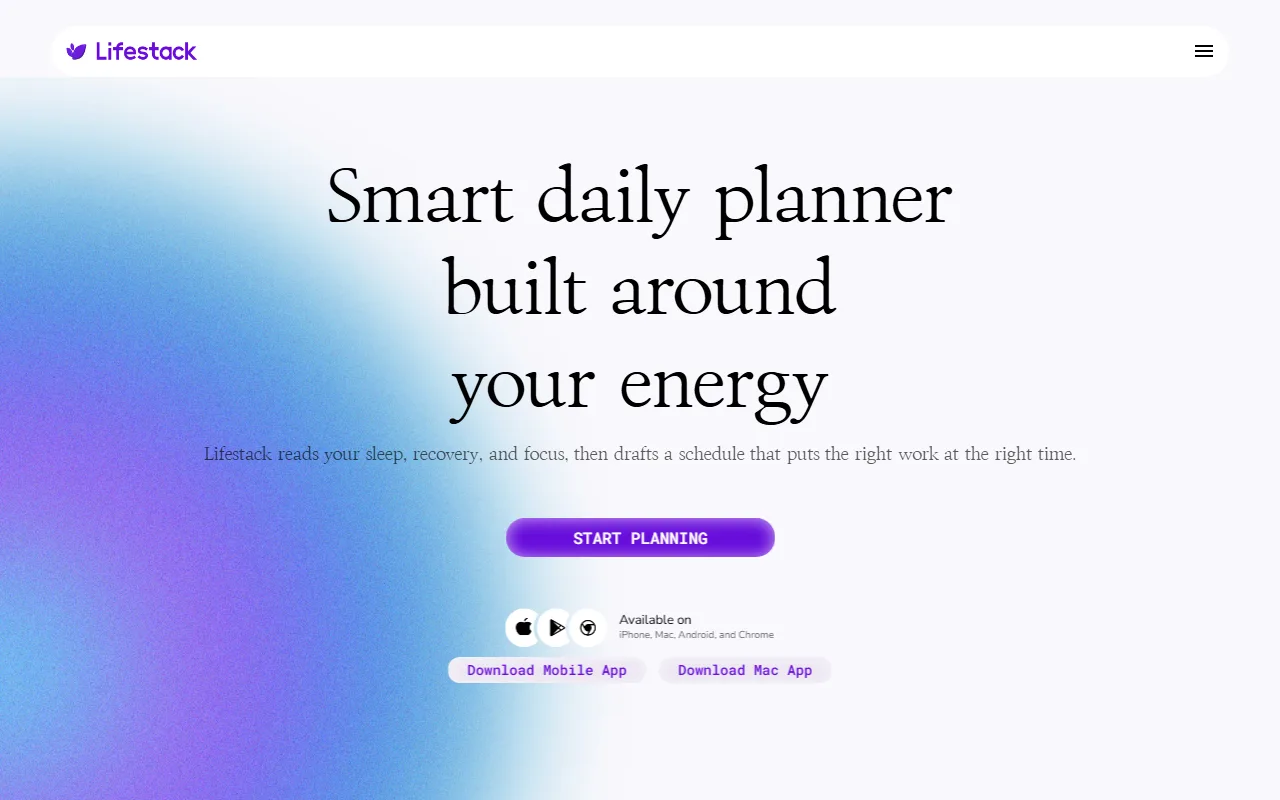
Lifestack screenshot — interface view 1

Captured by Zekai from the live Lifestack interface during review.

30,000+ professionals are already using this tool.
See Plans & Pricing →
Connects With

Works with your existing stack

Apple Health Trello
Setup complexity: Easy
Lifestack is an AI-powered daily planner designed for executive assistants and professionals to optimize productivity by aligning tasks with natural energy cycles. It integrates with wearables to analyze sleep, recovery, and focus data, then automatically drafts a schedule to maximize efficiency.
Comparison

How it compares

Lifestack vs. Motion: Motion is an AI-powered task manager that automatically plans your day by prioritizing tasks and finding open slots. It excels at optimizing for time and deadlines. Choose Motion if your primary goal is fitting a long to-do list into a packed schedule. Lifestack, however, optimizes for a different variable: your biological energy. By integrating with wearables, it schedules tasks based on when you're best equipped to handle them. Choose Lifestack if the goal is not just to get things done, but to do the *right* things at the *right* time to improve focus and prevent burnout.

The decision

Is it worth it?

Return on investment
For $50/year, reclaiming just one hour of high-focus time per month by avoiding low-energy scheduling could deliver significant returns on executive performance.
Built for
Executive Assistants, Personal Assistants, and busy professionals managing complex schedules for themselves or high-performance individuals.
Effort to adopt
Easy
Compliance
Compliance posture not publicly documented — verify with vendor.
Who It's For

Why Personal Productivity & Executive Assistants choose this tool

🎯
Built for
This tool is best for assistants managing demanding executives who use wearables, enabling proactive, energy-aware scheduling to boost performance and prevent burnout.
In-Depth Overview
For an Executive Assistant, managing an executive's time is paramount. Lifestack moves beyond simple time-blocking by introducing a critical variable: biological energy. The tool's core premise is that true productivity isn't just about cramming tasks into slots, but about matching the task's demand to the person's capacity. By integrating with wearables and health data, it identifies 'Energy Zones'—periods of peak focus or calm. This allows an assistant to proactively schedule deep work, like board prep or strategic planning, during an executive's high-focus windows, and relegate administrative tasks to lower-energy periods. The AI not only plans work but also considers meals and rest, creating a holistic daily plan. With support for platforms like Trello and major calendars, it fits into existing workflows, preventing you from working against your executive's natural rhythm and reducing the risk of burnout for both of you. The claim of '30,000+ users' suggests a growing adoption of this energy-aware approach to personal and professional management.

Key Use Cases

👩‍💼
Optimize Your Executive's High-Stakes Day
Executive Assistant
Sync with your executive's wearable to see their energy peaks. Schedule the critical board presentation during their 'Focus' zone and move administrative catch-ups to their 'Calm' period.
Fewer rescheduled meetings, higher impact.
🚀
Manage Your Own Energy to Avoid Burnout
Startup Founder
Let Lifestack analyze your sleep and recovery data to build a sustainable work schedule. It automatically blocks time for deep work when you're sharpest and reminds you to rest.
Increased daily productivity without exhaustion.
🧠
Structure Your Day Around Focus Fluctuations
Professional with ADHD
Use the 'Energy-Aware' planning to get a pre-built schedule that respects your body's signals, making it easier to start and complete tasks without fighting against your own brain.
More consistent task completion.
✓ Pros
Aligns high-demand tasks with peak biological energy levels.
Integrates health data directly into the calendar for a holistic view.
Helps prevent burnout by scheduling around natural body rhythms.
Syncs tasks from third-party platforms like Trello.
Available across desktop and mobile platforms (iOS, Android, Mac).
· Cons
Effectiveness is dependent on consistent use of a compatible wearable device.
No dedicated free tier is available, only a 7-day trial on the annual plan.
The concept may require a behavioral shift for those used to traditional scheduling.
No explicit mention of enterprise-grade security compliance (e.g., SOC2).
⚡ Editorial Verdict

Lifestack offers a unique, data-driven approach to scheduling that goes beyond traditional calendars. For EAs managing principals who value data and peak performance, it's a powerful way to optimize their day. The main trade-off is its reliance on wearable tech; its value is directly tied to the user consistently wearing and syncing a device.

Questions & Answers

Frequently asked questions

Is Lifestack available in Europe?

+
Lifestack is available as a web and mobile application (iOS/Android) and can be downloaded and used globally, including in Europe. However, you should verify data privacy specifics, as its policies may differ based on region.

Can Lifestack help me manage my team's schedule?

+
Lifestack is primarily designed for individual planning. While you can use it to manage an executive's schedule, it does not currently offer team-wide scheduling features. It does offer group deals for multiple individual licenses.

Do I need a wearable device for Lifestack to work?

+
While not strictly required, the core value of Lifestack comes from its integration with wearables. Without health data from a synced device, the AI cannot generate an energy-aware schedule, limiting its functionality to that of a standard planner.

How is my private health data protected?

+
Lifestack states a 'Privacy First' policy, claiming that health and calendar data is never sold or shared. The service is built with security standards, and the user remains in control of their information. For specific compliance details, it's best to consult their privacy policy.

What calendars are compatible with Lifestack?

+
The website mentions a Chrome extension and compatibility with 'unlimited calendars', which typically implies it works with major platforms like Google Calendar and Outlook Calendar, but the specific calendars are not explicitly listed.

Is Lifestack free to use?

+
No, Lifestack is a paid service. There is no permanent free tier. However, the annual plan includes a 7-day free trial to test the full feature set before committing.

Last reviewed:

Plans & Pricing

Start today

Prices and features are updated regularly but can change at any time — always confirm on the official website. Some links on this page are affiliate links.

See all 121 AI for Personal Productivity & Executive Assistants tools →
Free guide

Take it with you

  • The Science of Chronotypes & Ultradian Rhythms
  • Choosing and Syncing the Right Wearable
  • Mapping Task Types to Energy Zones (Focus, Energize, Calm)
  • Communicating the 'Why' to Your Executive
  • Advanced Tips: Integrating Meals, Rest, and Travel
+3 more steps inside the guide
Send me the full guide

Get Lifestack deal alerts

Be the first to know when Lifestack drops a new discount, adds features, or changes pricing.

Exclusive Lifestack discount codes
New feature announcements
Best alternative picks when pricing changes
Zero spam — unsubscribe anytime
🎉
You're subscribed!
We'll notify you when Lifestack has a new deal.
AI Directory

About Lifestack

Full Description

Lifestack is an AI-powered daily planner designed for executive assistants and professionals to optimize productivity by aligning tasks with natural energy cycles. It integrates with wearables to analyze sleep, recovery, and focus data, then automatically drafts a schedule to maximize efficiency.

Editorial Verdict

Lifestack offers a unique, data-driven approach to scheduling that goes beyond traditional calendars. For EAs managing principals who value data and peak performance, it's a powerful way to optimize their day. The main trade-off is its reliance on wearable tech; its value is directly tied to the user consistently wearing and syncing a device.

Last reviewed:
Disclaimer
Zekai is an independent AI tools directory. We are not affiliated with, endorsed by, or officially connected to Lifestack unless clearly stated. All product names, logos, and brands are the property of their respective owners and are used for identification purposes only. The information on this page — including pricing, features, and availability — is general information, may have changed since our last review, and is not professional advice. Zekai Scores and verdicts are our editorial opinion. Some outbound links are affiliate links that may earn us a commission at no extra cost to you. Spotted outdated or incorrect information? Request a correction →
Previous Tool Reclaim AI Next Tool Morgen
All AI Tools A–Z →
Visit website ↗
Lifestack8.7Try Lifestack ↗Next tool →
Today's top 3 AI for Personal Productivity & Executive Assistants tools →