
Turn your scattered to-do lists and calendars into a focused, AI-driven daily plan that gets executed.
Trevor AI predicts task durations, finds the optimal time, and time-blocks your day for you.
Zekai Verdict
- What is it?
- For Executive Assistants and busy professionals, Trevor AI acts as a smart planner, unifying scattered tasks from various lists and calendars.
- Best for
- Best for turning a chaotic mix of tasks from multiple sources into a single, manageable, and AI-optimized daily…
- Not ideal for
- Limited number of direct task management integrations compared to some rivals.
- Price
- Free plan · paid from $5/mo
- Zekai Score
- 9.1/10
 Scribe
 Superhuman
 Notta
Notta Sorinai
 NudgeForMe
 Descript
 Reclaim AI
Top AI for Personal Productivity & Executive Assistants picks
See all 121 AI for Personal Productivity & Executive Assistants tools →For Personal Productivity & Executive Assistants, Trevor AI is a top choice for transforming chaotic to-do lists into an actionable, time-blocked schedule. It excels by integrating with essential calendars (Google, Microsoft) and task managers (Todoist), then using AI to predict task durations and intelligently slot them into your day, reportedly boosting task completion to 85%.
See Trevor AI in action
Your workflow, automated
Before & After
Juggling scattered to-do lists and multiple calendars, manually estimating task times.
40% task completionA single, unified, and intelligently scheduled plan for the day, blocked out in your calendar.
85% task completionTry it with these prompts
Copy any prompt and paste it directly into the tool.
I have a task to 'Prepare monthly sales report'. Please estimate its duration, find a suitable time in my calendar based on my availability, and schedule it for me. I prefer to do this task in the afternoon.
My task is 'Launch new marketing campaign'. Please break this down into smaller, actionable steps. For each step, suggest a time block and add it to my calendar. I need to start this by next Monday.
What are the best practices for using scheduling blocks to separate work and personal life? How can I configure these in Trevor AI to improve AI scheduling accuracy?
Trusted by professionals
Inside Trevor AI
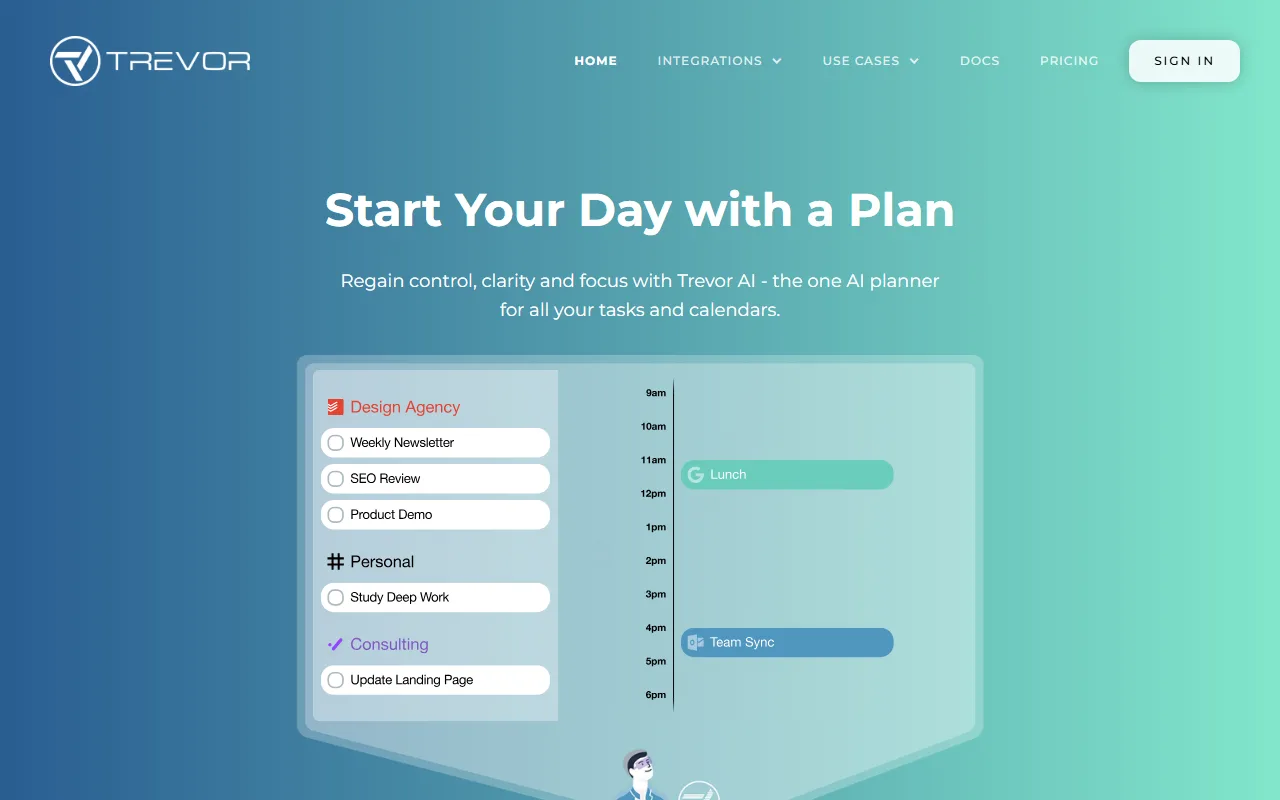
Captured by Zekai from the live Trevor AI interface during review.
Works with your existing stack
How it compares
Trevor AI vs. Motion: Choose Trevor AI if you are an individual, freelancer, or EA focused on affordably and effortlessly planning your own day. Its strength is simplicity, a great free tier, and powerful AI for personal time-blocking. Pick Motion if you are a manager or part of a team needing advanced project management features, team collaboration, and are willing to pay a premium. Motion is for orchestrating team-wide work, while Trevor AI is for mastering your own schedule.
Is it worth it?
Why Personal Productivity & Executive Assistants choose this tool
Key Use Cases
Trevor AI excels at its core promise: transforming abstract to-do lists into concrete, scheduled time blocks. Its AI-powered duration prediction and scheduling suggestions are genuinely useful for overcoming planning inertia. The main trade-off is its focus on a few key task integrations (Todoist, Google/MS) rather than a vast library, prioritizing depth of planning over breadth of connectivity.
Frequently asked questions
Is Trevor AI free to use?
What does the 'AI' in Trevor AI actually do?
Does Trevor AI replace my Google or Outlook calendar?
Which AI tool is best for turning my to-do list into a daily schedule?
How can I use AI to manage multiple calendars and task lists for my executive?
What's a good AI planner that integrates with Todoist and Google Calendar?
Last reviewed:
Start today
Prices and features are updated regularly but can change at any time — always confirm on the official website. Some links on this page are affiliate links.
Top 10 AI tools in this category


Take it with you
- Unify Your Digital Life: Connect all your calendars and task lists.
- Embrace AI Scheduling: Let Trevor predict durations and find the best time slots.
- From List to Plan: Convert chaotic to-dos into a concrete, time-blocked schedule.
- Achieve Deep Work: Use Focus Mode to eliminate distractions and execute tasks.
- Talk to Your Planner: Leverage 'Ask Trevor' to reschedule and manage tasks with chat.
Get Trevor AI deal alerts
Be the first to know when Trevor AI drops a new discount, adds features, or changes pricing.
Latest AI news



About Trevor AI
Full Description
For Executive Assistants and busy professionals, Trevor AI acts as a smart planner, unifying scattered tasks from various lists and calendars. It uses AI to predict task durations, suggest optimal times, and automatically time-block your schedule, ensuring you move from a cluttered to-do list to an achievable daily plan.
Editorial Verdict
Trevor AI excels at its core promise: transforming abstract to-do lists into concrete, scheduled time blocks. Its AI-powered duration prediction and scheduling suggestions are genuinely useful for overcoming planning inertia. The main trade-off is its focus on a few key task integrations (Todoist, Google/MS) rather than a vast library, prioritizing depth of planning over breadth of connectivity.


