AI tools, scored for your job
Get paid to train AI
Overview How It Works Before & After Try It Reviews Integrations Why This Tool FAQ Pricing Top 10 Get Alerts News

2short.ai — AI for Video Editing & Production

Automatically extract engaging short clips from long-form videos to grow your audience on TikTok, Reels, and Shorts.

Use AI to find the best moments, add animated subtitles, and export watermark-free clips 10x faster.

What is 2short.ai?

2short.ai: Automatically extract engaging short clips from long-form videos to grow your audience on TikTok, Reels, and Shorts. It has a free plan; paid plans start at $19.90/mo. Zekai scores it 6.9 out of 10 after independent testing. Best for creating short-form social videos from long-form content.

DifferentiatorAI-driven clip selection combined with automatic facial tracking and animated subtitles.
ProofClaims to repurpose content 10x faster.
Try 2short.ai
Free Plan Pro from$19.90/mo
Free plan verified · free AI tools for Video Editors
6.9 Zekai
Rapid Content Repurposing
AI for Video Editing & Production
Ease of Use
8.2
Accuracy
7.0
Value
6.0
Time Saving
6.2
AI Clip GenerationFacial TrackingAnimated SubtitlesBrand KitsMulti-platform Export
🏷 Is this your tool? Claim this listing →

Zekai Verdict

What is it?
2short.ai helps video editors and production teams repurpose long-form content into engaging short-form videos for platforms like YouTube Shorts, TikTok, and Reels.
Best for
Best for rapidly creating a high volume of short-form social videos from existing long-form content like podcasts and…
Not ideal for
Requires videos with spoken words and captions to function effectively
Price
Free plan · paid from $19.90/mo
Zekai Score
6.9/10
Hand-scored by Zekai

Top AI for Video Editing & Production picks

See all 107 AI tools for Video Editors →
⚡ Quick answer

For Video Editing & Production professionals, 2short.ai is one of the best AI tools for rapidly repurposing long-form content. It automates the tedious process of finding compelling moments in videos like podcasts or interviews, using AI to extract clips, reframe them for mobile with facial tracking, and add animated subtitles, saving significant editing time.

CategoryAI Video Repurposing
Best forCreating short-form social videos from long-form content.
Price from$9.90/mo
Free planFree plan available
DifferentiatorAI-driven clip selection combined with automatic facial tracking and animated subtitles.
ProofClaims to repurpose content 10x faster.
Rating6.9/10
📖 About 2short.ai
How It Works

Your workflow, automated

1
Import Your Video
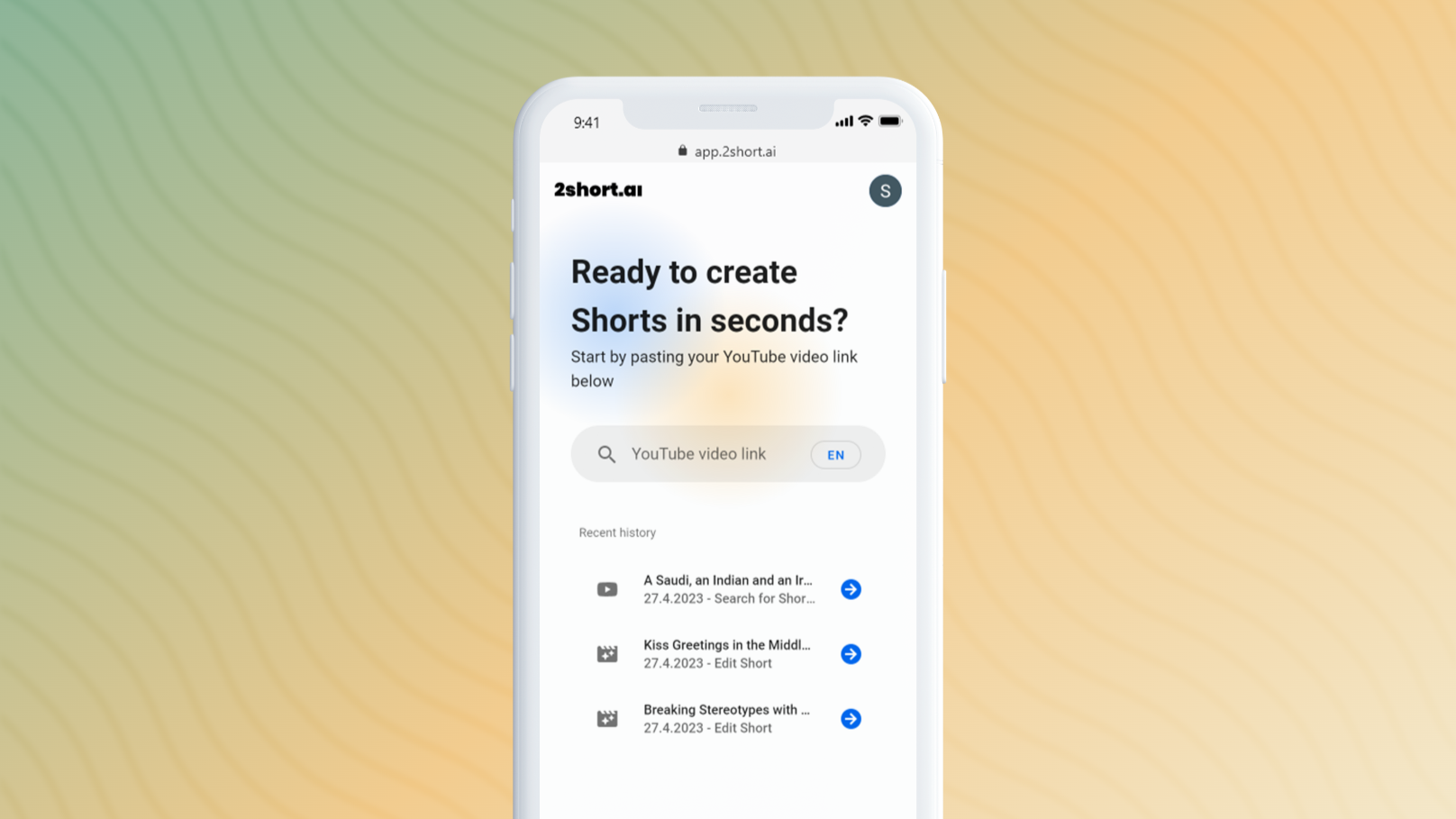
Paste a YouTube link or import from Google Drive. The AI begins analyzing the spoken content.
2
Review AI-Generated Shorts
Browse the short clips identified by the AI, complete with animated subtitles.
3
Edit & Export
Adjust aspect ratio, apply brand presets, and export your clips in 1080p without watermarks.
Ready to automate your workflow with 2short.ai?
Try 2short.ai →
Real Impact

Before & After

❌ Before

Manually scrubbing hours of footage to find short, shareable clips.

Hours per video
✅ After

Automatically generating dozens of potential clips in minutes.

Minutes per video
Prompt Templates

Try it with these prompts

Copy any prompt and paste it directly into the tool.

Extract engaging moments from a podcast

Take this podcast episode transcript and identify the most compelling soundbites or discussions. Extract these segments into short, shareable clips suitable for social media, ensuring key points are highlighted.

Create YouTube Shorts from a webinar

Analyze this webinar recording to find the most insightful explanations or demonstrations. Generate short video clips from these sections, complete with animated subtitles and branding, to promote the full webinar…

Generate clips from a product review video

Process this product review video and extract the most impactful feature highlights and user testimonials. Create short, engaging clips that showcase the product's benefits, using facial tracking to keep the speaker…

AI Prompts

Prompts for Video Editors

Prompt 01 Universal Dialogue Cleanup
Isolate all human speech from the background. Remove wind noise, microphone hum, and room echo. Normalize all speakers to a target loudness of -14 LUFS and a true peak of -1.5 dB.
Prompt 02 Filler Word and Silence Removal
Transcribe the audio track. Identify and create an edit list of all instances of the words 'um,' 'uh,' 'like,' 'you know,' and 'so.' Also identify all silent segments longer than 0.7 seconds. Do not delete them; present the list for review.
Prompt 03 De-Mix Production Audio
Separate the source audio into three distinct stems: one for dialogue, one for background music, and one for ambient sound effects. Export each as a 24-bit WAV file.
See all 35 AI prompts for Video Editors →
Social Proof

Trusted by professionals

Ease of Use
8.2
Accuracy
7.0
Value
6.0
Time Saving
6.2
Connects With

2short.ai integrations

YouTube Google Drive
Setup complexity: Beginner-friendly
2short.ai helps video editors and production teams repurpose long-form content into engaging short-form videos for platforms like YouTube Shorts, TikTok, and Reels. The AI analyzes your videos to identify the most compelling moments, automatically reframing them with facial tracking and adding animated subtitles. This streamlines the content repurposing workflow, saving significant editing time while helping grow channel reach.
Comparison

Best 2short.ai alternatives

2short.ai vs. Opus Clip: Both tools excel at AI-powered video repurposing. 2short.ai is highly straightforward, focusing on a fast workflow from link to export with integrated facial tracking and branding. It's ideal for creators who want speed and simplicity. Opus Clip, a major competitor, often provides more advanced AI features like a 'virality score' for clips and more dynamic editing styles. Choose 2short.ai for its clean interface and reliable core features. Opt for a tool like Opus Clip if you want more AI-driven analytics and varied editing templates.

The decision

Is 2short.ai worth it?

Return on investment
By automating clip discovery and subtitling, the $19.90/mo Pro plan can save a video editor several hours of manual work per long-form video.
Built for
Video editors, content creators, social media managers, and production agencies managing video-heavy channels.
Effort to adopt
Beginner-friendly
Compliance
Compliance posture not publicly documented — verify with vendor.
Who It's For

Why Video Editing & Production choose this tool

🎯
Built for
Best for rapidly creating a high volume of short-form social videos from existing long-form content like podcasts and interviews.
In-Depth Overview
For video editors and production professionals, 2short.ai addresses the relentless demand for short-form content by automating the most tedious parts of repurposing. Instead of manually scrubbing through hours of footage to find shareable clips, you simply paste a YouTube or Google Drive link. The AI analyzes the spoken content to identify the most engaging segments, a process it claims is 10x faster than traditional methods. The real time-saver is in the post-production features. The platform automatically applies facial tracking to keep speakers centered in vertical or square formats, a crucial task for reframing content shot in 16:9. One-click animated subtitles further boost engagement without needing complex keyframing in Premiere Pro or After Effects. Editors can also apply brand presets like logos and overlays, ensuring consistency across all repurposed clips. With support for 1080p watermark-free exports on all paid plans, it provides a professional finish, allowing you to focus on creating new long-form content while the AI handles the daily social media churn.

Key Use Cases

🎬
Turn One Podcast into Ten TikToks in Minutes
Video Content Creator
Paste the YouTube link of a one-hour podcast episode. Let the AI generate dozens of potential short clips, select the best ones, add branded subtitles, and export them for social media.
10x faster content repurposing
✓ Pros
Dramatically reduces time spent finding clips in long videos
Automated facial tracking keeps talking heads centered
Built-in animated subtitles improve viewer retention
Supports multiple aspect ratios for different platforms
Generous free plan for initial testing (30 mins/mo analysis)
· Cons
Requires videos with spoken words and captions to function effectively
AI clip selection can sometimes miss nuanced or visual highlights
Free plan has limited AI analysis time (30 mins/mo)
Advanced editing tools are basic compared to a full NLE
⚡ Editorial Verdict

2short.ai is a highly efficient tool for video professionals tasked with content repurposing. Its AI-powered clip selection and automated reframing significantly cut down on manual editing hours. The main trade-off is its reliance on speech-based content, making it less effective for purely visual or music-driven videos.

Questions & Answers

Frequently asked questions

How do I get started with 2short.ai?

+
Simply copy your video link from YouTube and paste it into the 2short app. The AI will then analyze your video and generate short clips automatically.

What types of videos does 2short.ai support?

+
The tool works best with videos containing spoken words, such as podcasts, educational videos, commentary, product reviews, and motivational speeches. It requires videos to have captions, which YouTube auto-generates for most content.

Which languages does 2short.ai support?

+
It supports a wide range of languages, including English, Spanish, French, German, Japanese, Korean, Portuguese, and many others, with the list continually expanding.

Can I use 2short.ai for videos that are not on YouTube?

+
Yes, the paid plans (Lite, Pro, and Premium) allow you to import videos directly from Google Drive or other public URLs, in addition to YouTube.

Does 2short.ai add a watermark to my videos?

+
No, even the free Starter plan allows you to export clips without a watermark. Paid plans offer unlimited, high-resolution 1080p exports.

Is 2short.ai a full replacement for my video editor?

+
No, it's a specialized tool designed to accelerate the first, most time-consuming step of content repurposing: finding and formatting good clips. For advanced color grading, effects, or complex edits, you would still use a traditional non-linear editor (NLE).

Last reviewed:

Plans & Pricing

2short.ai pricing and plans

Prices and features are updated regularly but can change at any time — always confirm on the official website. Some links on this page are affiliate links.

See all 107 AI tools for Video Editors →
Free guide

Take it with you

  • Automate Clip Discovery: Learn how 2short.ai's AI analyzes your long-form videos to find the most engaging, shareable moments.
  • Master Mobile Framing: Use automatic facial tracking to keep your speakers perfectly centered in vertical and square video formats.
  • Boost Engagement with Subtitles: Add eye-catching animated subtitles with a single click to stop the scroll.
  • Maintain Brand Consistency: Apply your logo and brand overlays to every clip for a professional look.
  • Export for Any Platform: Understand the different aspect ratios and export in high-quality 1080p for TikTok, Reels, and Shorts.
+3 more steps inside the guide
Send me the full guide

Get 2short.ai deal alerts

Be the first to know when 2short.ai drops a new discount, adds features, or changes pricing.

Exclusive 2short.ai discount codes
New feature announcements
Best alternative picks when pricing changes
Zero spam — unsubscribe anytime
🎉
You're subscribed!
We'll notify you when 2short.ai has a new deal.
AI Directory

About 2short.ai

Full Description

2short.ai helps video editors and production teams repurpose long-form content into engaging short-form videos for platforms like YouTube Shorts, TikTok, and Reels. The AI analyzes your videos to identify the most compelling moments, automatically reframing them with facial tracking and adding animated subtitles. This streamlines the content repurposing workflow, saving significant editing time while helping grow channel reach.

Editorial Verdict

2short.ai is a highly efficient tool for video professionals tasked with content repurposing. Its AI-powered clip selection and automated reframing significantly cut down on manual editing hours. The main trade-off is its reliance on speech-based content, making it less effective for purely visual or music-driven videos.

Last reviewed:
Disclaimer
Zekai is an independent AI tools directory. We are not affiliated with, endorsed by, or officially connected to 2short.ai unless clearly stated. All product names, logos, and brands are the property of their respective owners and are used for identification purposes only. The information on this page — including pricing, features, and availability — is general information, may have changed since our last review, and is not professional advice. Zekai Scores and verdicts are our editorial opinion. Some outbound links are affiliate links that may earn us a commission at no extra cost to you. Spotted outdated or incorrect information? Request a correction →
Get paid to train AI →
‹ Previous Tool GlossAi › Next Tool Zubtitle ‹ ›
All AI Tools A–Z →
Visit website ↗
2short.ai6.9Try 2short.ai ↗Next tool →
⚡ Today's top 3 AI for Video Editing & Production tools →
● 1,066 paid AI jobs open now →

See Zekai first in Google