Browse
AI Directory Open Source AI News AI Statistics
Browse by profession
Accounting, Bookkeeping & TaxCompliance, Audit & GRCConstructionCustomer SupportData ScienceMedical All 30 professions →
Company
About Advertise Submit a tool Get the free Productivity AI guide
Overview How It Works Before & After Reviews Integrations Why This Tool FAQ Pricing Top 10 Get Alerts News
Missive

For Executive Assistants, Missive transforms the shared inbox from a source of chaos into a streamlined collaboration hub. It allows you to...

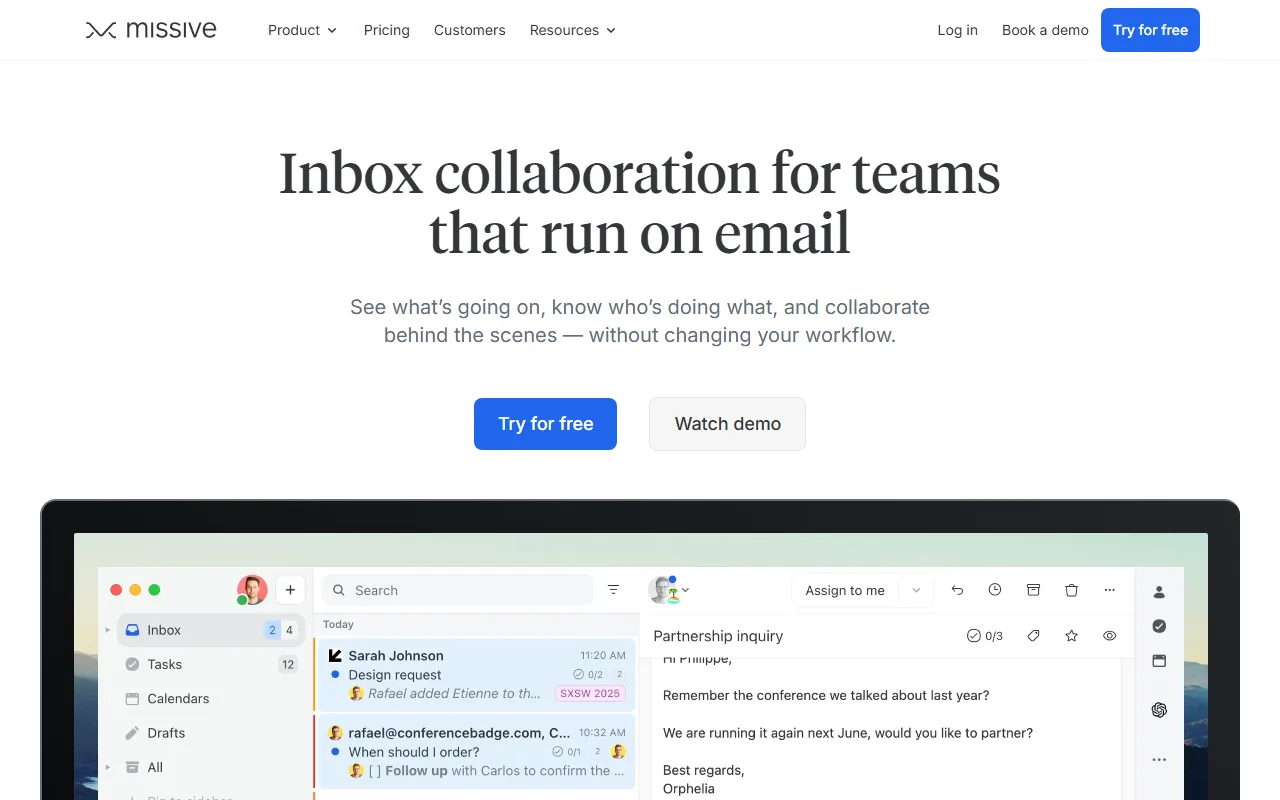
Turn your executive's chaotic inbox into a collaborative command center. Assign tasks, chat privately on emails, and automate responses.

Missive centralizes email, SMS, and social media into one shared workspace where you know exactly who's doing what.

Try Missive Free
Free Plan Pro from$24/user/month
Shared InboxTask ManagementAI AssistantAutomationsIntegrations
8.8 Zekai
Collaborative Inbox Command Center
AI for Personal Productivity & Executive Assistants
Ease of Use
8.5
Accuracy
8.8
Value
8.7
Time Saving
9.2
5,000+ companiesUsers
8.8/10Zekai Score
🏷 Is this your tool? Claim this listing →
⚡ Quick answer

For Executive Assistants, Missive is a top choice for transforming a chaotic shared inbox into an organized command center. It allows EAs to assign emails as tasks, collaborate privately with team members on responses, and automate workflows, all within the inbox. Its SOC 2 compliance and integrations with tools like Salesforce and Asana make it a robust, secure hub for executive support.

CategoryShared Inbox & Team Collaboration
Best ForEAs managing high-volume inboxes with a team.
Price From$14/user/month
FreeYes, a free plan is available.
DifferentiatorCombines team chat, task management, and multi-channel inbox (email, SMS, social) into one platform.
ProofUsed by over 5,000 companies; SOC 2 Type II Certified.
Rating4.4/5
📖 About Missive

For Executive Assistants, Missive transforms the shared inbox from a source of chaos into a streamlined collaboration hub. It allows you to manage emails, social media, and SMS as a team, assign tasks directly from messages, and discuss contextually without forwarding chains.

How It Works

Your workflow, automated

1
Connect Inboxes
Connect your personal and your executive's shared inboxes (Gmail, Outlook) along with other channels like SMS or WhatsApp.
2
Collaborate & Assign
Use internal chat on an email to discuss a response, then assign it to the right person or set a reminder for yourself.
3
Automate & Reply
Create rules to auto-tag important emails and use the AI assistant to draft replies based on context from your integrated apps.
Ready to automate your workflow with Missive?
Try Missive Free →
Real Impact

Before & After

❌ Before

Constantly forwarding emails, using separate task managers, and asking 'who is handling this?'

Hours lost in forwarding chains
✅ After

A single source of truth where every message has a clear owner, context, and next action.

Inbox zero for the team
Social Proof

Trusted by 5,000+ companies

5,000+ companies professionals using this tool
Ease of Use
8.5
Accuracy
8.8
Value
8.7
Time Saving
9.2

"I’ll never use another email client. I just can't do the things that I need to do without Missive anymore."

Benny R., Founder · June 2026

"We had to manually forward emails or loop others in. Things got missed. We weren’t always sure who was answering what. It was... stressful."

Estelle B., Operations Manager · May 2026

"It's a powerful system for team collaboration, but be prepared for a learning curve. Getting everyone to adopt the new workflows and leave old habits behind took some focused effort."

Casey P., Executive Assistant · April 2026

"Before Missive, our day was organized chaos with thousands of inbound messages. Now we just assign and move forward."

Mike M., CEO · March 2026
5,000+ companies+ professionals are already using this tool.
Start Free Today →
Connects With

Works with your existing stack

Gmail & Google Workspace Outlook IMAP Whatsapp Messenger Instagram SMS via Twilio ChatGPT OpenAI Dropbox Google Drive Zoom Google Meet Asana ClickUp Trello Hubspot Salesforce Stripe Notion Linear
Setup complexity: Moderate
For Executive Assistants, Missive transforms the shared inbox from a source of chaos into a streamlined collaboration hub. It allows you to manage emails, social media, and SMS as a team, assign tasks directly from messages, and discuss contextually without forwarding chains.
Who It's For

Why Personal Productivity & Executive Assistants choose this tool

🎯
Built for
Best for assistants who need to collaborate with colleagues or their executive to manage and delegate tasks from a shared inbox.
In-Depth Overview
As an Executive Assistant, your primary role is to be a force multiplier for your executive. Missive is built for this. Instead of a messy inbox with endless forwarding chains, you get a command center. You can triage your executive's incoming mail, assign requests to other departments, and track them to completion—all from one place. You can collaboratively draft a sensitive reply with your executive in a private chat attached to the email itself, ensuring the final version is perfect before it's sent. The platform's automation engine handles repetitive tasks, like tagging emails from the board or assigning all IT requests to the tech team. With its AI assistant pulling context from integrated apps like your CRM, you can draft informed replies in seconds. This isn't just a better inbox; it's a system for managing your executive's communications workload, proven effective in over 5,000 companies and backed by SOC 2 Type II security compliance.

Key Use Cases

👩‍💼
Triage and Delegate the Executive Inbox Without Missing a Beat
Executive Assistant to CEO
Assign emails from the CEO's inbox to other team members, discuss the best response in a private chat, and use AI to draft a reply for the CEO's final approval.
Eliminates duplicate work and missed messages
✓ Pros
Centralizes multiple communication channels (email, SMS, WhatsApp) into one view.
Clear assignment and status tracking eliminates confusion over who is handling a request.
Internal chat on emails prevents messy forwarding chains and keeps context together.
Powerful automation engine saves time on routine tasks and email sorting.
SOC 2 Type II compliance provides a strong, verifiable security posture.
· Cons
Requires buy-in from your executive and team to be fully effective.
Can be overly complex for solo EAs who don't need team features.
AI features require bringing your own API key or purchasing Missive AI credits.
⚡ Editorial Verdict

Missive is a powerful command center for any EA managing a complex, shared inbox. Its core strength is turning ambiguous emails into actionable, trackable tasks with clear ownership. The main trade-off is that its full value is only unlocked when your entire immediate team or executive adopts the platform.

Questions & Answers

Frequently asked questions

Can I use Missive to manage my executive's email without them seeing my own personal inbox? +
Yes. Your personal emails remain private by default. You can manage shared inboxes (like exec-office@) and your own personal inbox from one app, and your coworkers will not see your personal mail unless you explicitly share a specific conversation.
Does Missive's AI assistant work with information from other apps? +
Yes. The AI assistant can be connected to tools like your CRM or Stripe. This allows it to gather context from external sources before drafting a reply, leading to more relevant and accurate responses.
How does Missive help an EA manage tasks for their executive? +
Missive allows you to turn any email, SMS, or other message into a trackable task. You can assign it to yourself, your executive, or another team member, set a due date, and monitor its status, ensuring nothing falls through the cracks.
Is Missive secure enough for handling confidential executive communications? +
Yes, Missive is SOC 2 Type II certified and GDPR ready. This demonstrates a high level of security and process control, making it suitable for handling sensitive business and executive communications.
What happens to my data if I cancel my Missive subscription? +
After canceling your plan, you retain access to all features until the end of your billing cycle. Afterwards, your content remains available in a read-only mode, so you won't lose your data.
What platforms and devices does Missive run on? +
Missive is available as a web app for any browser, and also offers dedicated desktop apps for macOS and Windows, as well as mobile apps for iOS and Android.

Last reviewed: Reviewed June 2026 — Assessed collaborative features, AI assistant, and pricing for Executive Assistant workflows.

Plans & Pricing

Start today

Enterprise
$36/user/month
Tailored for teams and large organisations.
Contact Sales
Personal Productivity & Executive Assistants

Top 10 AI tools in this category

Get Missive deal alerts

Be the first to know when Missive drops a new discount, adds features, or changes pricing.

Exclusive Missive discount codes
New feature announcements
Best alternative picks when pricing changes
Zero spam — unsubscribe anytime
🎉
You're subscribed!
We'll notify you when Missive has a new deal.
Zekai Blog

Latest AI news

AI Directory

About Missive

Full Description

For Executive Assistants, Missive transforms the shared inbox from a source of chaos into a streamlined collaboration hub. It allows you to manage emails, social media, and SMS as a team, assign tasks directly from messages, and discuss contextually without forwarding chains.

Editorial Verdict

Missive is a powerful command center for any EA managing a complex, shared inbox. Its core strength is turning ambiguous emails into actionable, trackable tasks with clear ownership. The main trade-off is that its full value is only unlocked when your entire immediate team or executive adopts the platform.

Last reviewed: Reviewed June 2026 — Assessed collaborative features, AI assistant, and pricing for Executive Assistant workflows.
Previous Tool Fyxer Next Tool Missive
All AI Tools A–Z →
This site is registered on wpml.org as a development site. Switch to a production site key to remove this banner.