Browse
AI Directory Open Source AI News 🏆 AI Challenge AI Statistics
Browse by profession
Accounting, Bookkeeping & TaxCompliance, Audit & GRCConstructionCustomer SupportData ScienceMedical All 38 professions →
Company
About Advertise Submit a tool Get the free Video AI guide
Overview How It Works Before & After Try It Reviews Integrations Why This Tool FAQ Pricing Top 10 Get Alerts News

AI-powered video editor for creating viral clips with engaging subtitles, AI voiceovers, and optimized gameplay.

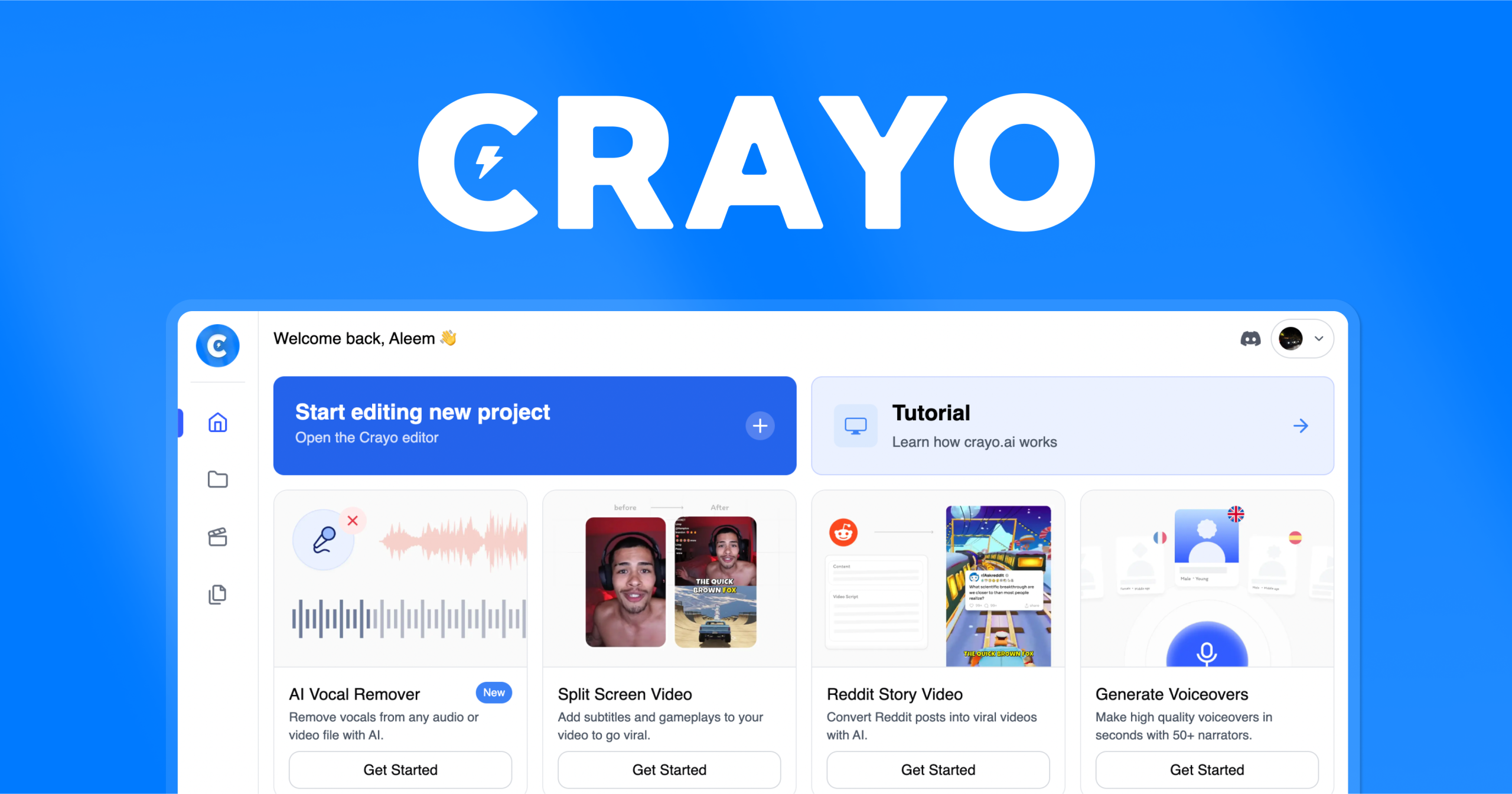
An all-in-one platform for clipping, subtitling, and generating content for social media, used by over 3.2 million creators.

Best forRapidly creating short-form viral video clips.
DifferentiatorAll-in-one platform combining AI clipping, subtitles, voiceovers, and social media templates.
Proof3.2M+ users worldwide; billions of views generated.
Explore Crayo AI
Pro from$13/month
8.9 Zekai
Viral Clip Engine
AI for Video Editing & Production
Ease of Use
9.2
Accuracy
8.2
Value
8.8
Time Saving
9.5
3.2M+Users
8.9/10Zekai Score
AI ClippingAuto SubtitlesAI VoiceoverWeb-Based EditorSocial Media Templates
🏷 Is this your tool? Claim this listing →
Hand-scored by Zekai

Top AI for Video Editing & Production picks

See all 99 AI for Video Editing & Production tools →
⚡ Quick answer

For video editing and production professionals focused on social media, Crayo AI is a top choice for rapidly creating viral clips. Its AI-powered 'Auto Clip' feature, combined with 15+ subtitle styles and AI voiceovers, automates the tedious work of repurposing long-form content into engaging shorts, as proven by its 3.2 million users and billions of views generated.

CategoryAI Video Editor
Best ForRapidly creating short-form viral video clips.
Price From$13/mo
FreeNo
DifferentiatorAll-in-one platform combining AI clipping, subtitles, voiceovers, and social media templates.
Proof3.2M+ users worldwide; billions of views generated.
Rating4.5/5
📖 About Crayo AI

Crayo AI is a web-based video editor designed for creating viral social media content. It automates tasks like clipping, adding subtitles, and generating AI voiceovers, enabling video editors and producers to quickly repurpose content for platforms like YouTube Shorts and TikTok.

How It Works

Your workflow, automated

1
Upload Your Source Video
Upload any video file directly or simply paste a link from YouTube or TikTok to import your long-form content.
2
Select a Workflow & Style
Choose an automated workflow like 'Auto Clip' or 'Reddit Story Video' and select from over 15 pre-built, viral subtitle styles.
3
Generate & Refine
The AI generates your short-form video in seconds. Use the web-based editor to make final adjustments before exporting.
Ready to automate your workflow with Crayo AI?
Explore Crayo AI →
Real Impact

Before & After

❌ Before

Manually scrubbing through hours of footage to find clips, then painstakingly adding captions and formatting for different social platforms.

Hours per video
✅ After

Automatically generate dozens of viral-ready clips from a single video, complete with subtitles and effects, in minutes.

Minutes per batch
Prompt Templates

Try it with these prompts

Copy any prompt and paste it directly into the tool.

Generate viral video clips with AI subtitles

Upload a long video or provide a YouTube/TikTok link. Select one of the 15+ viral subtitle styles. Crayo AI will generate an engaging video clip in seconds, optimized for virality.

Create AI voiceovers and enhance audio

Use Crayo AI to generate AI voiceovers for your content. The tool also offers cutting-edge speech enhancement to improve audio quality for your videos.

Generate AI images for content creation

Utilize Crayo AI's image generator to create visuals for your projects. This feature can save you from needing multiple subscriptions for different AI models.

Social Proof

Trusted by 3.2M+

3.2M+ professionals using this tool
Ease of Use
9.2
Accuracy
8.2
Value
8.8
Time Saving
9.5

"This is the tool I wish I had when I started. It automates the most tedious parts of clipping and lets my team focus on strategy."

Alex S., Video Agency Owner · June 2026

"The Reddit story generation is a game-changer for our Shorts channel. This is the most worthwhile subscription I have for scaling content."

Maria K., YouTube Producer · May 2026

"Makes formatting and clipping content so much easier. The credit system can be a bit confusing at first, and I wish there was more control over the auto-clip selections, but the time saved is undeniable."

David L., Freelance Editor · April 2026

"Crayo is the only tool I've found that removes video backgrounds this well without a green screen. It's an essential part of my workflow for creating UGC-style ads."

Chen W., Social Media Manager · March 2026
3.2M+ professionals are already using this tool.
See Plans & Pricing →
Connects With

Works with your existing stack

YouTube TikTok
Setup complexity: Beginner-friendly
Crayo AI is a web-based video editor designed for creating viral social media content. It automates tasks like clipping, adding subtitles, and generating AI voiceovers, enabling video editors and producers to quickly repurpose content for platforms like YouTube Shorts and TikTok.
Comparison

How it compares

Crayo AI vs. Descript: Choose Crayo AI for its specialized focus on creating *viral* short-form content with its trendy subtitle styles, split-screen templates, and 'Auto Clip' feature designed for maximum social engagement. Opt for Descript if your primary need is text-based video and podcast editing, with a stronger emphasis on transcription accuracy and multi-track audio editing for narrative-driven content. Crayo is for speed and virality; Descript is for precision and podcasting.

You need a full-featured non-linear editor with advanced color grading and effects.
Your primary work is long-form cinematic or documentary production.
You require deep integration with an existing Adobe Creative Cloud or DaVinci Resolve workflow.
The decision

Is it worth it?

Return on investment
By automating clip generation and subtitling, a team using the $27/mo Clipper plan can save dozens of manual editing hours each month, turning a single long-form video into a week's worth of social content.
Built for
Social Media Video Editors, Content Creators, Production Assistants, and agencies focused on short-form viral video production.
Effort to adopt
Beginner-friendly
Compliance
Compliance posture not publicly documented — verify with vendor.
Who It's For

Why Video Editing & Production choose this tool

🎯
Built for
Best for video professionals rapidly creating and repurposing short-form content like clips, shorts, and reels for social media platforms.
In-Depth Overview
For video editors tasked with populating social media feeds, Crayo AI is a significant workflow accelerator. Its core value lies in its '3-Step Workflow' that automates the most time-consuming aspects of creating short-form content. Instead of manually scrubbing through hours of footage in Premiere or Final Cut, you can upload a single long-form video and use the 'Auto Clip' feature to instantly identify and segment potentially viral moments. The platform's claim as the '#1 Clipping Tool' is supported by a feature set built by actual content creators to solve their own 'scaling problems.' This includes over 15 viral subtitle styles, AI voiceovers, and even niche video formats like Reddit stories, all within one interface. This consolidation saves money on separate subscriptions for transcription, stock media, or voice generation. Proof of its effectiveness is in the numbers: over 3.2 million users and billions of views generated for its clients. It transforms the editor's role from a manual clipper to a curator, selecting the best AI-generated options and getting content live in minutes, not hours.

Key Use Cases

🎬
Repurpose long-form content into dozens of viral clips.
Social Media Video Editor
Upload a full podcast or stream recording. Use the Auto Clip feature to identify viral moments and instantly generate dozens of short-form videos with engaging subtitles and optimized formatting for TikTok and YouTube Shorts.
Hours of manual clipping saved daily
✓ Pros
All-in-one platform reduces need for multiple subscriptions
Simple 3-step workflow for rapid video generation
Designed by successful content creators for viral content
Includes unique features like Reddit Story and Fake Text videos
Supports direct import from YouTube/TikTok links
· Cons
Not a full-featured non-linear editor (NLE)
Credit-based system (workflow, export, voiceover) can be confusing
Best for short-form content, not long-form projects
Limited fine-tune customization compared to professional desktop software
⚡ Editorial Verdict

Crayo AI excels at streamlining the creation of viral short-form video content, combining clipping, subtitling, and AI voiceovers into a single, fast workflow. While it's a powerful tool for social media managers and clippers, traditional video editors will find it lacks the deep timeline control and advanced effects of a professional NLE.

Questions & Answers

Frequently asked questions

Can I monetize videos created with Crayo?

+
Yes, videos created using Crayo can be monetized on platforms like YouTube and TikTok, as you own the rights to the final exported content.

What is a workflow credit?

+
A workflow credit is used for automated video generation tasks, such as creating a Reddit story video, a split-screen video, or using the auto-clip feature. Each generation consumes one or more credits from your monthly allowance.

What are the main limitations for a professional video editor?

+
Crayo is a specialized tool for rapid, short-form content creation. It is not a full non-linear editor (NLE) and lacks the deep timeline control, advanced color grading, and complex effects of software like Adobe Premiere Pro or DaVinci Resolve.

How does Crayo AI speed up the process of creating video clips for social media?

+
Crayo AI accelerates video production by automating key tasks. You can upload a long video and use its 'Auto Clip' feature to find viral moments, automatically add one of 15+ subtitle styles, and generate a ready-to-post video in seconds, bypassing manual editing steps.

Can Crayo AI handle complex video editing tasks like multi-cam editing or advanced color grading?

+
No, Crayo AI is not designed for complex post-production tasks. It focuses on clipping, subtitling, and applying templated styles for social media. For multi-cam editing or professional color grading, you would need to use dedicated software like Premiere Pro or Final Cut Pro.

Is Crayo AI a good replacement for Adobe Premiere Pro for social media video editors?

+
Crayo AI is a powerful supplement, not a direct replacement. It's ideal for quickly generating high volumes of clips and short videos. Many editors use it for initial clipping and subtitling before moving to Premiere Pro for finer adjustments, or use it exclusively for content that fits its templated, fast-turnaround model.

Last reviewed:

Plans & Pricing

Start today

Prices and features are updated regularly but can change at any time — always confirm on the official website. Some links on this page are affiliate links.

See all 99 AI for Video Editing & Production tools →
Free guide

Take it with you

Getting Started with Crayo AI: From Long-Form to Viral Clips
  • What is Crayo AI & Who is it for?
  • Understanding Crayo's Credit System: Workflows, Exports & Voiceovers
  • Core Features: Auto Clip vs. Manual Editing
  • Using Viral Templates: Subtitles, Reddit Stories & More
  • The All-in-One Advantage: Voiceovers, Background Removal & Image Gen
+4 more steps inside the guide
Send me the full guide

Get Crayo AI deal alerts

Be the first to know when Crayo AI drops a new discount, adds features, or changes pricing.

Exclusive Crayo AI discount codes
New feature announcements
Best alternative picks when pricing changes
Zero spam — unsubscribe anytime
🎉
You're subscribed!
We'll notify you when Crayo AI has a new deal.
AI Directory

About Crayo AI

Full Description

Crayo AI is a web-based video editor designed for creating viral social media content. It automates tasks like clipping, adding subtitles, and generating AI voiceovers, enabling video editors and producers to quickly repurpose content for platforms like YouTube Shorts and TikTok.

Editorial Verdict

Crayo AI excels at streamlining the creation of viral short-form video content, combining clipping, subtitling, and AI voiceovers into a single, fast workflow. While it's a powerful tool for social media managers and clippers, traditional video editors will find it lacks the deep timeline control and advanced effects of a professional NLE.

Last reviewed:
Disclaimer
Zekai is an independent AI tools directory. We are not affiliated with, endorsed by, or officially connected to Crayo AI unless clearly stated. All product names, logos, and brands are the property of their respective owners and are used for identification purposes only. The information on this page — including pricing, features, and availability — is general information, may have changed since our last review, and is not professional advice. Zekai Scores and verdicts are our editorial opinion. Some outbound links are affiliate links that may earn us a commission at no extra cost to you. Spotted outdated or incorrect information? Request a correction →
Previous Tool Quso Next Tool Eklipse
All AI Tools A–Z →
Visit website ↗
Crayo AI8.9Try Crayo AI ↗Next tool →
Today's top 3 AI for Video Editing & Production tools →